
MatchWare MindView 9.0.61106 Free Download – Mind Mapping and Project Planning Software
MatchWare MindView is a professional mind mapping and project planning application designed to help users turn ideas into organized visual plans. It lets you create mind maps, concept maps, timelines, Gantt charts, and work breakdown structures, making it useful for students, teachers, teams, and business professionals.
With MindView, you can organize complex information, connect ideas, manage tasks, and present your plans in a clearer way. It also supports integration with Microsoft Office formats, so you can move your work into Word, PowerPoint, Excel, and other project tools without rebuilding everything manually.
Important licensing note: MindView is commercial software, not completely free. MatchWare offers a 30-day free trial with no credit card required. After the trial, a paid licence or subscription is needed to continue using the software.
MatchWare MindView 9.0.61106 Download Links
| Part / Link | Rapidgator / DDownload | Nitroflare |
|---|---|---|
| MatchWare MindView 9.0.61106 | 🟣 DOWNLOAD / 🔵 DOWNLOAD | 🟡 DOWNLOAD |
MatchWare MindView – Software Information
| Field | Details |
|---|---|
| Title | MatchWare MindView |
| Version | MindView 9 |
| Developer | MatchWare |
| License | Commercial – 30-day free trial |
| Category | Mind Mapping & Project Management |
| Operating System | Windows 10 or later, macOS 10.15 or later |
| File Size | Windows: approximately 1.85 GB disk space required |
| Languages | English, German, French, Danish and Norwegian (availability varies by edition) |
| Official Website | MatchWare |
What Is MatchWare MindView?
MatchWare MindView is a mind mapping and visual planning tool that helps you capture ideas and arrange them into structured diagrams. Instead of keeping everything in long documents or scattered notes, you can build visual maps that show how topics, tasks, and information connect.
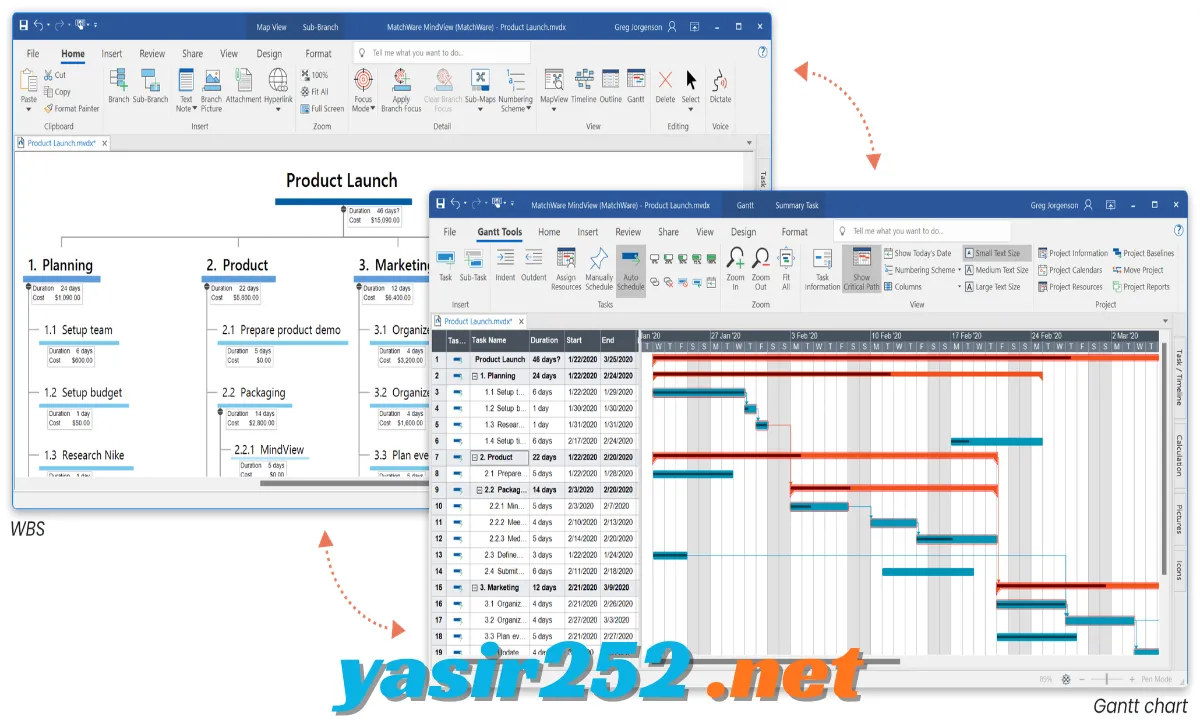
The software also includes project management tools such as Gantt charts, timelines, and work breakdown structures. This makes it useful beyond brainstorming, allowing you to plan projects, track tasks, prepare presentations, and share organized information with others.
Key Features of MatchWare MindView
– Professional Mind Mapping: Create visual maps to organize thoughts, brainstorm ideas, and connect related topics. You can add branches, sub-branches, notes, hyperlinks, and attachments.
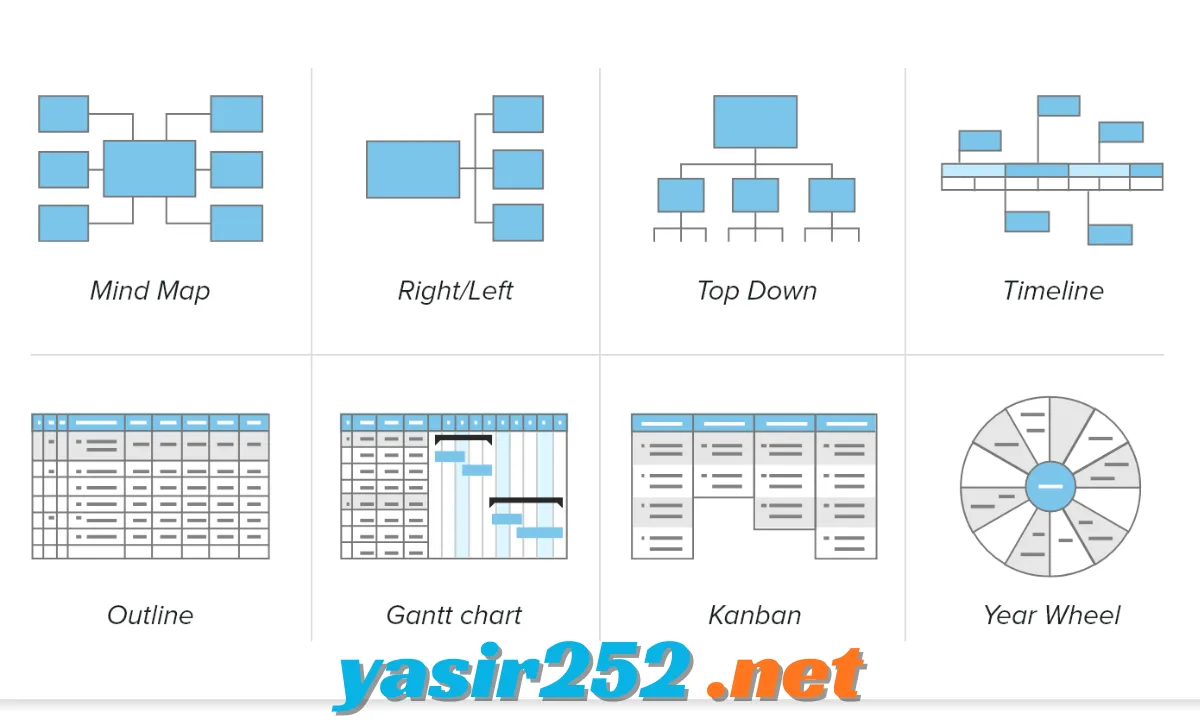
– Multiple Visual Views: Switch between Mind Map, Top Down, Left/Right, Outline, Timeline, Year Wheel, Gantt Chart, and Kanban views. Your information stays connected when you change layouts.
– AI-Assisted Mind Mapping: Use AI assistance to generate suggestions, improve ideas, support decision-making, and help with repetitive tasks.
– Project Management Tools: Turn brainstorming sessions into structured project plans. Define goals, deadlines, deliverables, and tasks without starting from scratch.
– Interactive Gantt Charts: Create project schedules with task dependencies, milestones, constraints, and scheduling information. The Gantt view helps you understand project progress and timing.
– Built-in Task Management: Organize project activities and synchronize task information across supported views. You can update your planning data without recreating the entire project.
– Kanban Project View: Display tasks in a visual board layout to make project organization easier. This view is useful for tracking work through different stages.
– Timeline and Year Wheel: Present events, deadlines, and time-related information in visual formats. These views help make schedules and historical information easier to understand.
– Microsoft Office Integration: Export and import supported documents through Microsoft Word, PowerPoint, Excel, Outlook, and Project, depending on the platform and edition.
– PDF and Image Export: Save visual maps and project information in supported output formats, including PDF and picture formats, for sharing or presentation.
– Research Capture Toolbar: Collect useful material while working on projects. The research tools support capturing pictures, text, video, and audio recordings.
– Notes and Attachments: Add notes, hyperlinks, files, and other supporting material to individual topics. This keeps important information connected to the relevant ideas.
– Templates and Map Styles: Start with ready-made templates and visual styles instead of building every project from scratch. You can customize maps to match your preferred layout.
– Sub-Maps for Large Projects: Break complicated mind maps into smaller sections using sub-maps. This makes large projects easier to navigate and manage.
– Collaboration and Cloud Integration: Use supported cloud services and collaboration features to save and share documents. Available options depend on the MindView edition and platform.
– Academic Writing Support: Organize research material and prepare structured documents with citation and bibliography tools. Supported integrations include Zotero and Mendeley.
– Accessibility Features: MindView AT provides additional assistive tools, including speech-related features, dictation, and other accessibility options. Availability depends on the edition.
– Calculation and Budget Planning: Add numerical values and formulas to topics to calculate costs, budgets, and other project figures. This can help organize financial information within a visual plan.
Latest Version of MatchWare MindView
MatchWare’s current product generation is MindView 9. The Windows update listing includes MindView 9 Update 7 (version 9.0.60114), released January 14, 2026. This update added Swedish language support and included fixes for Google Drive document handling and timeline behavior.
The Mac edition has its own update history and version numbering, so Windows and Mac update numbers should not be treated as interchangeable.
MatchWare MindView System Requirements
Check the following requirements before installing MindView 9.
| Component | Minimum Requirement |
|---|---|
| Operating System (Windows) | Windows 10 or later |
| Disk Space (Windows) | Approximately 1.85 GB |
| Operating System (Mac) | macOS 10.15 or later |
| Mac Processor | 64-bit Intel or ARM64 |
| Mac Disk Space | Approximately 460 MB |
| Microsoft .NET Framework | Version 4.8 or newer |
| Microsoft .NET | .NET 8 |
| Visual C++ Runtime | Microsoft Visual C++ 2022 Redistributable |
| Additional Component | Microsoft Edge WebView2 Runtime |
Actual requirements can vary by operating system, edition, and installed components.
Is MatchWare MindView Free?
MatchWare MindView is not freeware. It is commercial software that requires a valid licence or subscription for continued use.
However, MatchWare provides a 30-day free trial, and the trial registration page states that no credit card is required. This gives users an opportunity to test the software before purchasing.
| Edition / Access | Details |
|---|---|
| Free Trial | 30 days |
| Credit Card | Not required for trial registration |
| Full Version | Requires a paid licence or subscription |
| Freeware | No |
| Commercial Use | Requires an appropriate licence |
How to Download MatchWare MindView
You can download the official MindView installer directly from MatchWare. Follow these steps:
-
Visit the official MatchWare Downloads page.
-
Find the MindView 9 section.
-
Select the Windows or Mac version you need.
-
Choose the available language.
-
Download the installer to your computer.
-
Open the downloaded setup file.
-
Follow the installation instructions.
-
Launch MindView and register for the free trial or activate your existing licence.
Official download page: https://www.matchware.com/de/downloads
How to Install MatchWare MindView
-
Locate the downloaded MindView installer.
-
Double-click the setup file to begin installation.
-
Approve the Windows permission prompt if it appears.
-
Follow the setup wizard instructions.
-
Allow the installer to check for required components.
-
Complete the installation process.
-
Open MatchWare MindView from the Start menu.
-
Sign in or register to activate your trial or paid licence.
Advantages and Disadvantages
| Advantages | Disadvantages |
|---|---|
| Professional mind mapping tools | Not completely free |
| Multiple project visualization layouts | Requires a paid licence after the trial |
| Built-in Gantt charts and timelines | Windows installation requires considerable disk space |
| Microsoft Office integration | Some features vary by platform |
| AI-assisted brainstorming | Some advanced tools require specific editions |
| Templates and customization options | May take time for beginners to learn |
| Research and attachment support | Trial access is time-limited |
Frequently Asked Questions
1. What is MatchWare MindView?
MatchWare MindView is mind mapping and project management software used to organize ideas, create visual diagrams, and plan projects.
2. Is MatchWare MindView free to download?
You can download and test it through the official 30-day free trial. The complete software is commercial and requires a paid licence or subscription afterward.
3. What is the latest version of MindView?
The current product generation is MindView 9. Windows and Mac editions have separate update histories.
4. Does MindView support Windows 11?
Yes. MindView 9 supports Windows 10 and later, which includes Windows 11.
5. Does MatchWare MindView work on macOS?
Yes. MatchWare provides a Mac edition that supports macOS 10.15 and later, with compatible Intel and Apple Silicon hardware.
6. Can I create Gantt charts with MindView?
Yes. MindView includes a Gantt Chart view for creating and managing project schedules, tasks, dependencies, and milestones.
7. Does MindView support Microsoft Office?
Yes. Depending on the platform and edition, it supports importing and exporting documents through Word, PowerPoint, Excel, Outlook, and Microsoft Project.
8. Can I export MindView maps to PDF?
Yes. MindView supports PDF export, allowing you to share your maps and project information in a commonly used document format.
9. Does MindView include AI features?
Yes. MindView includes AI assistance for generating suggestions, supporting decisions, translating languages, and automating repetitive tasks.
10. Can beginners use MatchWare MindView?
Yes. Beginners can start with templates and basic mind mapping tools before exploring advanced project management features.
11. Does MindView support Kanban boards?
Yes. MindView 9 includes a Kanban view for organizing and visualizing tasks through different project stages.
12. Can I use MindView without Microsoft Office installed?
MindView uses Office Open XML formats for supported Word, PowerPoint, and Excel import/export operations, so Microsoft Office is not always required for those operations. You may still need compatible software to open or edit exported files.
13. Is MindView suitable for students?
Yes. Students can use it to organize research, plan assignments, structure essays, prepare presentations, and manage study projects.
14. Does MindView have a portable version?
MatchWare provides official desktop installers for Windows and Mac. An official portable edition is not confirmed, so avoid assuming that unofficial repackaged versions are supported.
15. Is the MindView free trial unlimited?
No. The official trial is limited to 30 days. Continued use requires an appropriate paid licence or subscription.
Conclusion
MatchWare MindView is a powerful solution for users who need more than basic mind mapping. Its combination of brainstorming tools, project planning, Gantt charts, timelines, Kanban views, research capture, and Microsoft Office integration makes it useful for both educational and professional work.
Although MindView is not completely free, its 30-day trial gives you time to explore the available features before purchasing. If you need a complete visual workspace for managing ideas and projects, MindView 9 is worth considering.