
Becky! Internet Mail 2.85.00 Download [2027] – Free Email Client for Windows
Becky! Internet Mail is a lightweight desktop email client built for users who want a practical way to manage multiple email accounts without relying entirely on webmail. It supports email protocols such as POP3 and IMAP, allowing users to organize messages, manage mailboxes, create filters, and handle everyday email communication from a desktop application.
If you’re searching for Becky! Internet Mail Download [2027], this guide covers its features, supported email protocols, installation process, system requirements, trial and license information, and how to configure it on a Windows PC. Becky! Internet Mail is particularly appealing to users who prefer a compact email application with customizable filters, templates, reminders, and mailbox management tools.
Becky! Internet Mail 2 Download Links
| DDownload | Nitroflare |
|---|---|
| 🔵 DOWNLOAD | 🟡 DOWNLOAD |
Becky! Internet Mail Software Information
| Software Details | Information |
|---|---|
| Software Name | Becky! Internet Mail |
| Latest Version | 2.84.01 |
| Release Date | November 20, 2026 |
| Developer | RimArts, Inc. |
| Category | Email Client |
| License | Shareware / Trial |
| Operating System | Windows 10 and Windows 11 |
| Architecture | Windows 32-bit / compatible Windows environments |
| Email Protocols | POP3, IMAP4, SMTP |
| Encryption | SSL/TLS, depending on account configuration |
| File Size | Approximately 7.5 MB for the English installer |
| Official Website | rimarts.jp |
What Is Becky! Internet Mail?
Becky! Internet Mail is a desktop email client that provides a simple but powerful way to manage email accounts on Windows. It allows users to connect multiple mailboxes, organize messages, create custom filtering rules, manage mailing lists, and compose emails using templates.
The application is designed for people who want more control over their email workflow. Rather than depending on a web browser, users can manage email messages locally through a dedicated interface that supports POP3, IMAP4, and SMTP, including encrypted connections when configured appropriately.
Becky! Internet Mail also includes useful productivity features such as reminders, message searching, custom filters, plug-ins, portable media synchronization, and support for HTML email. Its relatively small installation size makes it an interesting option for users looking for a compact email management application.
Key Features of Becky! Internet Mail
1. Multiple Mailbox Management
Becky! Internet Mail lets you create and manage multiple mailboxes from one desktop application. This makes it convenient for users who handle personal, business, work, and other email accounts.
2. POP3, IMAP4 and SMTP Support
The application supports popular email protocols, including POP3, IMAP4, and SMTP. Users can configure their accounts to receive and send messages according to their email provider’s settings.
3. Multiple Profiles
Becky! Internet Mail supports multiple profiles for mailboxes, allowing users to organize different configurations and account workflows. This can be helpful when managing several email identities.
4. Advanced Email Filtering
Flexible filtering and message organization
The filtering manager allows users to create rules based on different conditions and actions. These rules can help automatically organize incoming emails, reduce clutter, and direct messages into appropriate folders.
5. HTML Email Support
Becky! Internet Mail supports viewing and composing HTML emails. Its rendering options depend on the configured HTML engine and the components available on the Windows system.
6. Email Templates
The template feature allows users to create reusable email content for repetitive tasks. Templates can help save time when sending frequently used messages, responses, or business correspondence.
7. Email Reminders
The reminder feature helps users schedule messages for later delivery or create reminders for their own tasks. This can be useful for follow-ups, delayed messages, and personal organization.
8. Mailing List Manager
Becky! Internet Mail includes a mailing list management feature that helps users organize and manage subscribed mailing lists from a dedicated interface.
9. Portable Media Synchronization
The Sync With Portable Media functionality is designed to let users carry their Becky! configuration and related data through compatible portable storage workflows. The exact setup and portability behavior depend on how the software is configured.
10. Query Search
The Query feature allows users to search for text across email folders. Search results can also be saved as folders, making it easier to organize and revisit matching messages.
11. Email Agents
Becky! Internet Mail includes an Agents feature for managing follow-up tasks, such as waiting for a reply or remembering that a message needs a response within a specific period.
12. Plug-In Support
The plug-in interface allows third-party developers to extend the application’s functionality. Plug-ins may provide additional tools or integrations depending on their compatibility.
13. SSL and TLS Support
The application supports secure email connections through SSL-related settings and supported connection configurations. Users should always configure their accounts according to their provider’s current security requirements.
14. Custom Email Rules
Users can build filtering rules with multiple conditions and actions to customize mailbox organization. This can help manage large volumes of messages and automate routine email handling.
15. Message Search
Becky! Internet Mail includes search tools for finding messages across folders. Its Query functionality provides a flexible way to search email content and save useful results.
16. Customizable Email Composition
The composing environment provides options for managing templates, signatures, and other message settings. These features can help users personalize their email workflow.
17. HTML Rendering Options
The software provides options for HTML email display, including supported rendering engines. In newer versions, users can select supported HTML rendering configurations depending on their system setup.
18. Lightweight Windows Application
Becky! Internet Mail is relatively compact compared with many modern email applications. Its small installer and focused functionality make it suitable for users who prefer a dedicated email client.
19. Email Organization
Mailboxes, filtering rules, queries, and mailing list tools help users organize messages and maintain a more manageable inbox.
20. Recent Accessibility Improvements
Recent releases include improvements involving screen-reader support, UI Automation, email-list navigation, and text email display options. These changes help improve accessibility and usability for certain workflows.
What’s New in Becky! Internet Mail 2.84.01?
Becky! Internet Mail 2.84.01 is the latest version identified in the available release information, published on November 20, 2026. This release focuses on compatibility, accessibility, HTML email display, and usability improvements.
Version 2.84.01 Improvements
-
WebView2 Compatibility Fix: Fixed a startup crash affecting systems with older Microsoft Edge WebView2 Runtime components.
-
UI Automation Improvements: Improved performance when email lists are accessed through UI Automation tools.
-
Screen Reader Improvements: Fixed issues that could affect how message subjects and sender information are read by screen readers.
-
HTML Display Options: Added an option to display text emails in HTML under advanced settings.
-
Keyboard Navigation: Improved navigation between the email list and message body using Tab and Shift+Tab.
-
IMAP Progress Display: Fixed an issue where the progress indicator could remain visible after loading large IMAP messages.
-
HTML Engine Labels: Updated the names of HTML rendering engine options to Edge (WebView2) and IE (Trident).
-
Bug Fixes: Includes additional minor corrections and usability improvements.
The latest identified release is 2.84.01, dated November 20, 2026.
Becky! Internet Mail Interface
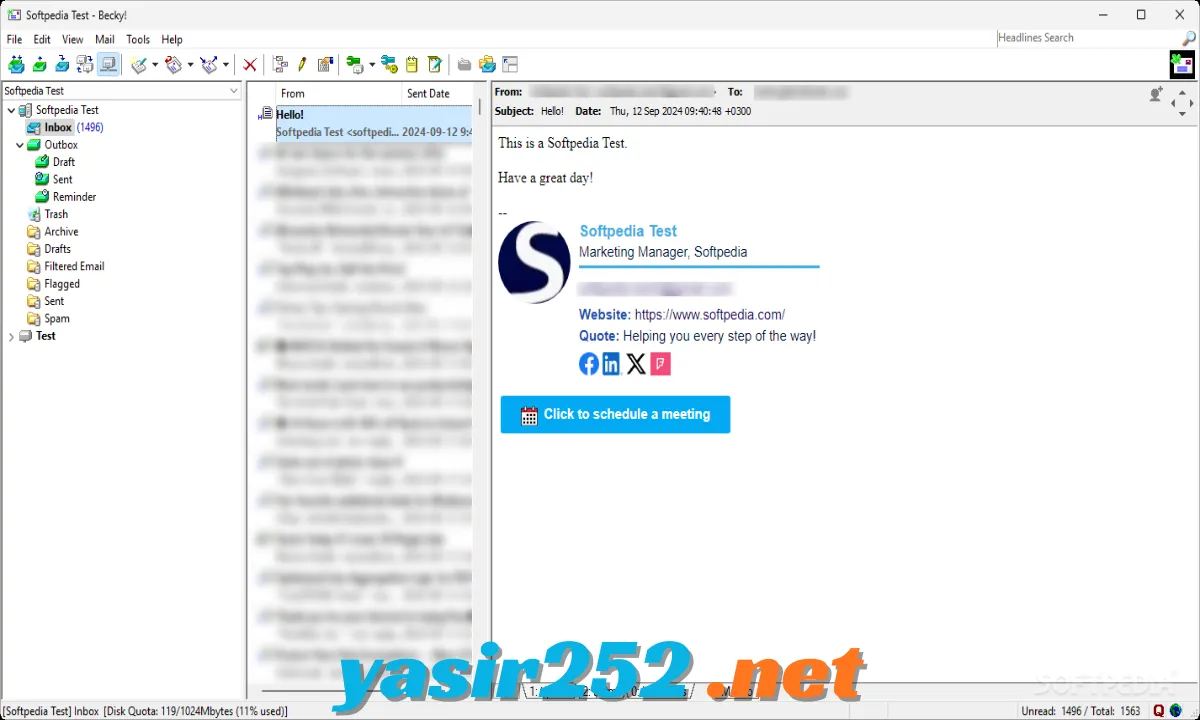
Becky! Internet Mail uses a traditional desktop email interface designed to make message management straightforward. The layout typically includes mailbox folders, message lists, and a reading or composing area.
Users can access account settings, message filters, search tools, templates, reminders, and mailing list management from the application’s menus and workspace.
Its interface is more focused on functionality than modern visual design. Users who prefer traditional desktop email programs may appreciate the familiar layout, while newcomers may need a little time to explore the settings.
How to Download Becky! Internet Mail for Windows
Follow these steps to download Becky! Internet Mail and install it on your Windows computer.
-
Open the official RimArts website.
-
Navigate to the Becky! Internet Mail download section.
-
Select the English version of the software if available.
-
Download the installer or ZIP archive.
-
Save the file to your computer.
-
Run the downloaded installer.
-
Follow the setup instructions.
-
Launch Becky! Internet Mail after installation.
Official website: https://www.rimarts.jp/becky-j.htm#download
Availability note: The developer has announced that international sales of the English version have been closed following the closure of Kagi Marketplace. Existing licensed users can continue receiving software updates, and the English version may be used under the Japanese version’s license terms. Availability of new licenses may therefore be limited.
How to Install Becky! Internet Mail
Installing Becky! Internet Mail on a compatible Windows computer is straightforward.
-
Download the installer from the official website.
-
Locate the downloaded EXE file.
-
Double-click the installer.
-
Follow the installation wizard.
-
Select your preferred installation options.
-
Complete the installation process.
-
Open Becky! Internet Mail from the Start menu.
-
Configure your email account to begin using the application.
If you download a ZIP archive instead of an EXE installer, extract its contents and follow the instructions provided with the package.
How to Configure an Email Account in Becky!
Step 1: Open Account Settings
Launch Becky! Internet Mail and access the account configuration area to begin setting up your email account.
Step 2: Enter Your Email Information
Enter the information requested by the program, including:
-
Email address
-
Account name
-
Username
-
Password or supported authentication method
Step 3: Configure Incoming Mail
Choose the incoming mail protocol supported by your email provider:
-
IMAP: Keeps mail synchronized with the email server, depending on the provider and configuration.
-
POP3: Downloads email using the POP3 protocol, with behavior depending on your settings.
Step 4: Configure Outgoing Mail
Enter the SMTP server information supplied by your email provider, including the required port and authentication settings.
Step 5: Enable Secure Connections
Configure SSL/TLS or other supported security settings according to your email provider’s instructions.
Step 6: Test the Account
Send and receive a test message to make sure the account configuration is correct.
Some modern email providers require OAuth2 authentication or application-specific configuration. Standard username and password authentication may not work for every account.
How to Organize Emails Using Becky!
Create Filtering Rules
-
Open Becky! Internet Mail.
-
Access the filtering or rule management settings.
-
Create a new rule.
-
Select the conditions for matching messages.
-
Choose the action, such as moving a message to a folder.
-
Save the rule.
-
Test the rule using incoming messages.
Use Email Templates
-
Open the message composition settings.
-
Create a new template.
-
Add the content you frequently use.
-
Save the template.
-
Select it when composing a new email.
Search Emails
-
Open the Query search feature.
-
Enter the text you want to find.
-
Select the relevant folders or search scope.
-
Run the search.
-
Save the query results as a folder if needed.
Manage Follow-Ups
-
Open the relevant email or task workflow.
-
Configure the Agent or reminder option.
-
Select the follow-up condition.
-
Set the desired reminder or tracking period.
-
Review your follow-up tasks when needed.
Becky! Internet Mail System Requirements
Becky! Internet Mail is a lightweight Windows email application. Its current developer information indicates support for Windows 10 or later.
| Component | Requirement |
|---|---|
| Operating System | Windows 10 or later |
| Windows Compatibility | Windows 10 and Windows 11 |
| Processor | Compatible Windows processor |
| RAM | 512 MB or more recommended |
| Storage | Approximately 50 MB or more recommended |
| Architecture | Compatible Windows environment |
| Internet Connection | Required for email communication |
| Email Protocols | POP3, IMAP4, SMTP |
| Additional Components | WebView2 Runtime may be required for certain HTML display configurations |
These are practical compatibility and usage recommendations rather than a complete official minimum specification. Actual requirements depend on your Windows installation and configured email accounts.
Is Becky! Internet Mail Free?
Becky! Internet Mail is shareware, meaning users can evaluate the software before purchasing a license. The developer previously offered a 30-day fully functional trial.
However, the developer has announced that international sales of the English version are closed following the shutdown of Kagi Marketplace. Software updates continue for existing users, and the Japanese version remains available for purchase under the developer’s current arrangements.
License Information
-
Trial Version: The software historically offered a 30-day evaluation period.
-
Commercial License: A license is required for continued use beyond the applicable trial terms.
-
International Sales: New international purchases of the English version are currently limited.
-
Existing Users: Existing licensed users can continue receiving software updates.
Becky! Internet Mail Full Version, Crack and License Key
Many users search for Becky! Internet Mail full version, crack, serial key, activation code, or license key when looking for ways to unlock the application.
Becky! Internet Mail is commercial shareware, and its continued use is governed by the developer’s license terms. Unofficial cracked installers, unauthorized serial keys, and modified software packages can expose users to malware, compromised email credentials, and other security risks.
For email software, security matters because the application may contain private correspondence, attachments, contact information, and account credentials. Use a legitimate installation and the appropriate license whenever possible.
Advantages and Disadvantages of Becky! Internet Mail
Advantages
-
Supports multiple mailboxes and profiles.
-
Compatible with POP3, IMAP4, and SMTP.
-
Includes flexible filtering rules.
-
Provides email templates and reminders.
-
Supports HTML email viewing and composing.
-
Includes mailing list management.
-
Offers portable media synchronization.
-
Includes message searching and Query functionality.
-
Supports third-party plug-ins.
-
Lightweight desktop application.
-
Offers several useful email productivity tools.
Disadvantages
-
Traditional interface may feel dated.
-
Commercial licensing is required for continued use.
-
New international English licenses may be difficult to obtain.
-
Account configuration may require technical knowledge.
-
Modern authentication requirements can vary by email provider.
-
Primarily designed for Windows.
Best Alternatives to Becky! Internet Mail
If Becky! Internet Mail is not the right email client for your needs, consider these alternatives.
| Email Client | Best For |
|---|---|
| Mozilla Thunderbird | Free email management, extensions, and multiple accounts |
| Microsoft Outlook | Microsoft 365 and professional email workflows |
| eM Client | Modern desktop email and calendar management |
| Mailbird | Simplified email management and integrations |
| Claws Mail | Flexible email management and customization |
| Windows Mail alternatives | Lightweight email workflows on Windows |
Frequently Asked Questions (FAQs)
1. What is Becky! Internet Mail?
Becky! Internet Mail is a Windows desktop email client developed by RimArts. It supports multiple mailboxes, email filtering, templates, reminders, and standard email protocols.
2. Is Becky! Internet Mail free?
Becky! Internet Mail is shareware. It historically offered a 30-day trial, after which users needed an appropriate license for continued use.
3. Where can I download Becky! Internet Mail?
You can find the official download information on the RimArts website at rimarts.jp.
4. What is the latest version of Becky! Internet Mail?
The latest version identified in this guide is 2.84.01, released on November 20, 2026.
5. Does Becky! Internet Mail work on Windows 11?
Yes, Becky! Internet Mail supports Windows 10 and later, including Windows 11.
6. Does Becky! Internet Mail support IMAP?
Yes, it supports IMAP4, allowing users to synchronize their email with compatible email servers.
7. Does Becky! Internet Mail support POP3?
Yes, the software supports POP3 for receiving email.
8. Can Becky! Internet Mail send emails?
Yes, it supports SMTP for sending email messages.
9. Can I manage multiple email accounts?
Yes, Becky! Internet Mail supports multiple mailboxes and profiles, making it useful for users managing several email accounts.
10. Does Becky! Internet Mail support HTML email?
Yes, it supports HTML email viewing and composing. Its rendering behavior depends on the selected engine and configuration.
11. Does Becky! Internet Mail support email filtering?
Yes, it includes a filtering manager that allows users to create rules based on conditions and actions.
12. Can I use email templates in Becky! Internet Mail?
Yes, its template feature allows users to create reusable content for frequently sent messages.
13. Does Becky! Internet Mail have a reminder feature?
Yes, the application includes reminder functionality for scheduling messages and managing certain follow-up workflows.
14. Does Becky! Internet Mail support mailing lists?
Yes, it includes a mailing list manager for organizing subscribed mailing lists.
15. Can Becky! Internet Mail be used from a USB drive?
It offers a Sync With Portable Media feature designed for portable workflows, allowing users to carry compatible software data and configurations.
16. Does Becky! Internet Mail support SSL and TLS?
Yes, it supports secure email connection configurations, depending on the protocol, account settings, and server requirements.
17. Is Becky! Internet Mail still updated?
Yes, the developer continues to publish software updates. Version 2.84.01 is the latest release identified in this guide.
18. Can I purchase the English version of Becky! Internet Mail?
The developer has announced the closure of international sales of the English version following the shutdown of Kagi Marketplace. Existing users can continue receiving updates, and the English version can be used under the Japanese version’s license terms.
19. Does Becky! Internet Mail support OAuth2?
The software has OAuth2-related configuration and improvements, including Microsoft account type selection in recent releases. Authentication availability depends on the version and email provider.
20. Is Becky! Internet Mail worth using in 2027?
Becky! Internet Mail remains an interesting option for users who prefer a compact, traditional email client with powerful filtering, templates, mailbox management, and search tools. However, users considering a new installation should also evaluate licensing availability and compatibility with their email provider’s authentication requirements.
Conclusion
Becky! Internet Mail is a practical desktop email client that combines mailbox management, message filtering, email templates, reminders, search tools, and support for POP3, IMAP4, and SMTP in a lightweight Windows application.
Its flexible filtering system, multiple mailbox support, Query search, mailing list manager, and portable media functionality make it useful for users who prefer a traditional desktop email workflow. Recent releases also introduce improvements to accessibility, HTML email handling, and compatibility.
If you’re looking for Becky! Internet Mail Download [2027], visit the official RimArts website to check the latest available version, installation package, and licensing information before installing the software.