
SysTweak Disk Analyzer Pro 1.0.1400.1325 Download [2027] – Disk Space Analyzer for Windows
SysTweak Disk Analyzer Pro is a Windows disk space analysis utility developed by Systweak Software that helps users understand how storage space is being used on their computers. It scans drives, organizes files into categories, and generates reports that make it easier to identify large files, old data, duplicate content, and unnecessary files taking up valuable disk space.
Disk Analyzer Pro is designed for users who want to clean up clutter, manage storage, and organize files without manually browsing every folder on their hard drive. It provides disk usage statistics, file filtering, storage reports, and tools for locating unwanted files, making it useful for home users and anyone who regularly manages Windows storage.
Disk Analyzer Pro 1.0.1400.1325 Download Links
| Nitroflare | Rapidgator |
|---|---|
| 🟡 DOWNLOAD | 🟣 DOWNLOAD |
SysTweak Disk Analyzer Pro Software Information
| Field | Details |
|---|---|
| Title | Disk Analyzer Pro |
| Category | Disk Space Analyzer, Storage Management, Windows Utility |
| Developer | Systweak Software |
| Publisher | Systweak Software |
| Version | 1.0.1400.1325 (version supplied in the linked listing) |
| Operating System | Windows |
| License | Commercial |
| Free Trial | Trial availability depends on the current official offer |
| Latest Version | Verify on the official download page |
| Official Website | https://www.diskanalyzerpro.com/ |
| Official Download | https://www.diskanalyzerpro.com/windows-disk-analyzer/ |
What Is Disk Analyzer Pro?
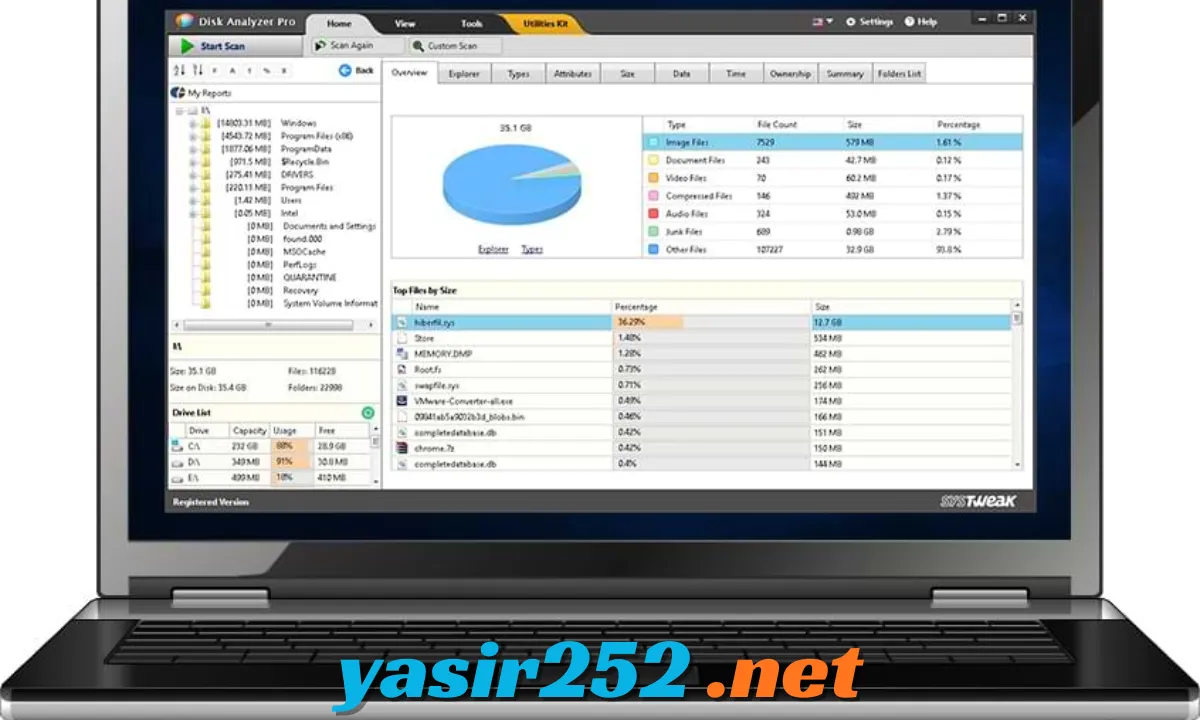
Disk Analyzer Pro is a disk space analyzer for Windows that helps users find out where their storage space is being consumed. It scans selected drives and presents information about files and folders, including their sizes, file types, and other characteristics, helping users identify storage-heavy locations.
The program can categorize storage usage into file groups such as images, videos, documents, audio, compressed files, junk files, and other files. Users can explore the scan results, search for unwanted files, locate old data, and decide which files they no longer need.
Disk Analyzer Pro is especially useful when a computer’s hard drive or SSD is running low on free space. Instead of guessing which folders are taking up the most storage, users can analyze their drives and make more informed cleanup decisions.
Key Features of SysTweak Disk Analyzer Pro
– Detailed Disk Space Analysis: Scan your hard drive or SSD to understand how storage is being used. Disk Analyzer Pro presents file counts, storage sizes, and percentage-based statistics for different categories.
– File Category Reports: Organize storage usage into categories such as images, videos, audio, documents, compressed files, junk files, and other files, helping you understand what occupies your disk.
– Large File Finder: Locate large files and folders that consume substantial storage space. Review them before deciding whether to move, archive, or remove them.
– Old File Detection: Find older files that have not been used or modified for a long time. This can help identify outdated data that may no longer be necessary.
– Junk File Search: Identify certain unnecessary files, including supported temporary and junk file categories, to help recover disk space.
– Custom File Search: Use your own search criteria to find files and folders that match specific requirements, helping you locate unwanted or difficult-to-find data.
– Duplicate File Discovery: Identify duplicate content, including supported image, video, and compressed file categories, so you can review redundant files.
– Folder Size Analysis: Examine individual folder sizes to understand how storage is distributed across your computer.
– File Date Filtering: Analyze storage usage based on file dates and identify older files that may be candidates for archiving or cleanup.
– File Type Filtering: Review storage consumption by file extension or category to better organize your files and locate unwanted content.
– File Ownership Analysis: Organize supported disk reports by file ownership to help understand how files are associated with different users.
– Disk Cleanup Assistance: Use the scan results to identify potential cleanup targets and remove files you no longer need, helping recover available storage.
– Storage Management: Review files and folders in a structured manner to make storage cleanup more organized and efficient.
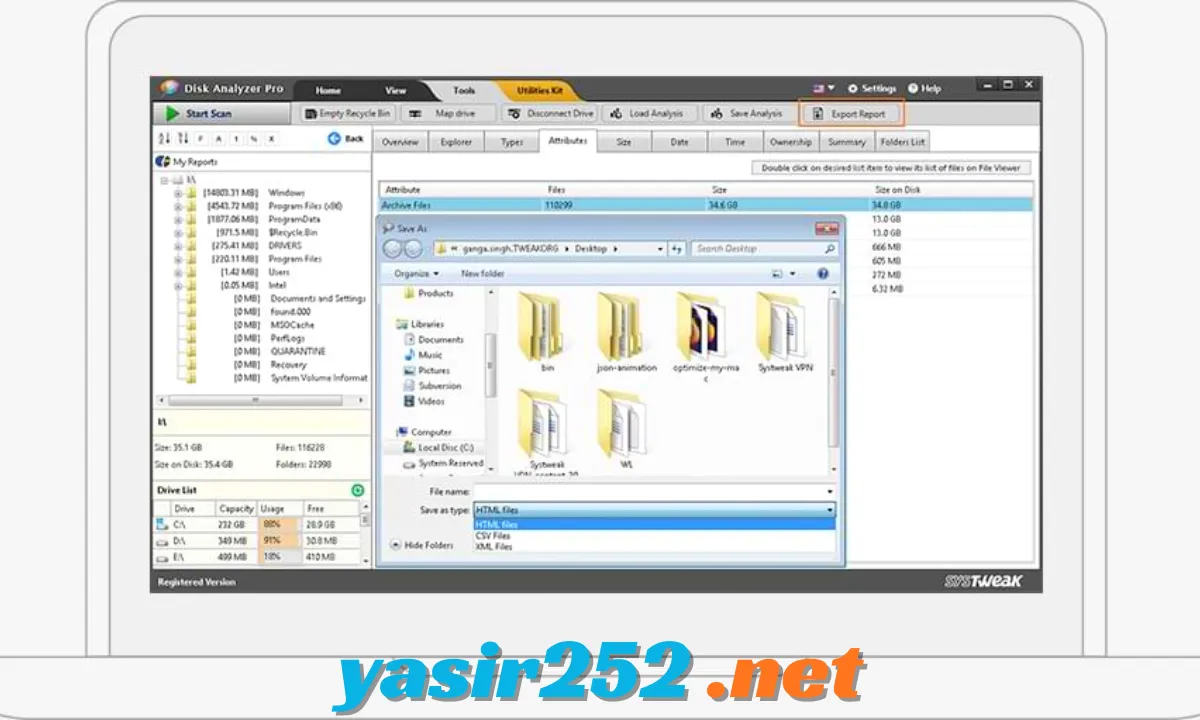
– Report Export: Export disk space analysis reports to supported formats, including HTML, CSV, and XML, for recordkeeping or further analysis.
– Storage Growth Monitoring: Save reports and compare them over time to understand how disk usage changes and identify storage growth patterns.
– User-Friendly Interface: Explore storage information through an accessible graphical interface rather than relying entirely on command-line tools.
– Hard Drive and SSD Analysis: Analyze supported Windows storage drives to identify files and folders that consume available space.
– Windows File Management: Use the analysis results as a starting point for managing files, organizing data, and planning storage cleanup.
What’s New in Disk Analyzer Pro?
Disk Analyzer Pro version 1.0.1400.1325 is the version identified in the download listing provided for this article. I could not verify a complete official changelog for this specific build, so the following section focuses on the software’s documented capabilities rather than claiming unverified version-specific improvements.
Main Capabilities
-
Storage Usage Reporting: Review disk usage statistics, file counts, and storage distribution.
-
File and Folder Analysis: Identify large folders, old files, and unwanted data.
-
Duplicate File Detection: Locate supported duplicate files for manual review.
-
Custom Search: Search for files using user-defined criteria.
-
Report Export: Save analysis reports for later review or comparison.
These are documented product capabilities, not a verified changelog for version 1.0.1400.1325.
SysTweak Disk Analyzer Pro Download
If you want to download Disk Analyzer Pro for Windows, use the official Systweak product website to access the product information and download options.
Official Disk Analyzer Pro Website
https://www.diskanalyzerpro.com/windows-disk-analyzer/
Use the official website to access the product download and check the current version, trial availability, and license information.
How to Download Disk Analyzer Pro
-
Open the official Disk Analyzer Pro website.
-
Navigate to the product download section.
-
Look for the Windows download option.
-
Download the setup file from the official website.
-
Save the installer to your computer.
-
Locate the downloaded file and run the setup program.
Download Disk Analyzer Pro 1.0.1400.1325
Version 1.0.1400.1325 is the version identified in the third-party download listing linked in the request. If you specifically need this build, verify the file’s authenticity and compatibility before installing it.
For everyday use, prefer the version currently provided by the official Systweak website rather than an older installer from an unverified source.
How to Install Disk Analyzer Pro on Windows
Follow these steps to install Disk Analyzer Pro on your Windows computer.
Step 1: Download the Setup File
Visit the official Disk Analyzer Pro website and download the Windows installer.
Step 2: Locate the Installer
Open your Downloads folder and locate the downloaded setup file.
Step 3: Run the Setup
Double-click the installer to begin the installation process. Review the Windows security prompt if one appears.
Step 4: Follow the Installation Wizard
Follow the instructions displayed by the setup wizard. Review any installation options and accept the software’s license terms if you choose to proceed.
Step 5: Complete the Installation
Wait for the installation process to finish. Once complete, launch Disk Analyzer Pro from the Windows Start menu or the desktop shortcut if available.
Step 6: Select a Drive
Choose the hard drive, SSD, or supported storage location you want to analyze.
Step 7: Start the Scan
Begin the disk analysis and allow the software to scan the selected location. The time required depends on the drive size, file count, and storage performance.
Step 8: Review the Results
Explore the reports to identify large files, old files, duplicate content, and other potential cleanup targets.
How to Use Disk Analyzer Pro
Disk Analyzer Pro helps you review storage usage and find files that may be unnecessarily occupying space. Its basic workflow involves selecting a drive, scanning it, reviewing reports, and carefully managing the files you identify.
1. Launch Disk Analyzer Pro
Open the program after completing the installation. Familiarize yourself with the main interface and available scanning options.
2. Select the Storage Drive
Choose the drive you want to analyze. You can start with your main Windows drive if it is running low on storage.
3. Start Disk Analysis
Run the scan and allow the software to examine the selected drive. Larger drives with many files may take longer to complete.
4. Review the Storage Report
Examine the results to understand which categories, folders, and files consume the most storage space.
5. Find Large Files
Use the available filters and reports to locate large files that may be taking up unnecessary space. Review the files before removing or moving them.
6. Locate Old Files
Analyze older files and folders to identify data that may no longer be needed. Consider archiving important files before deleting anything.
7. Find Duplicate Files
Use the duplicate-file discovery capabilities to identify potentially redundant content. Verify duplicates before deleting them.
8. Search for Junk Files
Review the supported junk and temporary file categories. Remove only files you understand and no longer need.
9. Export a Report
Export the disk usage report to HTML, CSV, or XML where supported. This can help you keep records of storage usage or compare future scans.
10. Clean Up Your Storage
Use the information from your analysis to organize files, archive important data, and remove unwanted items carefully.
Always review files before deleting them. Avoid removing Windows system files, application data, recovery files, or personal files unless you understand their purpose.
Disk Analyzer Pro System Requirements
Disk Analyzer Pro is designed for Windows computers. Exact minimum hardware requirements for version 1.0.1400.1325 could not be independently verified, so the table below provides general usage guidance rather than official minimum specifications.
| Component | Requirement / Guidance |
|---|---|
| Operating System | Windows 10 or Windows 11 recommended |
| Processor | Compatible Windows-supported processor |
| RAM | 2 GB minimum for general use; 4 GB or more recommended |
| Disk Space | Sufficient free space for installation and temporary scan operations |
| Storage | Hard drive, SSD, or supported storage volume |
| Architecture | Verify compatibility with the installer |
| Internet Connection | Required for download, registration, and online services where applicable |
| Permissions | Access to the selected drive and folders |
These are general recommendations, not verified official minimum specifications for version 1.0.1400.1325. Compatibility with older Windows releases should be checked with Systweak before installation.
Disk Analyzer Pro License and Pricing
Disk Analyzer Pro is commercial software developed by Systweak Software. The official website offers purchase options and may provide trial or evaluation access depending on the current offer.
The official pricing page has listed a standard price of US$69.95, with promotional offers sometimes reducing the price. Pricing, promotional bundles, subscription terms, and license conditions can change.
| License Detail | Information |
|---|---|
| Software | Disk Analyzer Pro |
| Developer | Systweak Software |
| License Type | Commercial |
| Free Trial | Check current official offer |
| Standard Listed Price | US$69.95 on the official pricing listing |
| Promotions | Discounts and bundles may be available |
| Refund Policy | Official purchase page advertises a 60-day money-back guarantee, subject to terms |
Is Disk Analyzer Pro Free?
Disk Analyzer Pro is commercial software rather than a permanently free disk analyzer. The availability of a free evaluation depends on the current official download and offer.
If you only need to inspect storage usage, you can also use free alternatives such as WinDirStat or TreeSize Free, depending on the features you require.
Advantages and Disadvantages of Disk Analyzer Pro
Advantages
-
Detailed Storage Reports: Provides information about file counts, sizes, percentages, and categories.
-
Large File Detection: Helps locate files and folders consuming significant disk space.
-
Duplicate Discovery: Identifies supported duplicate content for review.
-
Custom Search Criteria: Makes it easier to locate specific files and folders.
-
Old File Analysis: Helps identify older files that may be candidates for archiving or removal.
-
Report Export: Supports exporting reports to HTML, CSV, and XML.
-
Easy-to-Use Interface: Provides a graphical environment for disk analysis.
-
Storage Cleanup Assistance: Helps users identify potential cleanup targets.
Disadvantages
-
Commercial License: The full product is paid software.
-
Windows Focus: Designed primarily for Windows computers.
-
Manual Review Required: Users must carefully review files before deleting them.
-
Older Version Uncertainty: Version 1.0.1400.1325 may not include improvements from newer releases.
-
Potential Compatibility Differences: Compatibility with older operating systems may vary.
-
Limited Verified Changelog: Specific build-level improvements are not confirmed here.
Best Alternatives to Disk Analyzer Pro
If you want to compare other disk space analyzer tools for Windows, these alternatives are worth considering.
-
WinDirStat: A free disk usage analyzer that visualizes files and folders through a treemap, helping users identify large storage-consuming items.
-
TreeSize Free: A Windows disk space analyzer that scans folders and displays their storage usage in an organized tree structure.
-
WizTree: A fast disk space analyzer that helps identify large files and folders consuming storage space.
-
SpaceSniffer: A portable disk space analyzer that displays storage usage through a visual treemap.
-
Windows Storage Settings: Windows’ built-in storage management interface for reviewing disk usage and managing certain temporary files.
Disk Analyzer Pro is a useful option if you prefer a dedicated graphical interface with file category reports, custom searches, duplicate detection, and exportable storage reports.
Frequently Asked Questions (FAQs)
1. What is Disk Analyzer Pro?
Disk Analyzer Pro is a Windows disk space analyzer developed by Systweak Software. It helps users identify large files, old files, duplicate content, junk files, and storage-consuming folders.
2. Is Disk Analyzer Pro free?
Disk Analyzer Pro is commercial software. Trial availability depends on the current official offer. Check the Systweak website for the latest licensing and evaluation options.
3. What is Disk Analyzer Pro used for?
It is used to analyze hard drive and SSD storage, find large files, locate duplicate content, identify unnecessary files, and generate disk usage reports.
4. Where can I download Disk Analyzer Pro?
You can access the official product website at https://www.diskanalyzerpro.com/windows-disk-analyzer/ to check the current download options.
5. Does Disk Analyzer Pro work on Windows 11?
Disk Analyzer Pro is a Windows utility. Windows 10 and Windows 11 are recommended for this article, but exact compatibility should be confirmed with the developer for your specific version.
6. Can Disk Analyzer Pro find large files?
Yes. It provides reports and search options that help identify large files and folders occupying substantial storage space.
7. Can Disk Analyzer Pro find duplicate files?
Yes. It includes duplicate-file discovery capabilities for supported file categories, helping users identify potentially redundant content.
8. Does Disk Analyzer Pro delete files automatically?
The software provides file management and cleanup capabilities, but users should review files before removing them. Avoid deleting system files or important data without understanding their purpose.
9. Can Disk Analyzer Pro scan SSDs?
Disk Analyzer Pro can analyze supported Windows storage drives, including SSDs, subject to the operating system and drive accessibility.
10. Does Disk Analyzer Pro support external hard drives?
It can analyze accessible storage volumes, including supported external drives, provided Windows can access the drive and the software has the necessary permissions.
11. Can Disk Analyzer Pro find junk files?
Yes. It can identify supported junk and temporary file categories to help users locate potential cleanup targets.
12. Can Disk Analyzer Pro export reports?
Yes. The product supports exporting disk analysis reports in formats including HTML, CSV, and XML.
13. What is Disk Analyzer Pro 1.0.1400.1325?
Disk Analyzer Pro 1.0.1400.1325 is the version identified in the third-party download listing supplied for this article. Verify the installer and version details before installing.
14. Is Disk Analyzer Pro safe?
Disk Analyzer Pro is a legitimate storage analysis utility developed by Systweak Software. For safer installation, download it from the official website and review files carefully before deleting them.
15. Can Disk Analyzer Pro analyze folder sizes?
Yes. It provides folder and file size information that helps users identify storage-heavy locations and manage their disk space.
16. Can Disk Analyzer Pro find old files?
Yes. Its analysis and filtering capabilities can help locate older files that may no longer be needed.
17. Does Disk Analyzer Pro work without an internet connection?
Disk analysis of locally accessible storage generally does not require an internet connection after installation. Internet access may be required for downloading, registration, updates, or online services.
18. How much does Disk Analyzer Pro cost?
The official pricing listing has shown a standard price of US$69.95, although discounts and promotional offers may change the actual price. Check the official purchase page before buying.
19. What is the best free alternative to Disk Analyzer Pro?
WinDirStat, WizTree, TreeSize Free, and SpaceSniffer are popular alternatives. They offer different ways to analyze storage usage, locate large files, and manage disk space.
20. Is Disk Analyzer Pro worth using?
Disk Analyzer Pro may be useful if you prefer a dedicated storage analysis interface with categorized reports, duplicate discovery, custom search, and export capabilities. Whether it is worth purchasing depends on your storage management needs and the features available in competing free tools.
Final Verdict
SysTweak Disk Analyzer Pro is a practical Windows utility for users who want to understand their disk space usage and organize storage more efficiently. Its disk analysis reports, large file detection, old file search, duplicate discovery, custom filtering, and export options help users identify files that may be unnecessarily consuming storage.
The software can be particularly helpful when a hard drive or SSD is running low on free space and you want to identify the biggest storage-consuming folders without manually checking every directory. However, users should carefully review all cleanup targets before deleting files.
If you are looking for a dedicated disk space analyzer for Windows, Disk Analyzer Pro is worth exploring. Compare its current licensing options and features with free alternatives before deciding whether to purchase it.