
KLS Backup Professional 2027 v15.0.0.7 Multilingual Download 2027 – Backup Software for Windows
KLS Backup Professional is a Windows backup software designed to protect important files, folders, databases, and other data against accidental deletion, hardware failure, and unexpected system problems. It provides backup, synchronization, scheduling, compression, encryption, and restore tools that help users keep their data protected without manually copying files every time.
With KLS Backup Professional, users can create backup jobs, select specific folders or storage locations, configure automatic schedules, and store backup copies on different destinations. Whether you want to protect personal documents, business files, or regularly updated data, KLS Backup Professional provides flexible backup options for managing and recovering your files.
KLS Backup Professional 15.0.0.7 (64-bit) Download Links
| Nitroflare | Rapidgator |
|---|---|
| 🟡 DOWNLOAD | 🟣 DOWNLOAD |
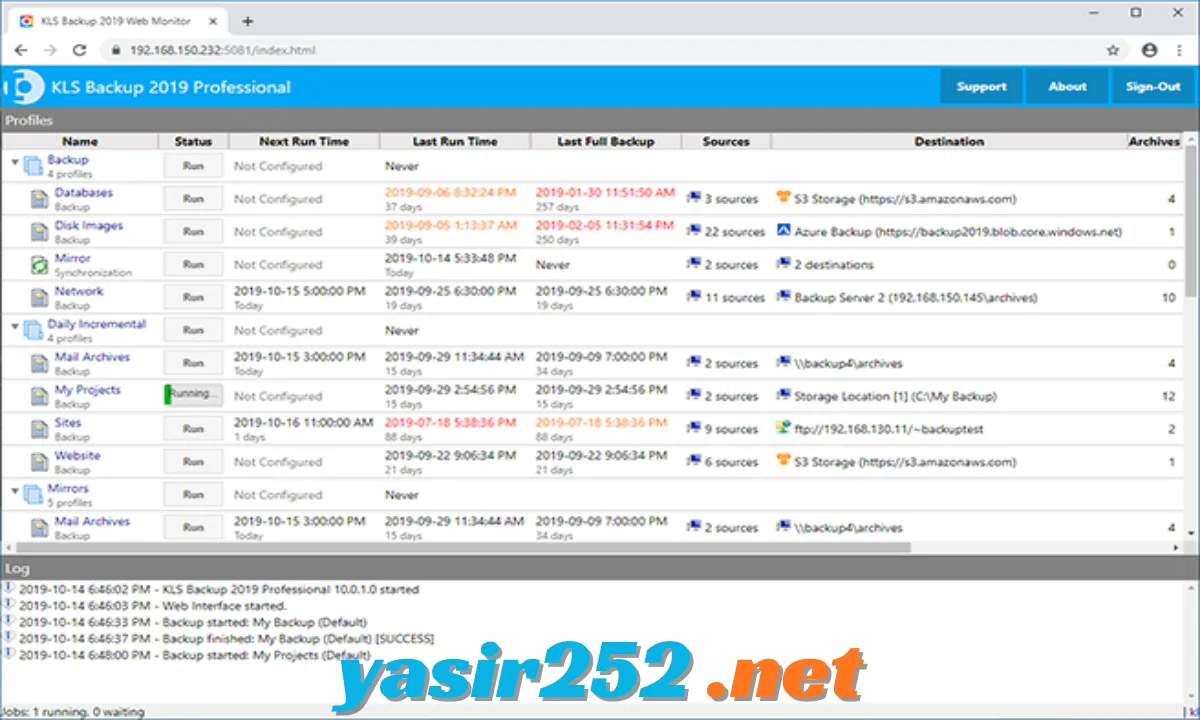
KLS Backup Professional Software Information
| Field | Details |
|---|---|
| Software Name | KLS Backup Professional |
| Version | Latest version subject to official availability |
| Developer | KLS Soft |
| Publisher | KLS Soft |
| Category | Backup and Data Protection |
| Operating System | Microsoft Windows |
| License | Commercial / Trial |
| Primary Function | Backup, Restore, Synchronization |
| Backup Sources | Files, Folders, and Supported Data Sources |
| Backup Destinations | Local Storage and Supported Network or Remote Locations |
| Official Website | https://www.kls-soft.com/ |
What Is KLS Backup Professional?
KLS Backup Professional is a data backup and recovery application for Windows that helps you create reliable backup copies of important information. Instead of manually copying files, you can configure backup tasks that automatically collect selected data and store it in a designated location. This makes it useful for home users, professionals, and small businesses that want a more organized approach to data protection.
The software is built around configurable backup jobs, allowing you to select what to back up, where to store the backup, and when the process should run. It also offers file synchronization, compression, encryption, scheduling, and restoration tools, depending on the supported configuration and edition. KLS Backup Professional is particularly useful for users who want scheduled backups and control over their backup storage destinations.
Key Features of KLS Backup Professional
– Automatic Backup Jobs: Create backup tasks for files, folders, and supported data sources. Configure recurring jobs to protect important data without manually starting a backup every time.
– Flexible Backup Selection: Select specific folders, files, and supported data locations to include in your backup tasks. This allows you to protect only the information that matters.
– Scheduled Backups: Configure backup jobs to run at selected times or on recurring schedules. Scheduling helps maintain regularly updated backup copies.
– File and Folder Backup: Protect documents, images, videos, archives, and other files stored on your computer. You can organize backup jobs according to different folders or data categories.
– Backup Compression: Compress backup data to reduce the storage space required for backup archives, depending on the configured backup format and options.
– Backup Encryption: Protect backup files using supported encryption options. Encryption is useful when backups contain private documents, business information, or sensitive data.
– File Synchronization: Synchronize selected folders between supported storage locations. This feature can help maintain consistent copies of files across different destinations.
– Incremental and Differential Backup: Use supported backup modes to avoid unnecessarily copying all data during every backup operation. Availability and behavior depend on the version and job configuration.
– Multiple Backup Destinations: Store backup copies on supported local drives, network locations, or other available destinations. Different storage locations help provide additional protection against hardware failures.
– Restore Files and Folders: Recover backed-up files when original data is deleted, damaged, or unavailable. Restoration tools help retrieve information from previously created backup sets.
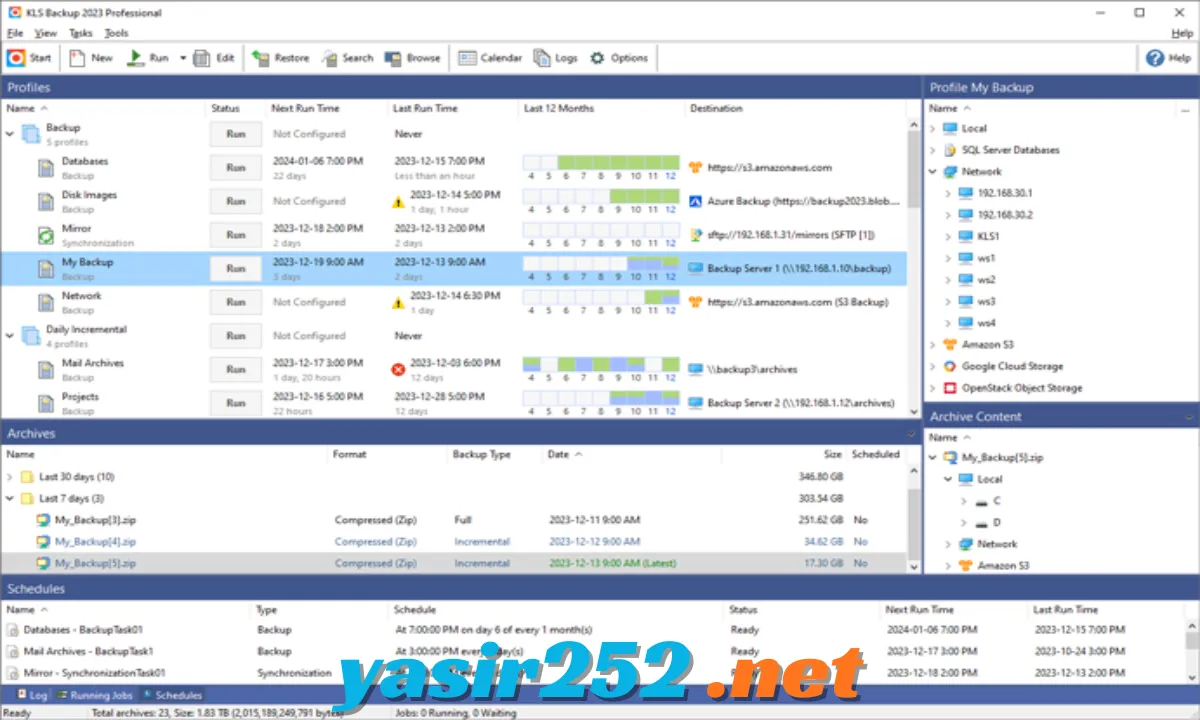
– Backup Management: Organize backup jobs, review configurations, and manage backup operations from the software interface. This helps keep different backup tasks easier to maintain.
– Custom Backup Rules: Configure selected backup parameters to match your data-protection requirements. Supported rules and filtering options can help refine what is included in a backup job.
– Data Protection for Business Files: Back up documents, spreadsheets, project folders, and other important work-related data. Scheduled backups can help reduce the risk of losing updated files.
– File Filtering: Use supported filtering or selection rules to control which files and folders are included in a backup. This can help avoid unnecessary data in backup sets.
– Backup Reports and Logs: Review available logs and backup-job information to check the status of operations and troubleshoot problems.
– Storage Flexibility: Use supported storage destinations to keep backup copies separate from the original files. External drives and other independent storage locations can help improve protection.
– Task Automation: Automate repetitive backup operations through configured schedules and supported automation features. This reduces the need to manually manage every backup.
– Windows Integration: Work with files and folders stored on Windows systems through the software’s backup interface. Compatibility depends on the version and supported Windows environment.
– Backup Verification and Reliability: Use available backup checks and review logs to confirm that backup operations complete successfully. Periodically test restoration to ensure the backup files are usable.
– Centralized Backup Configuration: Manage backup settings and multiple backup tasks through one application interface, making it easier to maintain different data-protection routines.
KLS Backup Professional Download 2027
KLS Backup Professional is commercial backup software. If you want to evaluate the application, check the developer’s official website for the currently available installer, trial, and licensing options.
Official download
KLS Backup Professional
Backup and recovery software for Windows
Visit KLS Soft Official WebsiteCheck the developer’s website for current downloads and trial availability.
How to Download KLS Backup Professional
-
Visit the official KLS Soft website.
-
Locate the KLS Backup product page.
-
Open the download section.
-
Select the available KLS Backup Professional installer.
-
Download the setup file to your Windows computer.
-
Verify the installer source before opening it.
-
Run the installer to begin installation.
How to Install KLS Backup Professional
Follow these steps to install KLS Backup Professional on Windows:
-
Download the installer from the official developer website.
-
Open the downloaded setup file.
-
Allow the Windows security prompt if required.
-
Follow the installation wizard.
-
Review the available setup options.
-
Complete the installation process.
-
Launch KLS Backup Professional from the Start menu or desktop shortcut.
-
Configure your first backup job.
How to Use KLS Backup Professional
1. Launch the Application
Open KLS Backup Professional after installation. Review the main interface and available backup-management options.
2. Create a New Backup Job
Choose the option to create a new backup task. Give the job a descriptive name so you can easily identify its purpose later.
3. Select Files and Folders
Choose the files, folders, or supported data sources you want to protect. Select only the data you need to back up to avoid unnecessarily large backup sets.
4. Choose the Backup Destination
Select a storage destination for your backup. Depending on the available configuration, this may include a local drive, external drive, or supported network location.
Avoid keeping your only backup on the same physical drive as the original files.
5. Configure Backup Settings
Review available backup options, including compression, encryption, backup mode, and other supported settings. Adjust them according to your storage and data-protection requirements.
6. Set a Backup Schedule
Configure a schedule if you want the job to run automatically. Choose a suitable frequency based on how often the selected data changes.
7. Run the Backup
Start the backup job and wait for the operation to finish. Review the job status and available logs to check whether the backup completed successfully.
8. Restore Your Data
Use the restore functionality to select the backup set and files you want to recover. Review the destination carefully before restoring to avoid overwriting newer files.
KLS Backup Professional System Requirements
The exact system requirements depend on the software release and supported backup components. The following table provides general requirements rather than unverified minimum specifications.
| Requirement | Details |
|---|---|
| Operating System | Supported Microsoft Windows version |
| Processor | Windows-compatible processor |
| RAM | Sufficient memory for the operating system and backup workload |
| Storage | Space for installation, temporary processing, and backup data |
| Backup Source | Files, folders, and supported data sources |
| Backup Destination | Supported local, external, or network storage |
| Internet Connection | May be required for downloading, updates, or licensing |
| Permissions | Appropriate permissions to access source and destination data |
| Additional Requirements | Depends on selected backup sources, destinations, and features |
Confirm the exact operating-system compatibility and minimum hardware requirements for the installer you download.
KLS Backup Professional License and Pricing
KLS Backup Professional is commercial software. Licensing, trial availability, pricing, and upgrade conditions can depend on the current product version and license type.
| License Type | Availability |
|---|---|
| Free Version | No permanently free Professional edition confirmed |
| Trial | Check official availability |
| Professional License | Commercial purchase |
| Lifetime License | Verify current purchase options |
| Upgrade License | Depends on the developer’s current licensing policy |
Is KLS Backup Professional Free?
KLS Backup Professional is a commercial application rather than a permanently free backup program. The developer may offer an evaluation version, so check the official website for the current trial conditions.
KLS Backup Professional 2019
KLS Backup Professional 2019 refers to an older version of the software. Users looking for this edition should verify its availability, Windows compatibility, and security status before installing it. Older releases may lack compatibility improvements and security updates included in newer builds.
KLS Backup Professional 2025
KLS Backup Professional 2025 is another version-specific search term. The exact release number and release history should be verified through the developer’s version archive or release documentation. If your goal is to back up data on a modern Windows computer, a supported current release is generally preferable to an older installer.
KLS Backup Professional License Key
KLS Backup Professional requires a valid license for licensed features beyond the permitted evaluation period. Obtain registration details through the official purchase process. Avoid unofficial license keys, key generators, and modified installers because they can expose your computer to malware or compromise your backup data.
Pros and Cons of KLS Backup Professional
Pros
-
Automated Backups: Schedule recurring backup tasks to reduce manual work.
-
Flexible Backup Selection: Protect specific files, folders, and supported data sources.
-
Restore Functionality: Recover backed-up files when needed.
-
Compression Support: Reduce backup storage requirements with supported compression settings.
-
Encryption Options: Protect backup data using supported encryption features.
-
Synchronization: Synchronize files between supported storage locations.
-
Backup Scheduling: Configure recurring backup tasks based on your needs.
-
Flexible Destinations: Use supported local and network storage options.
-
Backup Management: Organize and maintain multiple backup jobs.
Cons
-
Commercial Software: Professional use of licensed features requires a valid license.
-
Learning Curve: Advanced backup settings may take time for new users to understand.
-
Version Compatibility: Older editions may not work correctly with newer Windows environments.
-
Storage Requirements: Backup archives can require substantial storage space depending on the amount of data.
-
Trial Limitations: Evaluation versions may have restrictions depending on the current licensing policy.
Best Alternatives to KLS Backup Professional
If you want to compare KLS Backup Professional with other backup programs, consider these alternatives:
| Software | Best For |
|---|---|
| AOMEI Backupper | Windows file and system backup |
| EaseUS Todo Backup | Backup, system migration, and recovery |
| Macrium Reflect | Disk imaging and system recovery |
| Veeam Agent for Microsoft Windows | Windows backup and recovery workflows |
| Uranium Backup | Flexible backup jobs and storage destinations |
| Windows Backup | Basic backup and Windows data protection |
Each program offers different features, licensing models, and backup options. Choose one based on your backup destinations, recovery requirements, storage capacity, and operating-system compatibility.
Frequently Asked Questions (FAQs)
1. What is KLS Backup Professional?
KLS Backup Professional is Windows backup software designed to protect files, folders, and supported data sources through configurable backup jobs, scheduling, compression, synchronization, and restoration tools.
2. Is KLS Backup Professional free?
KLS Backup Professional is commercial software. An evaluation version may be available from the developer, but continued use of licensed features may require purchasing a license.
3. What is KLS Backup Professional 2019?
KLS Backup Professional 2019 refers to an older release of the backup application. Check the developer’s archive and compatibility information before installing it on a modern computer.
4. Is KLS Backup Professional 2025 available?
The availability and exact version details of KLS Backup Professional 2025 should be checked through the developer’s official release information or download archive.
5. Can KLS Backup Professional automatically back up files?
Yes. The software provides configurable backup jobs and scheduling options for supported data sources, allowing you to automate recurring backups.
6. Can KLS Backup Professional back up folders?
Yes. It supports file and folder backup operations, allowing users to select the data they want to protect.
7. Does KLS Backup Professional support compression?
The software provides supported compression options for backup operations, helping reduce the storage space required for backup data.
8. Can KLS Backup Professional encrypt backups?
It offers supported backup-encryption options. Check the selected backup configuration for the available encryption methods.
9. Can KLS Backup Professional restore files?
Yes. It provides restoration functionality for recovering files and data from previously created backup sets.
10. Does KLS Backup Professional support scheduled backups?
Yes. Backup jobs can be configured to run according to supported schedules, helping maintain updated backup copies.
11. Can KLS Backup Professional synchronize folders?
Yes. It provides file-synchronization functionality for supported configurations and destinations.
12. Is KLS Backup Professional suitable for businesses?
It can be useful for professionals and businesses that need scheduled file backups and configurable data-protection tasks. Businesses should verify licensing and specific data-protection requirements before deployment.
13. Does KLS Backup Professional support external hard drives?
It can use supported storage destinations, including compatible external storage configurations. Verify that the drive is accessible and supported by your backup job.
14. Can KLS Backup Professional back up network folders?
It can work with supported network storage configurations, subject to network access, permissions, and the selected backup destination.
15. Is KLS Backup Professional compatible with Windows 11?
Compatibility depends on the software version. Check the developer’s current system requirements before installing on Windows 11.
16. What is the difference between backup and synchronization?
Backup creates copies of data for recovery purposes, while synchronization keeps data consistent between selected locations. Synchronization alone is not a replacement for a separate backup because unwanted changes or deletions may also be synchronized.
17. Where can I download KLS Backup Professional?
You can find the official product information and download options through the KLS Soft website: https://www.kls-soft.com/
18. Is KLS Backup Professional crack safe?
Unofficial cracks and modified installers are not safe or legitimate licensing methods. They may contain malware or damage the integrity of your backup environment. Use the official installer and valid licensing options.
Final Verdict
KLS Backup Professional is a Windows backup utility for users who want to organize, automate, and manage their data-protection tasks. Its backup scheduling, file selection, compression, encryption, synchronization, and restore functionality make it a useful option for maintaining backup copies of important documents and files.
If you need a configurable backup program for personal files or work-related data, KLS Backup Professional is worth evaluating. Before installing, check the current version, Windows compatibility, trial availability, and license terms through the official developer website.