
Symantec Ghost 12.0.0.13074 Download [2027] – Disk Imaging, Backup and Deployment Software
Symantec Ghost is a well-known disk imaging and cloning solution designed to capture, back up, restore, and deploy computer systems. It has been used by IT professionals, system administrators, and technical support teams to create disk images, migrate operating systems, and restore computers without manually reinstalling everything. Its imaging technology became especially popular in environments where multiple computers needed the same Windows configuration.
The name Symantec Ghost is also associated with Ghost Solution Suite, a broader enterprise deployment product used for managing computer imaging and operating system deployment. Although older Ghost versions such as 11.5 remain popular in searches, they are legacy software and should not be confused with current enterprise deployment products. If you’re looking for a Symantec Ghost boot CD, bootable USB, Ghost Boot Wizard, or Ghost Solution Suite, this guide explains the differences and what to consider before downloading.
Symantec Ghost 12.0.0.13074 Download Links
Windows 10 (21H1)
| Rapidgator | DDownload |
|---|---|
| 🟣 DOWNLOAD | 🔵 DOWNLOAD |
Windows 11 (26H1)
| Rapidgator | DDownload |
|---|---|
| 🟣 DOWNLOAD | 🔵 DOWNLOAD |
Symantec Ghost Software Information
| Field | Details |
|---|---|
| Software Name | Symantec Ghost |
| Product Family | Symantec Ghost / Ghost Solution Suite |
| Original Developer | Binary Research (original Ghost software) |
| Historical Publisher | Symantec |
| Current Product Ownership | Broadcom |
| Software Category | Disk Imaging, Backup, Cloning and Deployment |
| Common Legacy Version | Ghost 11.5 |
| Related Enterprise Product | Ghost Solution Suite |
| Supported Platforms | Depends on product generation and release |
| Main Purpose | Disk imaging, system backup, cloning and deployment |
| License | Commercial / legacy licensing |
| Official Support Portal | https://support.broadcom.com/ |
| Official Enterprise Software Information | https://www.broadcom.com/ |
What Is Symantec Ghost?
Symantec Ghost is disk imaging software historically used to create exact image-based copies of hard drives, partitions, and computer systems. Instead of installing an operating system and applications individually on every computer, administrators could capture a prepared system image and restore or deploy it to other compatible machines.
Ghost became widely used for Windows deployment, computer labs, business environments, and system recovery. Its legacy tools include Ghost executable files, bootable recovery media, and utilities for capturing or restoring images. Later enterprise editions expanded these capabilities through Ghost Solution Suite, which provided centralized computer imaging and deployment workflows.
What Is Symantec Ghost Used For?
Symantec Ghost has several important uses:
-
Disk Imaging: Create image files containing the contents of a disk or partition.
-
Disk Cloning: Copy data from one compatible drive to another.
-
System Backup: Preserve a working system configuration for recovery.
-
Operating System Deployment: Apply prepared system images to multiple computers.
-
Computer Migration: Move a configured operating system and applications to replacement hardware where supported.
-
Recovery Operations: Restore a computer from a previously created image.
-
IT Management: Standardize computer installations across managed environments.
-
Laboratory Deployment: Prepare and restore identical configurations on multiple classroom or laboratory PCs.
Symantec Ghost Latest Version
One important distinction: Ghost 11.5 is a legacy imaging utility, not the latest version of Ghost Solution Suite. The enterprise product is maintained under Broadcom, which now provides Ghost Solution Suite downloads and updates through its support portal.
The latest release identified in Broadcom’s published version information is Ghost Solution Suite 3.3.13, build 12.0.0.11809. Broadcom also distributes Ghost Standard Tools separately for standalone imaging and boot-media creation. Check the Broadcom Download Center for the newest available installer and release notes before installing.
| Version / Product | Description |
|---|---|
| Ghost 11.5 | Older standalone disk imaging utility |
| Ghost 11.5.1 | Legacy Ghost 11.5 release line |
| Ghost Solution Suite 2.5 | Older enterprise imaging and deployment generation |
| Ghost Solution Suite 3.0 | Earlier enterprise deployment generation |
| Ghost Solution Suite 3.3.13 | Later 3.3 release identified in Broadcom version information |
| Ghost Standard Tools 3.3 | Standalone imaging utilities and Boot Disk Creator |
Which version should you choose?
-
For legacy imaging workflows that specifically require Ghost 11.5, check compatibility with your hardware and boot environment.
-
For standalone bootable USB or CD/DVD creation, investigate the current Ghost Standard Tools package.
-
For centralized enterprise imaging and deployment, use the supported Ghost Solution Suite release available through your Broadcom entitlement.
Symantec Ghost Solution Suite
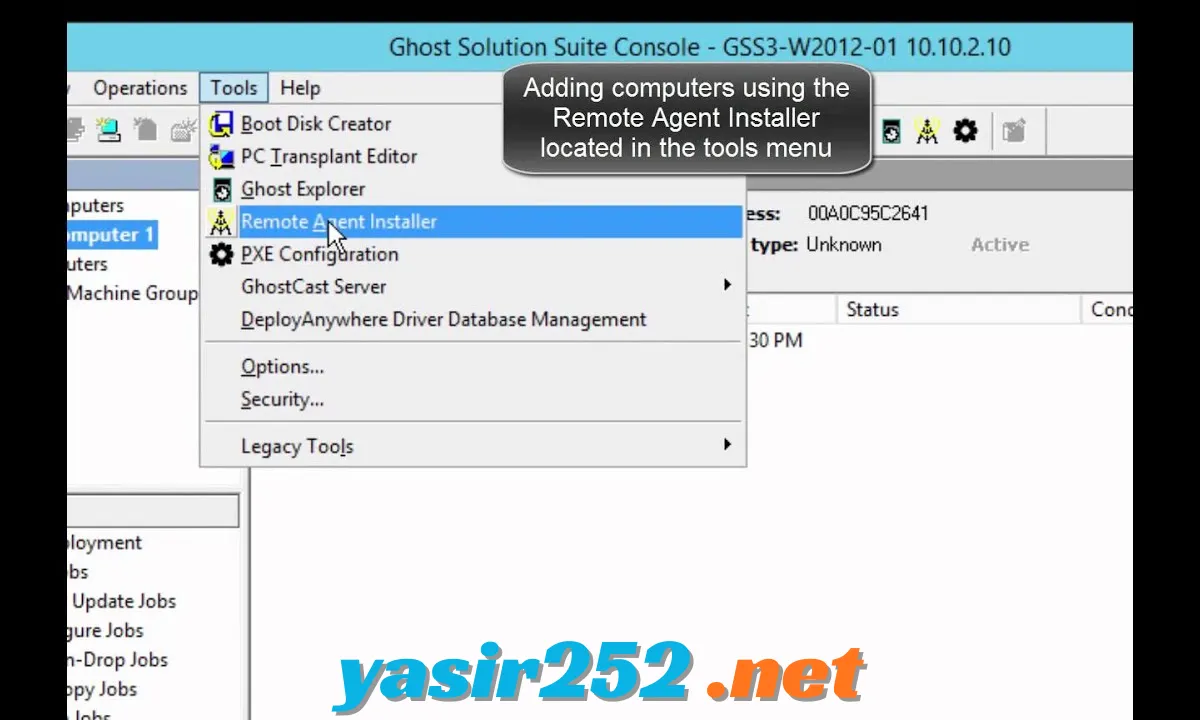
Symantec Ghost Solution Suite is an enterprise imaging and deployment platform designed to help IT teams provision computers, deploy operating system images, migrate systems, and restore endpoints. It provides management tools for organizing deployment jobs and coordinating imaging operations across multiple computers.
Unlike a standalone Ghost executable, Ghost Solution Suite includes a broader management environment. Administrators can manage supported client computers, prepare deployment jobs, distribute images, and automate repeatable IT tasks.
Key Features of Ghost Solution Suite
-
Centralized Deployment Management: Manage supported client computers and deployment tasks through a centralized console.
-
Operating System Imaging: Capture and deploy system images for repeatable computer installations.
-
Bare-Metal Provisioning: Prepare new computers and deploy operating systems using supported preboot environments.
-
Ghost Standard Tools: Access standalone imaging utilities and boot-media creation tools.
-
GhostCast Server: Distribute images across supported network environments using GhostCast workflows.
-
Boot Disk Creator: Prepare bootable USB drives and CD/DVD media for imaging and recovery tasks.
-
PXE Boot Support: Use supported PXE configurations to start computers in a network-based preboot environment.
-
Deployment Automation: Organize imaging and computer configuration operations into repeatable jobs.
-
Hardware Refresh: Help IT teams move standardized configurations to replacement computers.
-
Remote Recovery: Restore managed computers to a known-good configuration using supported deployment workflows.
-
Driver Management: Add suitable drivers to preboot environments to improve compatibility with target hardware.
-
Network Imaging: Capture or deploy images through supported network-based workflows.
-
Agent Management: Communicate with managed computers through supported Ghost Solution Suite agents.
Symantec Ghost 11.5 – Legacy Imaging Tool
Symantec Ghost 11.5 remains a commonly searched version because of its use in traditional disk imaging and cloning workflows. It is associated with executable utilities such as Ghost32.exe and Ghost64.exe, depending on the package and environment.
Ghost 11.5 can be useful in older IT environments where established imaging procedures depend on its interface or image format. However, it should not automatically be treated as suitable for every modern computer. Newer storage controllers, UEFI firmware, Secure Boot, NVMe drives, and current Windows installations can introduce compatibility challenges.
Important Ghost 11.5 Capabilities
-
Disk-to-Image Backup: Create image files from supported disks or partitions.
-
Image Restoration: Restore previously captured images to compatible storage devices.
-
Disk Cloning: Copy supported disk contents to another drive.
-
Partition Imaging: Work with individual partitions rather than imaging an entire disk.
-
Ghost Executables: Use the appropriate Ghost executable for the boot environment.
-
Bootable Media Workflows: Run Ghost from compatible bootable environments.
-
Legacy System Support: Maintain older imaging workflows where the required hardware and software are compatible.
Symantec Ghost Boot CD and Bootable USB
A Symantec Ghost boot CD or bootable USB allows a computer to start in a preboot environment so that imaging and recovery operations can be performed outside the normal Windows installation.
For newer Ghost Solution Suite workflows, Broadcom’s Ghost Standard Tools includes Boot Disk Creator. It can prepare boot media using supported Windows Preinstallation Environment (WinPE) components.
Before creating boot media:
-
Prepare a USB drive with sufficient capacity.
-
Back up any files on the USB drive because creating boot media can erase its contents.
-
Obtain compatible boot environment components and drivers.
-
Confirm that the target computer supports the selected boot mode.
-
Use the correct Ghost executable and network configuration for the imaging task.
How to Create a Symantec Ghost Bootable USB
-
Obtain Ghost Standard Tools through your authorized Broadcom download entitlement.
-
Install the appropriate Windows Assessment and Deployment Kit (ADK) and WinPE add-on required by your selected Ghost release.
-
Open Boot Disk Creator.
-
Install or import the appropriate preboot operating system.
-
Create a new boot configuration.
-
Select the required architecture and preboot environment.
-
Add network or storage drivers if the target computer needs them.
-
Configure networking using DHCP or the appropriate static settings.
-
Select the option to create boot media.
-
Choose USB or another supported output format and follow the wizard.
The exact ADK and WinPE requirements depend on the Ghost release. Follow the instructions for the specific version rather than assuming that every Windows ADK version is interchangeable.
Download Symantec Ghost and Ghost Solution Suite
For safety and compatibility, obtain Ghost software from Broadcom’s official download portal. Access to commercial installers may require an account and an active product entitlement.
Official download instructions: https://knowledge.broadcom.com/external/article/175846
Broadcom Ghost Solution Suite product page: https://www.broadcom.com/products/cybersecurity/endpoint/management/ghost-solutions-suite
Broadcom Support Portal: https://support.broadcom.com/
How to Download Ghost Solution Suite
-
Open the Broadcom Support Portal.
-
Sign in with the account associated with your software entitlement.
-
Open the downloads area or My Downloads.
-
Search for Ghost Solution Suite.
-
Select the available 3.3 release.
-
Review the release notes and product support information.
-
Download the required installer or Ghost Standard Tools package.
-
Follow Broadcom’s installation documentation.
The download portal may not show the product if your account does not have the necessary entitlement. In that situation, contact the Broadcom representative or partner associated with your license.
GhostCast Server – Network-Based Imaging
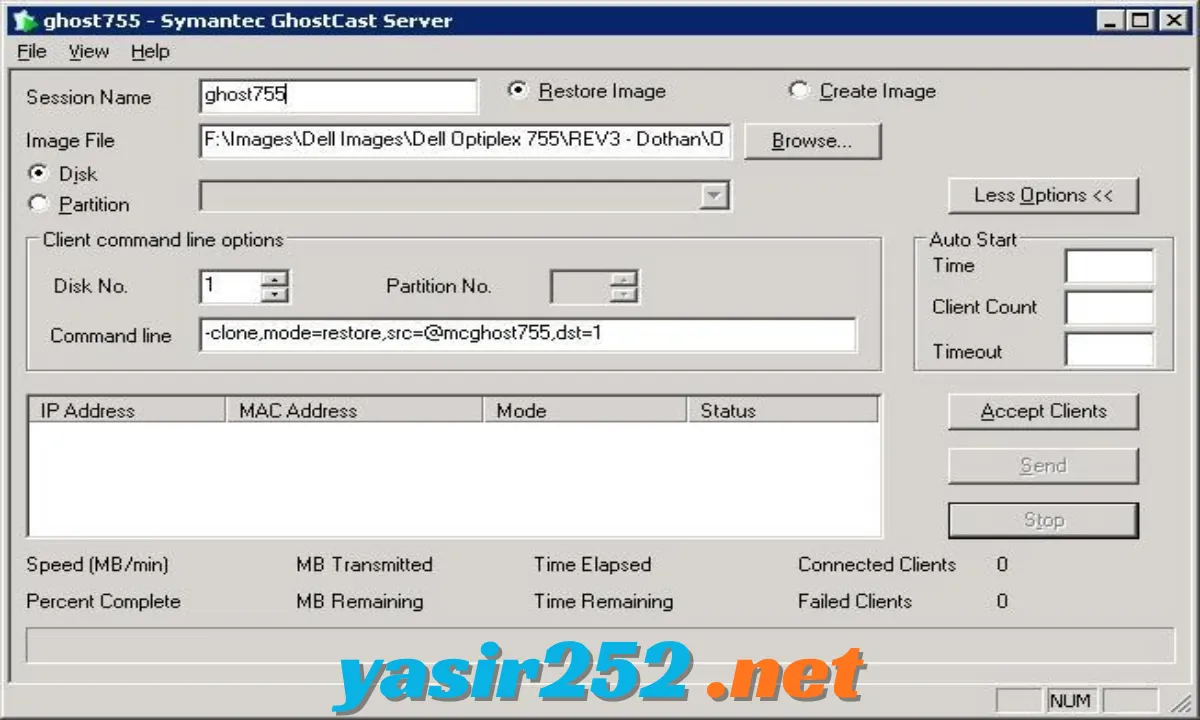
GhostCast Server is a component included with Ghost Standard Tools that supports network-based image distribution. It allows administrators to send or receive disk images through compatible network imaging workflows instead of relying entirely on local USB storage.
This can be useful when deploying the same system image to several computers in a computer lab, office, or managed IT environment.
Main GhostCast Server Capabilities
-
Multicast Imaging: Distribute a compatible image to multiple target computers through a supported multicast session.
-
Network Deployment: Transfer image data over a configured network.
-
Centralized Image Distribution: Coordinate imaging operations from a designated server.
-
Preboot Integration: Work with compatible Ghost boot environments.
-
IT Lab Deployment: Help standardize multiple computers using a common image.
Symantec Ghost System Requirements
Ghost has several generations, and their requirements are different. Ghost 11.5 is a legacy tool, while Ghost Solution Suite 3.3 uses a server-based management environment and separate boot-media components.
| Component | General Requirement / Consideration |
|---|---|
| Operating System | Depends on the Ghost version and component |
| Ghost 11.5 | Legacy boot environment; compatibility must be checked |
| Ghost Solution Suite 3.3 | Supported Windows Server environment for the management console |
| Ghost Standard Tools | Compatible Windows workstation for tool installation |
| Processor | Compatible 64-bit processor for current GSS components |
| RAM | Depends on the server, imaging workload, and number of managed clients |
| Storage | Sufficient space for installation, image files, and deployment data |
| Network | Ethernet connection recommended for network imaging |
| Boot Media | Compatible USB drive, CD/DVD, or supported PXE environment |
| Drivers | Suitable network and storage drivers for target hardware |
| Database | Required components depend on the selected GSS installation configuration |
Windows 10 and Windows 11 compatibility warning: Broadcom distinguishes Ghost Standard Tools from the Ghost Solution Suite management product. Ghost Standard Tools can be installed on supported workstation operating systems to create standalone boot media. The Ghost Solution Suite 3.x management console is not supported for installation on non-server operating systems such as Windows 10 or Windows 11. Always check the platform support matrix for the exact release.
How to Use Symantec Ghost for Disk Imaging
The general workflow for creating and restoring an image is straightforward, but the exact menu options differ between Ghost versions.
1. Prepare the Source Computer
Configure Windows, install the required applications, apply updates, and remove unnecessary temporary files. Make sure the computer is in the state you want to preserve.
2. Prepare the Boot Environment
Create compatible boot media or configure a supported network boot environment. Confirm that the required storage and network drivers are available.
3. Start Ghost
Boot the computer using the prepared media and launch the appropriate Ghost utility for your environment.
4. Select the Imaging Operation
Choose the required disk or partition imaging workflow. Verify the source disk carefully before proceeding.
5. Save the Image
Choose a suitable destination, such as an external drive or supported network location. Make sure sufficient storage space is available.
6. Verify the Image
Check the saved image and confirm that the operation completed successfully. Keep a separate backup copy of important images.
7. Restore the Image When Required
Boot the target computer using compatible media, select the correct image, and choose the intended destination disk.
Restoring or cloning an image can overwrite existing data on the destination drive. Always verify the source and destination disks before starting. Keep a separate backup of important files and never assume that a successful imaging operation guarantees that every restored computer will boot correctly.
Ghost Solution Suite vs. Ghost 11.5
| Feature | Ghost 11.5 | Ghost Solution Suite 3.3 |
|---|---|---|
| Product Type | Legacy standalone imaging utility | Enterprise deployment platform |
| Disk Imaging | Yes | Yes, through imaging components |
| Disk Restoration | Yes | Yes |
| Boot Media | Compatible legacy boot environments | Ghost Standard Tools and Boot Disk Creator |
| Centralized Management | Limited | Yes |
| GhostCast Server | Available in compatible packages | Included through Ghost Standard Tools |
| Network Deployment | Supported workflows | Supported enterprise imaging workflows |
| PXE Deployment | Depends on environment | Supported GSS configuration |
| Managed Client Agents | No comparable GSS console workflow | Yes |
| Best Use | Older standalone imaging workflows | Managed IT deployment environments |
Symantec Ghost Licensing and Availability
Symantec Ghost is associated with legacy software versions and commercial enterprise products. Ghost Solution Suite is currently distributed through Broadcom’s product and support channels.
Keep these licensing points in mind:
-
Commercial Licensing: Ghost Solution Suite is commercial software and requires the appropriate product entitlement.
-
Legacy Versions: Older Ghost 11.5 installers may be subject to historical licensing terms and availability restrictions.
-
Download Access: Broadcom may require an authorized account and entitlement before displaying installation files.
-
Education and Personal Use: Do not assume that an enterprise license includes free personal or educational use.
-
Unofficial Downloads: Avoid torrent packages, modified installers, and unauthorized activation tools because their integrity and licensing status cannot be verified.
Pros and Cons of Symantec Ghost
Pros
-
Reliable Imaging Workflows: Its disk imaging approach is useful for repeatable backup and deployment tasks.
-
Disk Cloning: Supports copying compatible disk and partition contents.
-
Bootable Recovery: Can run in supported preboot environments without starting the normal operating system.
-
Network Deployment: GhostCast workflows help distribute images over compatible networks.
-
Enterprise Management: Ghost Solution Suite adds centralized deployment and job management.
-
Legacy Compatibility: Ghost 11.5 can remain useful for maintaining older imaging procedures.
-
Standardized Builds: Helps IT teams deploy consistent system configurations.
Cons
-
Legacy Version Limitations: Ghost 11.5 is not designed for every modern storage device and boot configuration.
-
Licensing Requirements: Commercial versions may require an active entitlement.
-
Complex Setup: Enterprise deployment requires planning, configuration, and suitable infrastructure.
-
Hardware Compatibility: Storage and network drivers can affect boot and imaging operations.
-
Windows Platform Restrictions: GSS management components have different operating system requirements from standalone tools.
-
Modern Alternatives: Some newer deployment and backup tools provide more convenient interfaces and updated workflows.
Best Alternatives to Symantec Ghost
| Software | Main Purpose | Best For |
|---|---|---|
| Clonezilla | Disk imaging and cloning | Free and open-source imaging |
| Rescuezilla | Backup, recovery, and disk cloning | Users who prefer a graphical interface |
| Macrium Reflect | Disk imaging and backup | Windows backup and recovery workflows |
| AOMEI Backupper | System backup and disk cloning | Home and business backup tasks |
| Veeam Agent | Endpoint backup and recovery | Business and professional environments |
| Microsoft Configuration Manager | Operating system deployment and endpoint management | Enterprise IT teams |
Frequently Asked Questions (FAQs)
1. What is Symantec Ghost software?
Symantec Ghost is disk imaging and cloning software used to capture, back up, restore, and deploy computer systems. It has been used by IT administrators to standardize Windows installations and manage computer recovery.
2. What is the latest version of Symantec Ghost?
The latest release identified in Broadcom’s published version information is Ghost Solution Suite 3.3.13. Ghost 11.5 is an older standalone imaging utility, not the latest enterprise release.
3. Is Symantec Ghost still available?
Yes. Ghost Solution Suite and Ghost Standard Tools are available through Broadcom’s official download and support channels for eligible customers.
4. Is Symantec Ghost free?
Ghost Solution Suite is commercial software. Download access and use depend on the applicable license and Broadcom entitlement. Do not assume that legacy Ghost downloads are freely licensed.
5. What is the difference between Symantec Ghost and Ghost Solution Suite?
Symantec Ghost commonly refers to the older standalone imaging utility, while Ghost Solution Suite is an enterprise deployment platform with centralized management, imaging, and automation capabilities.
6. What is Symantec Ghost 11.5 used for?
Ghost 11.5 is used for compatible disk imaging, partition backup, disk cloning, and image restoration workflows. It is mainly relevant to legacy environments.
7. Does Symantec Ghost work on Windows 10?
Compatibility depends on the component. Ghost Standard Tools can be installed on supported workstation operating systems to create standalone boot media, but the Ghost Solution Suite 3.x management console is not supported for installation on Windows 10.
8. Does Symantec Ghost work on Windows 11?
Ghost Standard Tools and their boot environments have specific compatibility requirements. The Ghost Solution Suite 3.x management console is not supported for installation on Windows 11. Check Broadcom’s documentation for the exact release and component.
9. What is Symantec Ghost Boot Wizard?
The Ghost Boot Disk Creator, sometimes referred to as the Ghost Boot Wizard, is a utility used to configure and create bootable imaging media. It is included with compatible Ghost Standard Tools packages.
10. Can I create a Symantec Ghost bootable USB?
Yes. Compatible Ghost Standard Tools versions include Boot Disk Creator, which can create bootable USB media using an appropriate preboot environment and drivers.
11. Can I create a Symantec Ghost boot CD?
Yes. Compatible Boot Disk Creator workflows can generate bootable CD/DVD or ISO media. The exact options depend on the selected Ghost tools and boot environment.
12. What is GhostCast Server?
GhostCast Server is a network imaging utility that distributes or receives compatible disk images through supported network workflows. It is useful for deploying a standard image to multiple computers.
13. What is the difference between Ghost32.exe and Ghost64.exe?
These are different Ghost executable versions intended for compatible 32-bit and 64-bit environments. Choose the executable that matches the supported boot environment and imaging requirements.
14. What is Symantec Ghost Solution Suite 3.3?
Ghost Solution Suite 3.3 is an enterprise imaging and deployment product. It provides tools for managing computers, distributing images, automating deployment jobs, and restoring systems.
15. Is Ghost Solution Suite 3.0 still useful?
It may remain relevant to older environments that depend on its specific deployment workflows. However, administrators should evaluate supported upgrade paths and compatibility before continuing to use an older release.
16. What is Symantec Ghost Solution Suite 2.5?
Ghost Solution Suite 2.5 is an older generation of the enterprise deployment platform. It is primarily relevant to legacy IT infrastructures and should not be confused with the later 3.3 release.
17. Can Symantec Ghost clone an SSD?
Ghost can image and clone compatible storage devices, including supported SSD configurations. Modern NVMe controllers, firmware, partition layouts, and boot modes can affect compatibility, so test the workflow before relying on it.
18. Can Ghost create a full system backup?
Yes. Compatible Ghost imaging workflows can capture an entire disk or selected partitions into an image file. Keep the image on separate storage and verify it before relying on it for recovery.
19. Where can I download Symantec Ghost safely?
Use the official Broadcom Support Portal and its download instructions. Some installers require an authorized account and product entitlement.
20. Is Symantec Ghost suitable for beginners?
Basic imaging and restoration can be learned with practice, but users must understand disk selection, partition layouts, boot environments, and backup procedures. Enterprise Ghost Solution Suite is primarily intended for IT professionals and administrators.
Conclusion
Symantec Ghost remains an important name in disk imaging, cloning, and computer deployment. Its legacy Ghost 11.5 utility is still relevant to some older imaging workflows, while Ghost Solution Suite provides broader tools for enterprise operating system deployment, centralized management, and system recovery.
For modern installations, it’s important to choose the correct Ghost component rather than downloading an outdated executable without checking compatibility. Ghost Standard Tools is useful for standalone boot media and imaging, while Ghost Solution Suite is designed for managed IT environments. Obtain installers through Broadcom’s official channels and confirm the licensing and hardware requirements before using them.