
TickTick Premium 8.2.6 Multilingual Download [2027] – Task Manager, Calendar & Productivity App
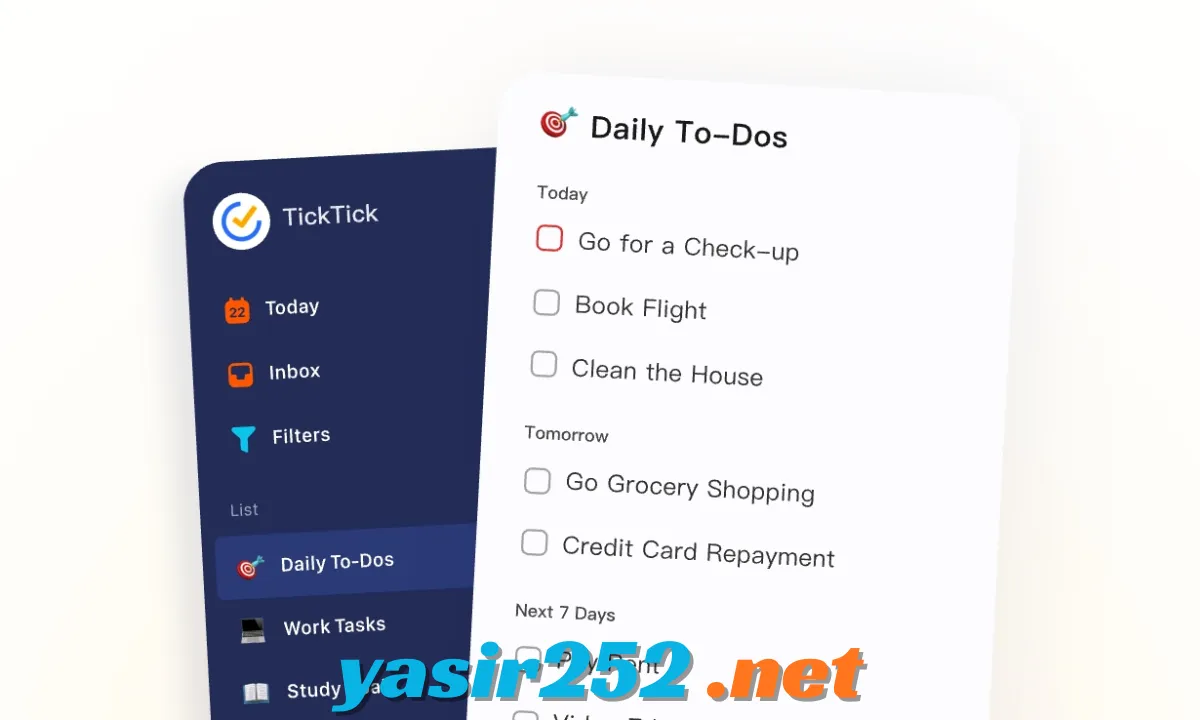
TickTick is a popular task management and productivity application designed to help you organize daily tasks, manage deadlines, build habits, and keep track of personal or professional goals. It combines a to-do list, calendar, reminders, habit tracking, focus tools, and task organization features in one convenient platform.
TickTick Premium expands the standard experience with additional productivity tools and enhanced limits for people who manage busy schedules. Whether you’re a student planning assignments, a freelancer handling client projects, or someone trying to stay organized every day, TickTick provides a practical way to keep your tasks, reminders, and plans under control across supported devices.
TickTick 8 Download Links
| Nitroflare | DDownload |
|---|---|
| 🟡 DOWNLOAD | 🔵 DOWNLOAD |
TickTick Software Information
| Field | Details |
|---|---|
| Title | TickTick |
| Premium Edition | TickTick Premium |
| Developer | TickTick Team |
| Publisher | TickTick Team |
| Category | Productivity / Task Management |
| License | Free version and paid Premium subscription |
| Operating System | Windows, macOS, Android, iOS, Linux (availability varies), Web |
| Main Purpose | Task management, scheduling, reminders, habits, and productivity |
| Official Website | https://ticktick.com/ |
What Is TickTick?
TickTick is a productivity app that helps users organize tasks, schedule activities, create reminders, and manage daily routines. It allows you to build task lists, set due dates, organize projects, track habits, and review upcoming activities through different views.
The application is available across several platforms, making it useful for people who want to access their tasks from a computer, smartphone, tablet, or browser. TickTick Premium adds enhanced features and higher limits for users who want more flexibility in managing their personal productivity and work schedules.
What Is TickTick Premium Used For?
TickTick Premium is used to manage more complex schedules, personal projects, recurring activities, and productivity workflows. It can help with several everyday tasks:
-
Task Management: Create, organize, prioritize, and track tasks for personal or professional activities.
-
Project Organization: Divide large projects into smaller tasks and organize them into lists.
-
Calendar Planning: Schedule tasks and review daily, weekly, or monthly plans using supported calendar views.
-
Reminders: Set reminders for important tasks, deadlines, meetings, and personal activities.
-
Habit Tracking: Track recurring habits and monitor progress toward personal goals.
-
Focus Sessions: Use built-in focus tools to help concentrate on tasks and reduce distractions.
-
Task Prioritization: Organize tasks using priority levels, tags, and other available organizational features.
-
Recurring Tasks: Schedule repeated tasks for daily routines, weekly activities, monthly responsibilities, and other recurring schedules.
-
Team and Collaboration Workflows: Share lists and collaborate on supported tasks with other users.
-
Cross-Platform Synchronization: Access tasks across supported devices and platforms using your TickTick account.
TickTick Premium Features List [2027]
TickTick Premium is designed for users who need more than basic task lists. It offers enhanced organizational tools, calendar functionality, customization options, and additional limits that can be useful when managing multiple projects or personal routines.
Key Features of TickTick Premium
– Advanced Calendar Views: Plan tasks and appointments using calendar views to visualize your schedule and upcoming deadlines. Premium may provide additional calendar-view options and flexibility compared with the free plan.
– Enhanced Task Limits: Manage more tasks, lists, subtasks, and other organizational items within the Premium account limits. Exact limits can change with subscription updates.
– Multiple Calendar Views: Review your schedule using different calendar layouts, helping you organize daily routines, weekly plans, and longer-term projects.
– Advanced Task Organization: Organize tasks using lists, folders, tags, priorities, and filters where supported. This makes it easier to separate work, personal responsibilities, and project activities.
– Habit Tracking: Build daily routines and monitor progress toward goals such as reading, exercise, study sessions, or other recurring activities.
– Focus Timer: Use built-in focus tools to dedicate time to tasks and manage distraction-free work sessions.
– Pomodoro Technique: Apply timed work and break sessions to maintain concentration and structure your productivity routine.
– Task Statistics: Review available productivity statistics and activity insights to better understand your task completion and focus habits.
– Calendar Subscription: Connect supported calendar services or subscribe to external calendars where available, allowing you to review appointments alongside tasks.
– Smart Lists and Filters: Create custom task views using available filtering and organizational tools.
– Task Templates: Use supported templates or recurring-task workflows to simplify repetitive planning activities.
– Advanced Reminders: Configure reminders and scheduling options to help you avoid missing important tasks.
– Custom Themes: Customize the application’s appearance using available themes and personalization settings.
– Widgets: Use supported desktop or mobile widgets to view tasks, schedules, and productivity information without opening the full application.
– Cross-Device Synchronization: Synchronize tasks and other supported data across your connected TickTick devices.
Premium features, limits, and availability may vary by platform, subscription status, and current TickTick plan. Check the official feature comparison for the latest details.
TickTick Interface
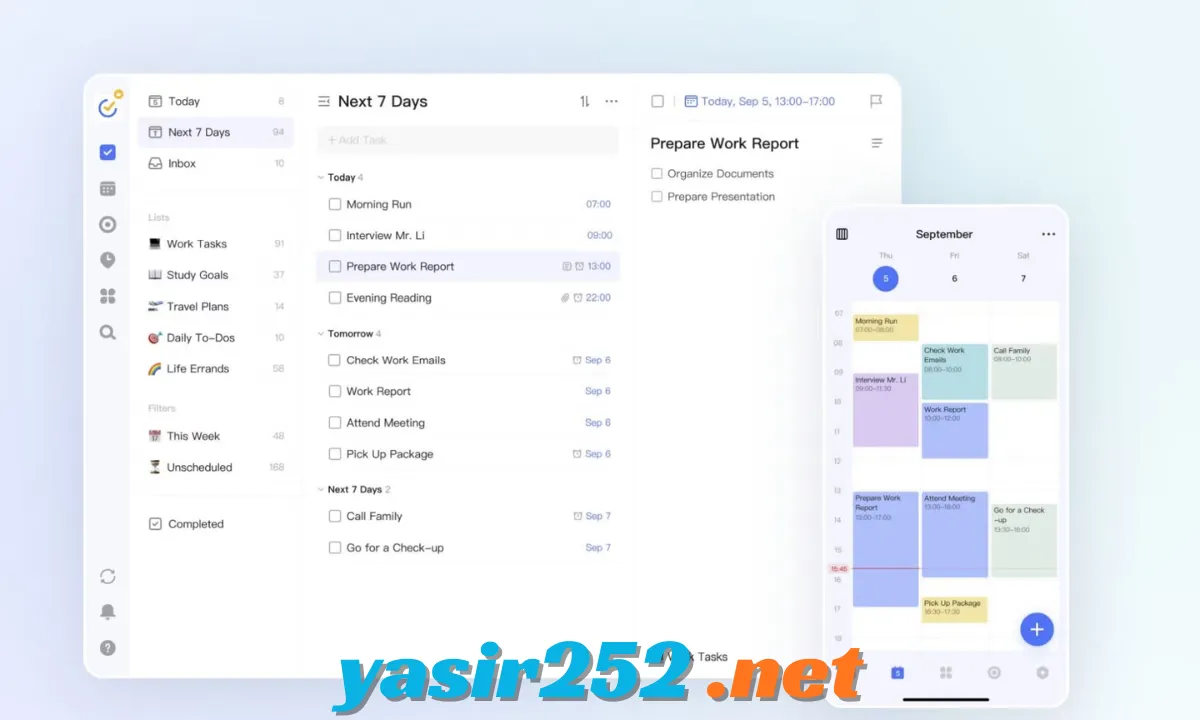
TickTick has a clean productivity-oriented interface that separates tasks, calendars, habits, and organizational lists. Its layout helps users quickly add tasks, check deadlines, review schedules, and access productivity tools.
The main interface generally includes:
-
Inbox: Capture tasks quickly before organizing them into specific lists.
-
Today View: Review tasks scheduled for the current day.
-
Upcoming View: See future tasks and deadlines.
-
Lists and Folders: Organize tasks into projects, categories, and personal workflows.
-
Calendar: Review scheduled tasks and deadlines using supported calendar layouts.
-
Habit Tracker: Manage and monitor recurring habits.
-
Focus Tools: Access focus sessions and related productivity features.
-
Settings: Configure notifications, account preferences, appearance, and synchronization.
The interface can vary between Windows, Android, iOS, macOS, and web versions.
TickTick Premium Download [2027]
TickTick is available through its official website and supported application stores. You can start with the free version and upgrade to Premium from your account if you need additional features.
Official website: https://ticktick.com/
Official download page: https://ticktick.com/download
How to Download and Install TickTick for PC
-
Visit the official TickTick website.
-
Open the download section.
-
Select the supported desktop version for your operating system.
-
Download the installer.
-
Run the downloaded setup file.
-
Follow the installation instructions.
-
Launch TickTick on your computer.
-
Sign in or create a new account.
-
Start adding tasks, reminders, and lists.
How to Upgrade to TickTick Premium
-
Open TickTick on your device or visit the official website.
-
Sign in to your account.
-
Open the account settings or Premium upgrade section.
-
Review the available subscription plans.
-
Select the subscription option you want.
-
Review the price, billing period, and renewal terms.
-
Complete the purchase using an available payment method.
Always review the subscription terms before purchasing, including automatic renewal and cancellation policies.
TickTick Premium for PC
TickTick is available for desktop use, including supported Windows and macOS versions. Its desktop interface makes it convenient to organize tasks, review schedules, manage lists, and use productivity tools while working on a computer.
The desktop application can be useful for:
-
Managing work tasks and project deadlines.
-
Planning daily and weekly schedules.
-
Organizing study assignments.
-
Tracking recurring personal activities.
-
Managing reminders while working.
-
Reviewing tasks using calendar layouts.
-
Synchronizing tasks with supported mobile devices.
You can also use TickTick through its web version if you prefer not to install a desktop application.
How to Use TickTick for Productivity
TickTick is easy to start using because you can create tasks immediately and gradually organize them into a more structured workflow.
Step 1: Create Your Account
Install TickTick or open its web version. Sign in or create an account to access your tasks and supported synchronization features.
Step 2: Add Tasks
Create a task by entering its name. You can add tasks such as completing an assignment, preparing a report, attending a meeting, or buying groceries.
Step 3: Set Due Dates
Assign a date and time to tasks that need to be completed by a specific deadline. This helps you organize your workload.
Step 4: Organize Tasks into Lists
Create lists for different areas of your life, such as work, study, personal projects, shopping, or daily routines.
Step 5: Set Reminders
Add reminders to important tasks so you receive notifications when activities are approaching.
Step 6: Use Priorities and Tags
Assign priorities to urgent tasks and use tags to organize activities by context, project, or type.
Step 7: Plan Your Calendar
Review scheduled tasks in the calendar to understand how your activities fit into the day, week, or month.
Step 8: Track Habits
Create recurring habits and use the habit tracker to monitor your progress over time.
Step 9: Start a Focus Session
Use the focus timer or Pomodoro-style workflow to work on a task without constantly switching between activities.
Step 10: Review Your Progress
Review completed tasks, upcoming deadlines, and available statistics to improve your planning habits.
TickTick Premium Pricing [2027]
TickTick offers a free plan and a paid Premium subscription. The Premium plan is intended for users who need more advanced scheduling, higher organizational limits, and additional productivity features.
Pricing can change by country, platform, currency, promotions, and billing period. The table below describes the plans rather than guaranteeing current prices.
| Plan | Pricing | Details |
|---|---|---|
| TickTick Free | Free | Basic task management and productivity tools with free-plan limits |
| TickTick Premium Annual | Paid yearly subscription | Enhanced features and higher limits |
| TickTick Premium Monthly | Availability varies | Check the account’s upgrade page for monthly billing options |
TickTick Premium Price in India
TickTick Premium pricing in India may differ from prices in other countries. The displayed price can depend on the platform through which you purchase the subscription, including the official website or mobile application stores.
To check the current price in India:
-
Open TickTick or visit its official website.
-
Sign in to your account.
-
Open the Premium upgrade page.
-
Check the price displayed in your local currency.
-
Review the billing period and renewal terms before purchasing.
Avoid relying on outdated pricing screenshots or unofficial sellers when comparing TickTick Premium subscriptions.
TickTick Premium vs Free
The free and Premium versions are both useful, but they are designed for different levels of productivity management.
| Feature | TickTick Free | TickTick Premium |
|---|---|---|
| Basic Tasks | Available | Available |
| Task Lists | Available with limits | Higher limits |
| Reminders | Basic functionality | Additional capabilities where supported |
| Calendar | Basic calendar functionality | Enhanced calendar options |
| Habit Tracking | Available with limits | Expanded capabilities or limits |
| Task Organization | Basic organizational tools | More advanced organizational capabilities |
| Customization | Basic options | Additional options where supported |
| Statistics | Limited | Enhanced insights where available |
| Synchronization | Available across supported devices | Available across supported devices |
| Subscription | Free | Paid |
The exact feature differences and account limits may change, so check TickTick’s official plan comparison before upgrading.
Best TickTick Alternatives
If you want to compare other task management applications before choosing TickTick Premium, these are worth considering.
– Todoist: A popular task manager for organizing projects, deadlines, recurring tasks, and personal or professional workflows.
– Microsoft To Do: A free task management application integrated with the Microsoft ecosystem, suitable for everyday lists and reminders.
– Notion: A flexible workspace for notes, databases, projects, documentation, and customized productivity systems.
– Any.do: A task manager with lists, reminders, calendar-related planning, and personal productivity tools.
– Trello: A visual project management application that organizes tasks using boards, lists, and cards.
– Google Tasks: A straightforward task management tool connected to supported Google services and calendar workflows.
Pros and Cons of TickTick Premium
Pros
-
Combines tasks, calendars, habits, and focus tools in one application.
-
Supports multiple platforms.
-
Provides reminders and recurring tasks.
-
Offers calendar-based task planning.
-
Includes habit tracking.
-
Supports task organization with lists, tags, and priorities.
-
Premium provides expanded productivity features.
-
Suitable for personal and professional organization.
Cons
-
Some advanced features require Premium.
-
Subscription costs may vary by country and platform.
-
The number of features can feel overwhelming to new users.
-
Some functionality varies across desktop and mobile platforms.
-
Premium is not necessary for every user.
-
Synchronization and account-related features depend on the service and connectivity.
Frequently Asked Questions About TickTick Premium
1. What is TickTick Premium?
TickTick Premium is the paid subscription of the TickTick task management application. It provides additional productivity features, expanded limits, and enhanced tools compared with the free plan.
2. Is TickTick Premium free?
No, TickTick Premium is a paid subscription. TickTick does offer a free plan, which provides basic task-management functionality.
3. What is TickTick used for?
TickTick is used to organize tasks, schedule activities, manage reminders, track habits, plan projects, and improve personal productivity.
4. What are the TickTick Premium features?
Premium features may include enhanced calendar views, expanded task and list limits, advanced organization, additional customization, and enhanced productivity tools. Exact features depend on the current plan.
5. How much does TickTick Premium cost?
TickTick Premium pricing depends on the subscription plan, region, currency, and billing platform. Check the official upgrade page for the current price.
6. What is TickTick Premium price in India?
The price in India may vary depending on the purchase platform and current subscription offering. Check the Premium upgrade page while signed in to see the price applicable to your account.
7. Is TickTick Premium worth it?
TickTick Premium can be worth it for users who manage many tasks, need enhanced calendar planning, track habits, or require higher limits. Casual users may find the free plan sufficient.
8. Can I use TickTick Premium on PC?
Yes. TickTick offers desktop applications for supported platforms and a web version. Premium features are available according to the account’s subscription and supported platform functionality.
9. Does TickTick work on Windows?
Yes. TickTick offers a desktop application for supported Windows versions. You can also access the service through a web browser.
10. Does TickTick work on Android?
Yes. TickTick offers an Android application through supported distribution channels, including the official Google Play Store where available.
11. Does TickTick work on iPhone?
Yes. TickTick is available for supported iOS devices through Apple’s App Store.
12. Can TickTick sync across devices?
Yes. TickTick supports synchronization across supported devices when you sign in to your account and use the available synchronization features.
13. Does TickTick have a calendar?
Yes. TickTick includes calendar functionality for reviewing and scheduling tasks. Calendar features and available views vary by plan and platform.
14. Does TickTick include a Pomodoro timer?
TickTick includes focus-related tools and a Pomodoro-style workflow to help users structure work sessions and breaks.
15. Can TickTick track habits?
Yes. TickTick includes a habit-tracking feature for managing recurring routines and monitoring progress.
16. Is TickTick Premium APK safe?
The safest way to install TickTick on Android is through the official Google Play Store or an official distribution channel. Modified Premium APKs from unofficial websites may contain malicious code, compromise your account, or expose personal information.
17. Is TickTick Premium Mod APK legitimate?
A modified APK claiming to unlock Premium without a legitimate subscription is not an official TickTick product. It may be modified, unsafe, unreliable, or violate the application’s terms.
18. Can I get TickTick Premium without paying?
You can use TickTick’s official free plan without paying. Premium features require a legitimate subscription unless TickTick officially offers a promotion or trial.
19. Does TickTick offer a Premium trial?
Trial availability may change and can depend on your account, region, or promotion. Check the official upgrade page for any currently available trial.
20. What is the best alternative to TickTick?
Todoist, Microsoft To Do, Notion, Any.do, Trello, and Google Tasks are alternatives. The best option depends on whether you need simple lists, calendar planning, habit tracking, or project management.
Conclusion
TickTick Premium is a useful productivity solution for people who want to manage tasks, schedules, reminders, habits, and focus sessions from one place. Its combination of task management, calendar planning, habit tracking, and focus tools makes it a practical choice for students, professionals, freelancers, and everyday users.
The free version is a good starting point for basic task organization, while Premium is better suited to users who need additional limits and advanced productivity tools. If you’re looking for TickTick Premium in 2027, download the official application and compare the current subscription features before upgrading.