
3DF Zephyr 9.500 Multilingual Download [2027] – Photogrammetry Software for 3D Models
3DF Zephyr is a powerful photogrammetry application that turns ordinary photographs into detailed 3D models. It’s designed for people who want to capture real-world objects, buildings, landscapes, and environments in 3D without needing expensive scanning equipment. By analyzing overlapping photos, the software reconstructs geometry, textures, and other useful 3D data.
Whether you’re working on a professional 3D project, architectural visualization, cultural heritage preservation, or simply experimenting with 3D scanning, 3DF Zephyr gives you a complete workflow in one place. It offers automated reconstruction tools alongside manual controls, making it useful for beginners and experienced 3D artists alike.
3DF Zephyr 9.500 Download Links
| Nitroflare | Rapidgator |
|---|---|
| 🟡 DOWNLOAD | 🟣 DOWNLOAD |
3DF Zephyr Software Information
| Field | Details |
|---|---|
| Title | 3DF Zephyr |
| Version | Current version available from the official website |
| Developer | 3Dflow |
| Publisher | 3Dflow |
| Category | Photogrammetry / 3D Reconstruction |
| License | Free edition and paid editions |
| Operating System | Windows |
| Primary Use | Creating 3D models from photographs |
| Official Website | https://www.3dflow.net/ |
What Is 3DF Zephyr?
3DF Zephyr is a photogrammetry software developed by 3Dflow. It uses photographs captured from different angles to reconstruct three-dimensional objects and scenes. The software analyzes common details between images, estimates camera positions, and builds a 3D representation of the photographed subject.
It is used in several fields, including architecture, surveying, archaeology, engineering, gaming, visual effects, and 3D asset creation. Users can generate point clouds, meshes, textured models, and other reconstruction outputs depending on the edition and workflow.
Key Features of 3DF Zephyr
– Automatic 3D Reconstruction: Generate 3D models from a collection of overlapping photographs. The software analyzes image details and camera positions to reconstruct the subject.
– Photogrammetry Workflow: Process images through different reconstruction stages, from camera alignment to dense point clouds and textured meshes.
– Point Cloud Generation: Create 3D point clouds that represent the shape and surface of photographed objects or environments.
– Textured 3D Models: Apply image-based textures to reconstructed geometry to produce realistic-looking models.
– Mesh Reconstruction: Convert reconstruction data into polygonal surfaces that can be used in 3D modeling and visualization workflows.
– Camera Alignment: Detect matching features across photographs and estimate camera positions to build a consistent 3D scene.
– Orthophoto and DEM Tools: Supported workflows can generate orthographic images and elevation data for mapping and measurement tasks.
– Measurement Tools: Analyze reconstructed scenes with available measurement features. Accuracy depends on image quality, calibration, scale information, and capture conditions.
– Image Masking: Exclude unwanted areas from photographs to help reduce reconstruction errors caused by backgrounds or moving elements.
– Control Points and Scaling: Use reference information and control points in supported workflows to improve alignment and establish real-world scale.
– 3D Model Export: Export reconstruction results in supported formats for use in compatible 3D applications and other production tools.
– Project Management: Save and reopen reconstruction projects so you can continue working on your 3D scenes.
– Beginner-Friendly Interface: Access reconstruction stages and project controls through a graphical interface rather than building the entire workflow with command-line tools.
– Professional Applications: Use photogrammetry results for architecture, cultural heritage, product visualization, surveying, and digital content creation.
Feature availability and processing limits can vary between 3DF Zephyr Free and the paid editions.
Understanding 3DF Zephyr Editions
3Dflow offers different editions for different types of users. The free edition is useful for learning and smaller projects, while paid editions provide expanded capabilities and higher processing limits.
| Edition | Best For | Important Note |
|---|---|---|
| 3DF Zephyr Free | Beginners and hobbyists | Free edition with project and processing limitations |
| 3DF Zephyr Lite | Individual creators | Paid edition with more capabilities than the free version |
| 3DF Zephyr | Professional users | Full professional photogrammetry workflow |
| 3DF Zephyr Aerial | Aerial mapping and surveying | Designed for aerial photogrammetry workflows |
Check the official edition comparison before choosing a license because features, limits, and pricing may change.
3DF Zephyr Free Download [2027]
If you want to try photogrammetry without immediately purchasing a professional license, start with the official 3DF Zephyr Free edition. It provides an accessible way to learn image-based 3D reconstruction and understand the software’s workflow.
Official website: https://www.3dflow.net/
Official downloads: https://www.3dflow.net/3df-zephyr-download/
Download the installer from the official 3Dflow website and confirm that the selected edition matches your intended use. Avoid unofficial installers that claim to provide an unlocked or cracked version.
How to Download and Install 3DF Zephyr
-
Visit the official 3Dflow website.
-
Open the 3DF Zephyr product or download page.
-
Review the available editions and select the appropriate version.
-
Download the Windows installer.
-
Open the downloaded setup file.
-
Follow the installation instructions.
-
Launch 3DF Zephyr after installation.
-
Activate or register the edition if required.
-
Start a new project and import your photographs.
What’s New in 3DF Zephyr 9.5?
3Dflow announced 3DF Zephyr 9.5 on November 11, 2026. This release focuses on improving reconstruction speed, responsiveness, and the quality of several processing tools.
Key improvements include:
-
Faster Structure from Motion: Improvements to the camera alignment and reconstruction pipeline.
-
Improved Multi-View Stereo: Processing speed improvements during dense reconstruction.
-
Faster LOD Mesh Dialog: Better responsiveness and loading performance.
-
Better Sections and Level Curves: Improved extraction quality for technical and surveying workflows.
-
Guided Breaklines: Improved extraction quality for terrain and surface work.
-
Enhanced Volume from Projection: The tool has been revised and improved.
-
Improved Hole Filling: Updates to tools used to repair gaps in reconstructed meshes.
-
GPS Data Fix: Fixed an issue affecting GPS data after merging projects.
-
Video Export Fix: Fixed compatibility problems with exported videos on Meta platforms.
For the latest build and complete release notes, check the official 3Dflow website.
3DF Zephyr Interface and Workflow
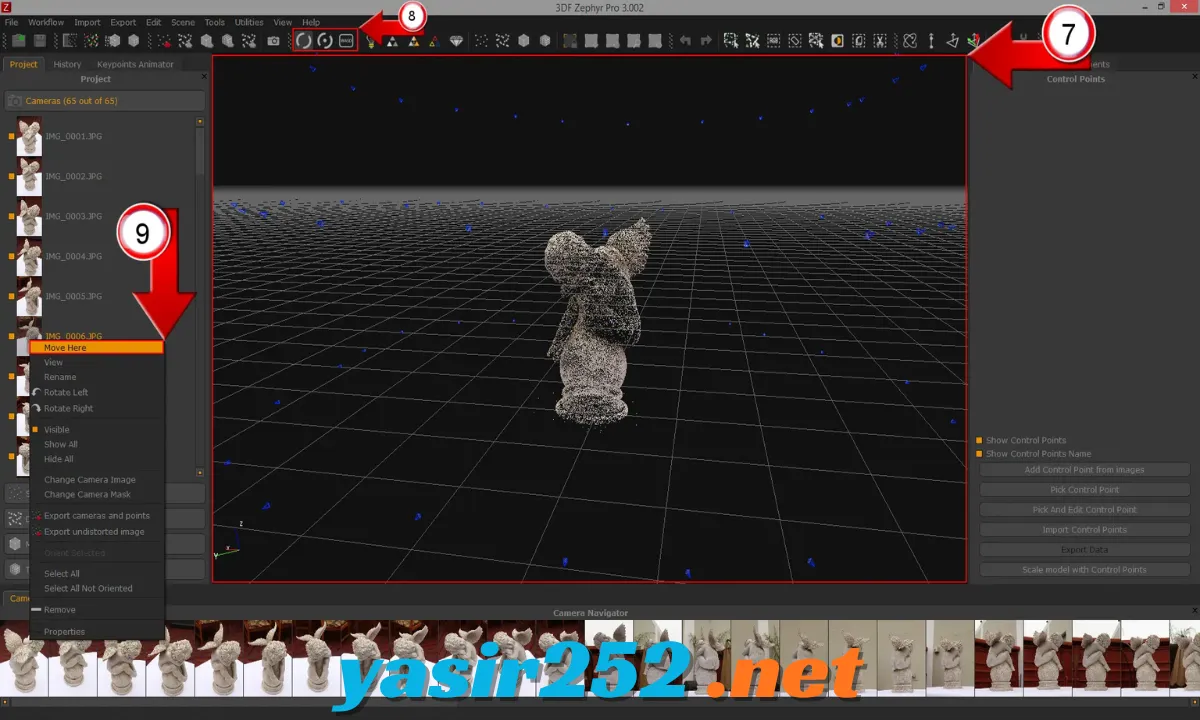
The 3DF Zephyr interface is organized around project management, image processing, reconstruction, and 3D editing. You can import photographs, inspect camera alignment, generate point clouds, create meshes, and export your results from the same application.
A typical project follows this workflow:
-
Create a Project: Start a new project and choose the photographs you want to process.
-
Import Images: Add overlapping pictures of the object, building, or environment.
-
Run Camera Alignment: Let Zephyr identify common visual details and estimate camera positions.
-
Generate a Dense Point Cloud: Reconstruct more surface details from the aligned images.
-
Create a Mesh: Convert the point cloud into a 3D surface.
-
Apply Textures: Generate a textured model using information from the original photographs.
-
Edit the Reconstruction: Clean unwanted geometry and make adjustments using the available tools.
-
Export the Result: Save the model in a supported format for another application or workflow.
How to Use 3DF Zephyr for a 3D Model
If you’re new to photogrammetry, start with a small object that is easy to photograph. A textured object with visible details usually produces better results than a plain, reflective, or transparent subject.
Step 1: Capture Good Photographs
Take multiple overlapping photos from different angles. Keep the lighting consistent, avoid motion blur, and make sure the subject is visible in several images.
Step 2: Import Your Images
Open 3DF Zephyr and create a new project. Import the photographs you captured and check that the software recognizes the image files correctly.
Step 3: Align the Cameras
Start the camera alignment process. Zephyr analyzes common features between images to estimate camera positions and build the initial reconstruction.
Step 4: Generate the 3D Reconstruction
Continue with dense point cloud generation and mesh creation. Processing time depends on the number of photographs, image resolution, and computer hardware.
Step 5: Apply Texture and Clean the Model
Generate textures from the original photographs. Remove unwanted geometry and refine the model where necessary.
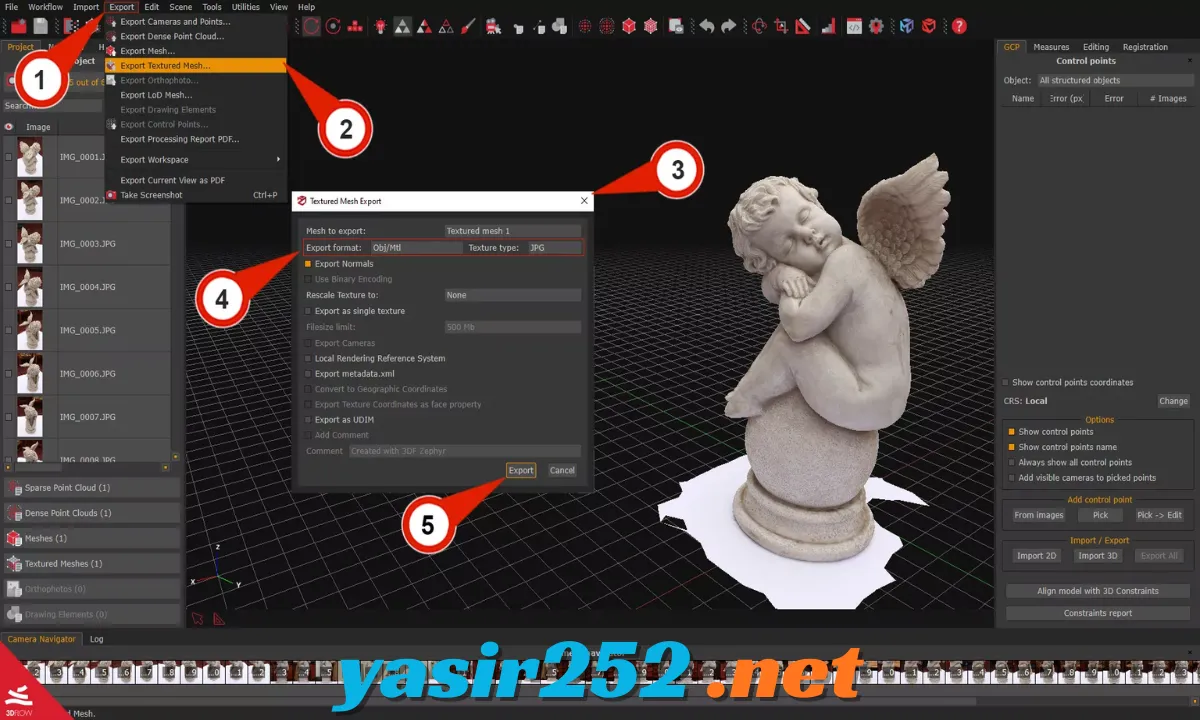
Step 6: Export Your 3D Model
Choose an export format supported by your edition and intended destination. You can then continue editing or using the model in compatible 3D applications.
3DF Zephyr System Requirements
3DF Zephyr is computationally demanding, particularly when processing large image collections. The following specifications are based on the software’s published requirements.
| Component | Minimum Requirements | Recommended Requirements |
|---|---|---|
| Operating System | Windows 10 / Windows 11 | Windows 10 / Windows 11 |
| Processor | Dual-core 2.0 GHz or equivalent | Quad-core Intel or AMD CPU |
| RAM | 16 GB | 32 GB |
| Storage | 20 GB free space | 40 GB free space, preferably SSD |
| Graphics | DirectX 9.0c-compatible NVIDIA or OpenCL graphics card with at least 1 GB memory | NVIDIA GPU with at least 4 GB memory and CUDA capability 3.5 or compatible OpenCL support |
| Internet | Required for online activation of applicable paid editions | Stable internet connection |
Actual performance depends on dataset size, image resolution, GPU support, and reconstruction settings. An SSD and a capable graphics card can make demanding projects more manageable.
Is 3DF Zephyr Free?
Yes. 3DF Zephyr Free is a genuinely free edition for personal use, and it is not simply a time-limited trial. However, it has important limitations, including a maximum of 50 photographs per project and restricted export and processing capabilities.
The paid editions are intended for users who need larger projects, more export options, and additional professional tools.
3DF Zephyr Pricing and Editions
| Edition | Pricing / License | Main Limitations or Benefits |
|---|---|---|
| 3DF Zephyr Free | Free for personal use | Maximum 50 photos per project; limited exports and editing tools |
| 3DF Zephyr Lite | €199 + VAT (listed price) | Unlimited images, up to two GPUs, basic exporting |
| 3DF Zephyr Subscription | €250 + VAT per month (listed price) | Professional features, unlimited images, full GPU support |
| 3DF Zephyr Perpetual | €4,200 + VAT (listed price) | Professional license with unlimited images and full feature access |
Prices are subject to change, regional taxes, and licensing updates. Check the official pricing page before purchasing.
Important: The older 3DF Zephyr Pro and 3DF Zephyr Aerial editions were merged into the main 3DF Zephyr version starting with version 5.0. They should not be treated as separate current editions when comparing licenses.
3DF Zephyr for Mac: Can You Install It?
3DF Zephyr is a Windows application and does not have a native macOS version. Mac users who want to run it may investigate installing Windows through a supported virtualization or dual-boot setup, depending on their Mac hardware.
Keep in mind that photogrammetry requires substantial processing power. Performance and GPU compatibility may vary significantly when running Windows in a virtual machine, particularly on Apple Silicon systems.
3DF Zephyr vs RealityCapture
Both 3DF Zephyr and RealityCapture are designed to create 3D models from photographs. They can be used for object reconstruction, architecture, digital assets, and other photogrammetry projects.
| Feature | 3DF Zephyr | RealityCapture |
|---|---|---|
| Main Purpose | Photogrammetry and 3D reconstruction | Photogrammetry and 3D reconstruction |
| Workflow | Guided reconstruction with manual controls | Automated and advanced reconstruction workflow |
| 3D Outputs | Point clouds, meshes, textures, and mapping outputs | Point clouds, meshes, textures, and mapping outputs |
| Professional Tools | Surveying, measurement, CAD, and GIS-related tools in applicable editions | Strong reconstruction and production workflows |
| Free Option | Free edition for personal use with limitations | Licensing and free-use conditions depend on the current Epic Games offering |
| Platform | Windows | Windows |
| Best For | Users who want a structured photogrammetry workflow and surveying tools | Users focused on high-quality reconstruction and production workflows |
Which one should you choose?
Choose 3DF Zephyr if you want a dedicated photogrammetry environment with different editions, measurement features, and surveying-related tools. RealityCapture is worth comparing if your main priority is reconstructing detailed 3D assets for visual production. Test both with the same photographs before committing to a paid workflow.
Best 3DF Zephyr Alternatives
If 3DF Zephyr does not match your hardware, budget, or workflow, these applications are worth considering.
-
RealityCapture: A photogrammetry solution for reconstructing detailed 3D models from images and other supported data.
-
Agisoft Metashape: A professional application for photogrammetry, mapping, aerial surveys, and 3D reconstruction.
-
Meshroom: An open-source photogrammetry application that offers an accessible node-based reconstruction workflow.
-
COLMAP: A widely used structure-from-motion and multi-view stereo tool for image-based 3D reconstruction.
-
Polycam: A 3D scanning application with photo-based reconstruction options and workflows for supported devices.
Pros and Cons of 3DF Zephyr
Pros
-
Converts ordinary photographs into 3D models.
-
Offers a free edition for personal use.
-
Supports point cloud and mesh reconstruction.
-
Provides textured model generation.
-
Includes professional measurement and surveying tools in applicable editions.
-
Supports different workflows for beginners and advanced users.
-
Offers regular software updates and technical documentation.
Cons
-
Requires a relatively powerful computer for demanding projects.
-
The free edition is limited to 50 photos per project.
-
Paid professional editions can be expensive.
-
The application is not natively available for macOS.
-
Large reconstructions can require considerable processing time and storage.
Frequently Asked Questions About 3DF Zephyr
1. What is 3DF Zephyr used for?
3DF Zephyr is used for photogrammetry and 3D reconstruction. It converts photographs into point clouds, textured meshes, and other 3D outputs.
2. Is 3DF Zephyr free?
3DF Zephyr Free is completely free for personal use. It has a 50-photo-per-project limit and restricted export capabilities.
3. What is the latest version of 3DF Zephyr?
Version 9.5 was announced on November 11, 2026. Check the official download page for the latest available installer and build.
4. Can I use 3DF Zephyr on Windows 11?
Yes. The published system requirements support Windows 10 and Windows 11.
5. Is 3DF Zephyr available for Mac?
No native macOS version is available. Mac users can investigate running Windows through compatible virtualization or other supported installation methods.
6. What is the difference between 3DF Zephyr Free and Lite?
The Free edition is limited to 50 photos per project and offers restricted exports. Lite supports unlimited images, up to two GPUs, and additional export capabilities.
7. What is 3DF Zephyr Pro?
3DF Zephyr Pro was an older edition. Since version 5.0, the former Pro and Aerial editions have been merged into the main 3DF Zephyr product.
8. How much does 3DF Zephyr cost?
The listed prices include €199 plus VAT for Lite, €250 plus VAT per month for the professional subscription, and €4,200 plus VAT for the perpetual professional license. Confirm current prices before buying.
9. Does 3DF Zephyr support RealityCapture projects?
Do not assume direct project compatibility. Export data from one application in a format supported by the other, then import it where compatible.
10. Can 3DF Zephyr create 3D models from photos?
Yes. It analyzes overlapping photographs to estimate camera positions and reconstruct 3D geometry and textures.
11. How many photos can I use in 3DF Zephyr Free?
The Free edition supports up to 50 photos per project.
12. Does 3DF Zephyr support GPU acceleration?
Yes. It supports GPU acceleration through compatible NVIDIA CUDA and OpenCL hardware. GPU availability and limits depend on the edition.
13. Can I use 3DF Zephyr for architecture?
Yes. It can be used to reconstruct buildings and architectural details, generate orthophotos, and support measurement and surveying workflows.
14. Can 3DF Zephyr generate point clouds?
Yes. Point cloud generation is an important part of its photogrammetry workflow.
15. Can I export 3DF Zephyr models to Blender?
You can export models using a format supported by both applications, such as OBJ or another compatible mesh format available in your edition. Import the exported file into Blender.
16. Is 3DF Zephyr suitable for beginners?
Yes. The guided interface and free edition make it possible to learn the basics of photogrammetry before moving to more advanced projects.
17. What is a good alternative to 3DF Zephyr?
RealityCapture, Agisoft Metashape, Meshroom, COLMAP, and Polycam are alternatives worth comparing. The best choice depends on your budget, operating system, and reconstruction needs.
18. Does 3DF Zephyr support video?
The software supports video-based workflows and frame extraction in applicable workflows. Check the selected edition and current documentation for specific input and processing capabilities.
19. Is 3DF Zephyr crack or torrent download safe?
Unofficial cracked or torrent installers can contain malware, modified files, or unwanted programs. Use the official free edition or a legitimate paid license instead.
20. Where can I download 3DF Zephyr?
Download it from the official 3Dflow website at https://www.3dflow.net/. This is the safest way to obtain the installer and updates.
Conclusion
3DF Zephyr is a capable photogrammetry application for anyone who wants to turn photographs into detailed 3D models. Its reconstruction tools, point cloud processing, mesh generation, texture creation, and professional measurement features make it useful for creative and technical projects.
The free edition is a good starting point for personal use and smaller experiments, while Lite and the professional edition offer more room for demanding work. If you’re planning to download 3DF Zephyr in 2027, use the official website to select the right edition and get the latest available version.