
Adobe Dreamweaver 2021 v21.8.2 (x64) Multilingual Download 2027 – Web Design and HTML Editor for Windows & Mac
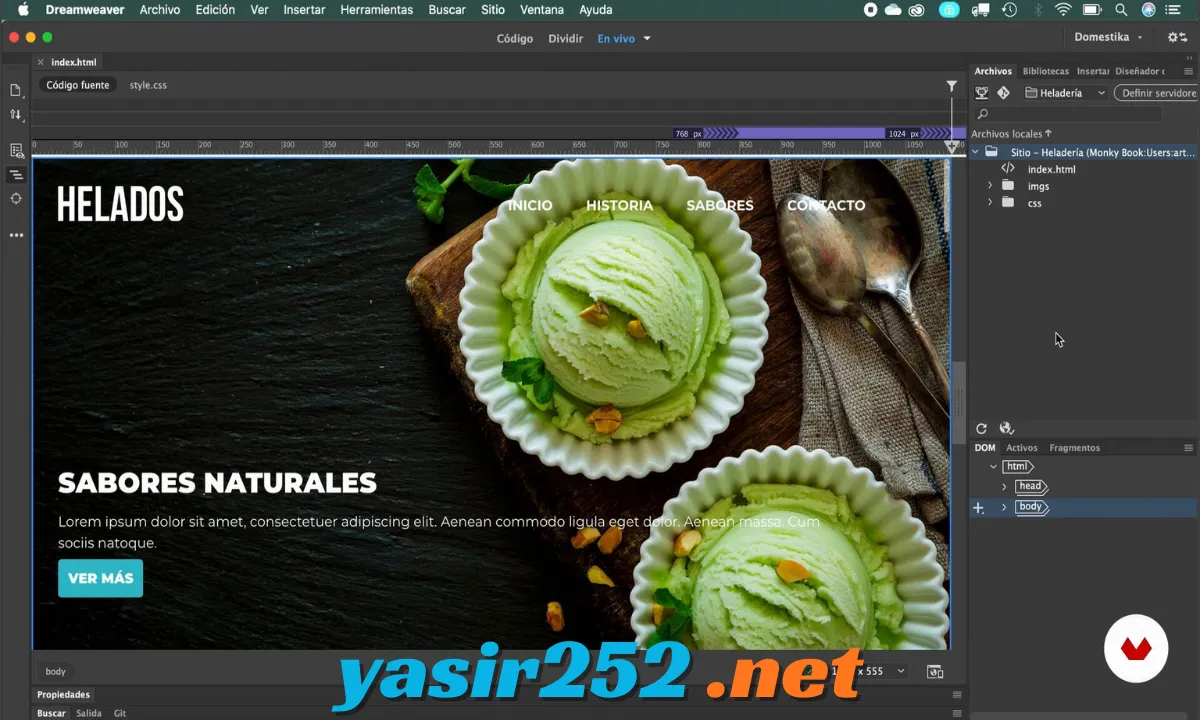
Adobe Dreamweaver is a professional web design and development application that helps users create, edit, and manage websites using HTML, CSS, JavaScript, and other web technologies. Developed by Adobe, it combines a code editor with a visual design workspace, making it useful for beginners learning web development as well as experienced developers building and maintaining websites.
With Adobe Dreamweaver, you can work directly with website code, preview page layouts, manage local and remote site files, and build responsive web pages for different screen sizes. Its code hints, starter templates, visual editing tools, and integration with Adobe Creative Cloud make it a practical choice for users who want a desktop environment for website development in 2027.
Adobe Dreamweaver 21.8.2 Download Links
| Nitroflare | Rapidgator |
|---|---|
| 🟡 DOWNLOAD | 🟣 DOWNLOAD |
Adobe Dreamweaver Software Information
| Software Details | Information |
|---|---|
| Software Name | Adobe Dreamweaver |
| Developer | Adobe Inc. |
| Genre | Web Design and Development |
| Latest Confirmed Version | 21.8.1 |
| Latest Confirmed Release | July 2026 |
| Operating System | Windows 10, Windows 11, macOS |
| Architecture | 64-bit |
| Programming Languages | HTML, CSS, JavaScript and more |
| License | Commercial subscription |
| Free Trial | 7 days |
| Official Website | https://www.adobe.com/products/dreamweaver.html |
What Is Adobe Dreamweaver?
Adobe Dreamweaver is a website creation and code editing application used by web designers, developers, students, and businesses. It provides a workspace where users can write website code, work with visual page layouts, and manage website projects without constantly switching between separate applications.
Unlike a basic text editor, Dreamweaver includes development-focused features such as code completion, syntax highlighting, visual aids, responsive design support, and website management tools. It is suitable for creating HTML pages, editing existing websites, building layouts, and working with different web technologies.
Key Features of Adobe Dreamweaver
1. Professional HTML Code Editor
HTML editing: Dreamweaver provides a dedicated coding environment for creating and editing HTML documents. Syntax highlighting and code assistance make it easier to understand page structure and identify different elements.
2. CSS Editing and Styling
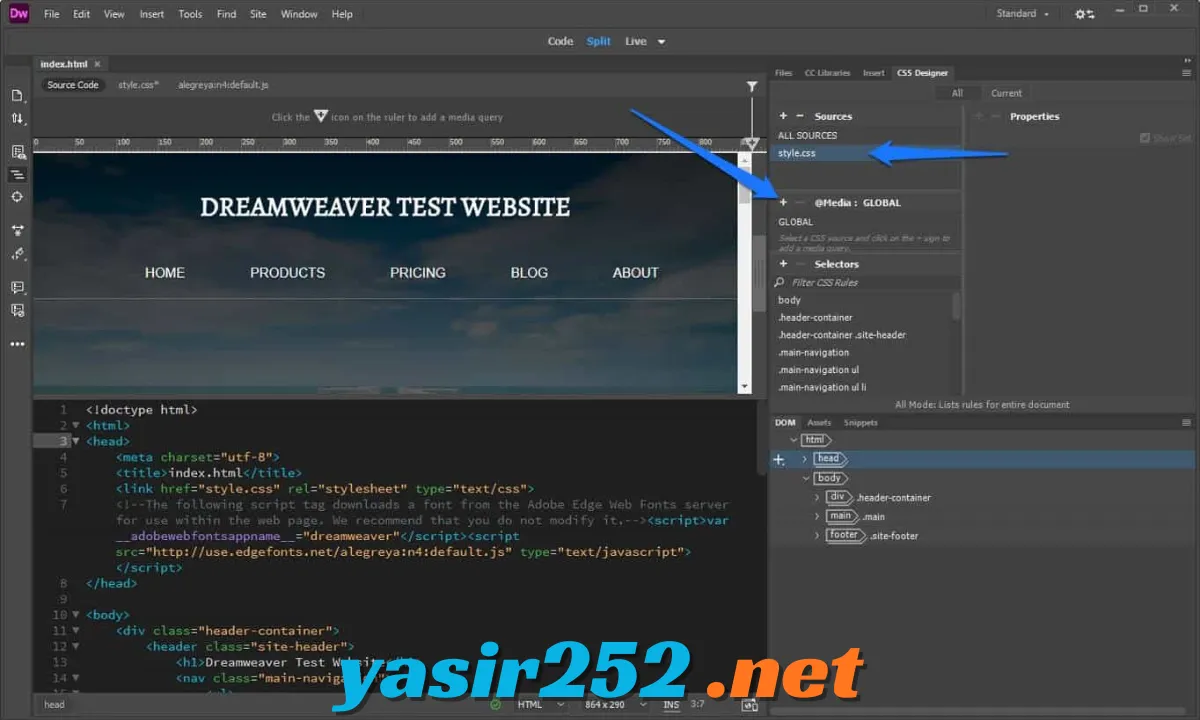
CSS development: You can create and edit stylesheets to control website layouts, typography, colors, spacing, and responsive behavior. Its code-focused tools help organize styling rules while working on website projects.
3. JavaScript Support
JavaScript development: Dreamweaver supports JavaScript editing, allowing developers to work with interactive website features and scripts. It provides code editing assistance for supported JavaScript workflows.
4. Code Completion and Hints
Smart code hints: The editor suggests code elements and provides useful hints while you type. This can reduce repetitive typing and help developers work with HTML, CSS, and other supported web technologies.
5. Live Preview
Visual preview: Dreamweaver allows you to preview website pages while working on their code. This makes it easier to check page structure, layout, and design changes during development.
6. Responsive Web Design
Responsive layouts: You can build and edit websites intended to work across desktop computers, tablets, and mobile devices. Responsive design tools help you inspect and adjust page layouts for different screen sizes.
7. Visual Design Workspace
Design and code workflow: Dreamweaver combines visual editing capabilities with a code editor. Users can work with page layouts and inspect the underlying HTML and CSS as their projects develop.
8. Starter Templates
Ready-made layouts: Dreamweaver includes starter templates that can help users begin projects such as blogs, portfolios, About pages, newsletters, and other website layouts. These templates can be customized to match individual design requirements.
9. Bootstrap Support
Responsive framework workflow: Dreamweaver provides tools for working with Bootstrap-based responsive website layouts. This helps developers create pages using an established front-end framework.
10. Website Management
Site management: The application includes tools for defining and managing website projects. You can organize local website files and work with the settings required to manage a site.
11. Remote Server Connections
File transfer: Dreamweaver supports workflows for connecting to remote website servers and managing site files. Supported connection methods and server configurations depend on your hosting environment.
12. Code Navigation
Faster development: Code navigation tools make it easier to move through larger documents and locate relevant sections. This is useful when maintaining existing websites or working with multiple files.
13. Creative Cloud Integration
Adobe ecosystem: Dreamweaver works within Adobe Creative Cloud, allowing users to access supported Creative Cloud services and assets. This can be useful when combining website development with other Adobe creative applications.
14. Multiple File Types
Web document support: Dreamweaver can work with common website files, including HTML, CSS, JavaScript, and other supported web-related documents. This makes it useful for editing different parts of a website project.
15. Website Testing and Publishing
Development workflow: You can inspect website pages, make code changes, preview the results, and manage publishing workflows from the application. This helps keep website development and maintenance tasks organized.
16. Customizable Workspace
Flexible interface: Dreamweaver provides workspace options that allow users to arrange panels and editing areas according to their workflow. Developers can focus on code editing, visual design, or a combination of both.
17. Code Validation and Error Assistance
Cleaner code: Its visual aids and code assistance can help identify issues while editing website documents. Developers can use these tools to improve the structure and readability of their code.
18. WordPress and Framework Code Editing
Framework-friendly editing: Dreamweaver can be used to edit website files associated with WordPress and other web frameworks. It is a code editor rather than a complete WordPress website hosting or management platform.
What’s New in Adobe Dreamweaver 2027?
The latest confirmed release information available for this article identifies Adobe Dreamweaver 21.8.1, released in July 2026. Adobe continues to provide maintenance, compatibility, library, and security-related updates for the application.
Notable updates in the recent 21.8 generation include:
-
Updated Libraries: Updated third-party components, including OpenSSL, Libcurl, jQuery, Lodash, RequireJS, Node.js, and Zlib.
-
Server Behaviors: Built-in server behaviors and database bindings for supported data-driven workflows.
-
Security Improvements: Updates to third-party components to address security vulnerabilities.
-
Bug Fixes: Maintenance improvements intended to improve application reliability.
-
Development Compatibility: Updated libraries and components to support the current development environment.
Version 21.8.1 is the latest confirmed release identified here. Check Adobe Creative Cloud for any newer update available before installing.
Adobe Dreamweaver Download for Windows 10 and Windows 11
If you want to download Adobe Dreamweaver for Windows, use Adobe’s official website or the Creative Cloud desktop application. Adobe distributes the current version through its Creative Cloud subscription service.
Official Adobe Dreamweaver page: https://www.adobe.com/products/dreamweaver.html
Official free trial page: https://www.adobe.com/products/dreamweaver/free-trial-download.html
How to Download Adobe Dreamweaver
-
Open the official Adobe Dreamweaver website.
-
Select the free trial or purchase option.
-
Sign in with your Adobe account or create a new account.
-
Choose the available Dreamweaver subscription plan.
-
Download and install Adobe Creative Cloud if required.
-
Find Dreamweaver in the Creative Cloud application.
-
Select Install and wait for the installation to finish.
How to Install Adobe Dreamweaver on Windows
-
Download Adobe Creative Cloud from the official Adobe website.
-
Run the Creative Cloud installer.
-
Sign in using your Adobe account.
-
Search for Dreamweaver in the available applications.
-
Select the Install option.
-
Wait while Creative Cloud downloads and installs the software.
-
Open Dreamweaver after installation.
-
Sign in to activate your trial or paid subscription.
How to Install Adobe Dreamweaver on macOS
-
Visit the official Adobe website.
-
Download the Creative Cloud desktop application.
-
Open the downloaded installer.
-
Complete the installation and sign in.
-
Find Adobe Dreamweaver in the application catalog.
-
Select Install.
-
Launch Dreamweaver after the installation finishes.
How to Use Adobe Dreamweaver
Dreamweaver offers a combination of code editing and visual design tools. Here is a basic workflow for creating a website.
Step 1: Create a New Website Project
Launch Dreamweaver and create a new site. Select the folder where you want to store your website files and configure the project settings.
Step 2: Create an HTML Document
Create a new HTML document from the File menu. You can start with a blank document or use one of the available starter templates.
Step 3: Write Your HTML Code
Add the basic structure of your webpage, including the document title, headings, paragraphs, images, and links.
Step 4: Add CSS Styling
Create a CSS file or add styles to your existing stylesheet. Use CSS to control the appearance of your website, including colors, fonts, spacing, and page layouts.
Step 5: Add JavaScript
If your website needs interactive elements, add JavaScript to the project. You can use it for menus, form interactions, buttons, and other supported website functionality.
Step 6: Preview Your Website
Use Dreamweaver’s preview workflow to inspect how the page looks in a browser. Check the layout and make adjustments where necessary.
Step 7: Test Responsive Layouts
Review the page at different screen sizes. Make sure the content remains readable and the layout works properly on desktop and mobile devices.
Step 8: Manage and Publish Your Website
Once your website is ready, use the available site management and remote connection settings to manage or publish your files to a compatible hosting server.
Adobe Dreamweaver System Requirements
Adobe Dreamweaver 21.8 and later has the following published minimum requirements.
| Requirement | Windows | macOS |
|---|---|---|
| Operating System | Windows 10 64-bit (version 1903 or later), Windows 11 64-bit | macOS 13 Ventura, 14 Sonoma, 15 Sequoia, or 26 Tahoe |
| Processor | Intel Core 2 or AMD Athlon 64, 2 GHz or faster | Apple Silicon or multicore Intel processor with 64-bit support |
| RAM | 2 GB minimum, 4 GB recommended | 2 GB minimum, 4 GB recommended |
| Storage | 2 GB available space, plus additional installation space | 3 GB available space, plus additional installation space |
| Display | 1280 × 1024 resolution, 16-bit video card | 1280 × 1024 resolution |
| Internet | Required for activation, subscription validation, and online services | Required for activation, subscription validation, and online services |
Requirements are based on Adobe’s published specifications for version 21.8 and later. Additional storage may be needed for installation and website projects.
Adobe Dreamweaver Pricing and License
Adobe Dreamweaver is commercial software distributed through Adobe Creative Cloud. It is not a permanently free application, although Adobe provides an official trial period.
The following is the advertised US pricing identified for the Dreamweaver Single App plan. Prices may differ by country, currency, taxes, and subscription terms.
| Plan | Advertised Price | Description |
|---|---|---|
| Dreamweaver Single App | US$22.99/month | Annual plan billed monthly |
| Creative Cloud Pro | US$69.99/month | Access to Dreamweaver and additional Creative Cloud applications |
| Free Trial | 7 days | Temporary access to the full application |
Is Adobe Dreamweaver Free?
Adobe Dreamweaver is available as a 7-day free trial, not as a permanently free full version. The trial includes the full application and its available features.
After the trial period, the subscription automatically converts to a paid membership unless you cancel before it ends. Review the checkout terms carefully and check your Adobe account if you do not want the subscription to continue.
Adobe Dreamweaver CS6 Free Download
Adobe Dreamweaver CS6 is an older, legacy release. It is different from the current Creative Cloud version and does not receive the same current feature and maintenance updates.
Adobe currently distributes Dreamweaver through Creative Cloud rather than offering CS6 as a standard free download. Be careful with websites advertising Dreamweaver CS6 full versions, repacks, or unauthorized activation files.
Adobe Dreamweaver CC
Adobe Dreamweaver CC refers to the Creative Cloud generation of Dreamweaver. It provides a modern web development environment with HTML, CSS, JavaScript, responsive design tools, code hints, and website management features.
Older CC releases, including Dreamweaver CC 2017, may differ significantly from the current 21.x version.
Adobe Dreamweaver License and Activation
A valid Adobe account and active subscription are required to use the full licensed application. Activation and subscription validation are handled through Adobe’s Creative Cloud services.
If you experience an activation problem:
-
Check your Adobe account and subscription status.
-
Confirm that you are signed in with the correct account.
-
Check your internet connection.
-
Update Adobe Creative Cloud.
-
Contact Adobe Support if the issue continues.
Avoid cracked installers, unauthorized serial numbers, torrents, and unofficial activation tools. They can introduce malware, compromise your Adobe account, or cause installation and activation problems.
Pros and Cons of Adobe Dreamweaver
Pros
-
Professional code editor: Provides a dedicated environment for HTML, CSS, and JavaScript development.
-
Visual design tools: Combines code editing with visual page design capabilities.
-
Responsive development: Helps create websites for desktop, tablet, and mobile screens.
-
Code hints: Provides suggestions that can speed up coding.
-
Starter templates: Offers ready-made layouts for different website projects.
-
Site management: Includes tools for organizing and managing website files.
-
Adobe integration: Works with the Creative Cloud ecosystem.
-
Learning resources: Adobe provides tutorials and documentation for beginners.
Cons
-
Paid subscription: Requires a Creative Cloud membership for continued use.
-
Learning curve: Beginners may need time to understand HTML, CSS, and website development.
-
Resource requirements: Larger projects can require more processing power and memory.
-
Alternative tools: Some developers prefer lightweight code editors or specialized development environments.
-
Trial limitation: The official free trial lasts only seven days.
Best Alternatives to Adobe Dreamweaver
If you want to explore other website development applications, consider these alternatives.
| Software | Main Features |
|---|---|
| Visual Studio Code | Free code editor with extensions, debugging, and web development support |
| Sublime Text | Lightweight code editor for programming and web development |
| WebStorm | Professional JavaScript and web development IDE |
| Pinegrow | Visual website editor with HTML, CSS, and responsive design tools |
| Brackets | Open-source code editor originally focused on web development |
Frequently Asked Questions (FAQs)
1. What is Adobe Dreamweaver?
Adobe Dreamweaver is a professional web design and development application used to create, edit, and manage websites using HTML, CSS, JavaScript, and other web technologies.
2. Is Adobe Dreamweaver free?
No, Dreamweaver is commercial software. Adobe offers a seven-day free trial, after which a paid subscription is required for continued use.
3. Where can I download Adobe Dreamweaver?
You can download the application through the official Adobe website or the Creative Cloud desktop application.
4. Does Adobe Dreamweaver work on Windows 11?
Yes, the current Dreamweaver 21.8 generation supports Windows 11 64-bit.
5. Can I install Adobe Dreamweaver on Windows 10?
Yes, Dreamweaver supports compatible 64-bit Windows 10 installations, starting with version 1903.
6. Is Adobe Dreamweaver available for Mac?
Yes, Adobe provides a macOS version compatible with supported Intel and Apple Silicon systems.
7. What is Adobe Dreamweaver CC?
Dreamweaver CC refers to the Creative Cloud generation of Adobe’s website design and development application. It provides code editing, visual design, and website management tools.
8. What is the latest version of Adobe Dreamweaver?
The latest confirmed release identified for this article is Dreamweaver 21.8.1, released in July 2026. Check Creative Cloud for newer updates.
9. Does Adobe Dreamweaver support HTML5?
Yes, Dreamweaver supports modern HTML development, including HTML5 documents.
10. Can I use Dreamweaver for CSS?
Yes, Dreamweaver provides CSS editing tools for controlling website layouts, colors, typography, spacing, and responsive designs.
11. Does Adobe Dreamweaver support JavaScript?
Yes, it supports JavaScript editing and code assistance for developing interactive website functionality.
12. Can beginners use Adobe Dreamweaver?
Yes, beginners can use its visual editing tools, starter templates, and code hints. However, learning basic HTML and CSS will make the application easier to use.
13. Is Adobe Dreamweaver CS6 still available?
CS6 is an older legacy version. Adobe distributes its current Dreamweaver application through Creative Cloud rather than offering CS6 as a standard free download.
14. Can I download Adobe Dreamweaver CS6 for free?
There is no standard official free CS6 download offer. Be cautious of unofficial websites offering modified or unauthorized installers.
15. Does Adobe Dreamweaver support responsive websites?
Yes, Dreamweaver includes responsive web design tools that help developers create layouts for different screen sizes and devices.
16. How much does Adobe Dreamweaver cost?
The advertised US Single App price is US$22.99 per month on an annual plan billed monthly. Pricing can vary by region and subscription terms.
17. Does Adobe Dreamweaver require internet access?
An internet connection is required for software activation, subscription validation, and certain online services. You should also expect to need internet access for updates and Creative Cloud functions.
18. Can I create a WordPress website with Dreamweaver?
Yes, you can use Dreamweaver to create and edit WordPress-related website files, including HTML, CSS, JavaScript, and PHP code. It is not a replacement for WordPress hosting or its administration dashboard.
19. Is Adobe Dreamweaver better than Visual Studio Code?
Both applications are useful for web development. Dreamweaver combines visual design and code editing tools, while Visual Studio Code offers a lightweight, extensible code-editing environment.
20. Is Adobe Dreamweaver worth using in 2027?
Dreamweaver is worth considering if you prefer a desktop application combining visual web design, code editing, responsive development, and website management. Developers who prefer lightweight tools may find Visual Studio Code more suitable.
Conclusion
Adobe Dreamweaver remains a capable website design and development application for users who want visual editing and coding tools in one desktop environment. Its HTML, CSS, JavaScript, responsive design, code hints, starter templates, and website management features make it useful for creating and maintaining websites.
If you are learning web development or managing professional website projects, Adobe Dreamweaver is worth exploring in 2027. Download the official trial, check your system compatibility, and choose a Creative Cloud subscription if you need continued access to the full application.