
Boris FX Continuum Plug-ins v20.0.2 for AVX Download [2027] – Complete VFX & Video Effects Suite
Boris FX Continuum is a professional collection of video effects, transitions, compositing tools, motion graphics, and image-processing plug-ins built for video editors and visual effects artists. It helps creators turn ordinary footage into polished productions using creative filters, cinematic looks, advanced tracking, restoration tools, and AI-powered effects. Rather than working with a single effect, Continuum brings a broad collection of tools into supported editing and compositing applications.
In 2027, Boris FX Continuum remains a valuable plug-in suite for editors working with Adobe Premiere Pro, After Effects, DaVinci Resolve, Avid Media Composer, VEGAS Pro, Final Cut Pro, and other supported hosts, depending on the specific plug-in and version. Its collection covers everything from color styling, film effects, lighting and transitions to masking, motion graphics, particle effects, and footage cleanup.
Boris FX Continuum 2027 AVX v20.0.2 Download Links
| Part | Nitroflare | Rapidgator |
|---|---|---|
| Part 1 | 🟡 DOWNLOAD | 🟣 DOWNLOAD |
| Part 2 | 🟡 DOWNLOAD | 🟣 DOWNLOAD |
Boris FX Continuum Plug-ins Software Information
| Field | Details |
|---|---|
| Software Name | Boris FX Continuum |
| Developer | Boris FX |
| Category | Video Effects, VFX & Editing Plug-ins |
| Latest Version | Check the official download page for the latest release |
| License | Commercial / Trial |
| Supported Platforms | Windows and macOS |
| Main Purpose | Video effects, transitions, compositing, motion graphics, and restoration |
| Supported Hosts | Adobe, DaVinci Resolve, Avid, VEGAS, Final Cut Pro, Nuke and other supported applications |
| Official Website | https://borisfx.com/products/continuum/ |
What Is Boris FX Continuum?
Boris FX Continuum is a comprehensive plug-in package that expands the creative capabilities of supported video editing and compositing software. It includes a large collection of visual effects, transitions, image restoration tools, motion graphics components, film looks, and compositing features.
The suite is designed for professional editors, filmmakers, motion designers, content creators, and video production teams who want advanced effects without building every visual element from scratch. Continuum provides customizable filters, presets, tracking tools, and workflow features that can be applied directly inside supported host applications.
Key Features of Boris FX Continuum Plug-ins
– 300+ Visual Effects: Explore a broad collection of creative filters and video effects for enhancing, transforming, stylizing, and correcting footage. The exact number and availability of effects may vary by version and package.
– AI-Powered Effects: Use supported AI-driven tools for selected image restoration, cleanup, enhancement, and creative processing tasks.
– Film Looks and Film Grain: Create cinematic appearances using film-inspired presets, grain, color treatments, and stylized visual effects designed to give footage a distinctive look.
– Transitions: Add professional transitions between scenes with a wide selection of effects that help connect clips and improve the visual flow of your video.
– Mocha Tracking: Use integrated Mocha tracking tools in supported Continuum effects for planar tracking, masking, motion analysis, and object-related compositing workflows.
– Particle Illusion: Create particle-based motion graphics such as sparks, smoke, energy effects, fireworks, and other animated visual elements using Particle Illusion.
– Title Studio: Build animated titles and motion graphics using 2D and 3D text, design controls, and customizable templates.
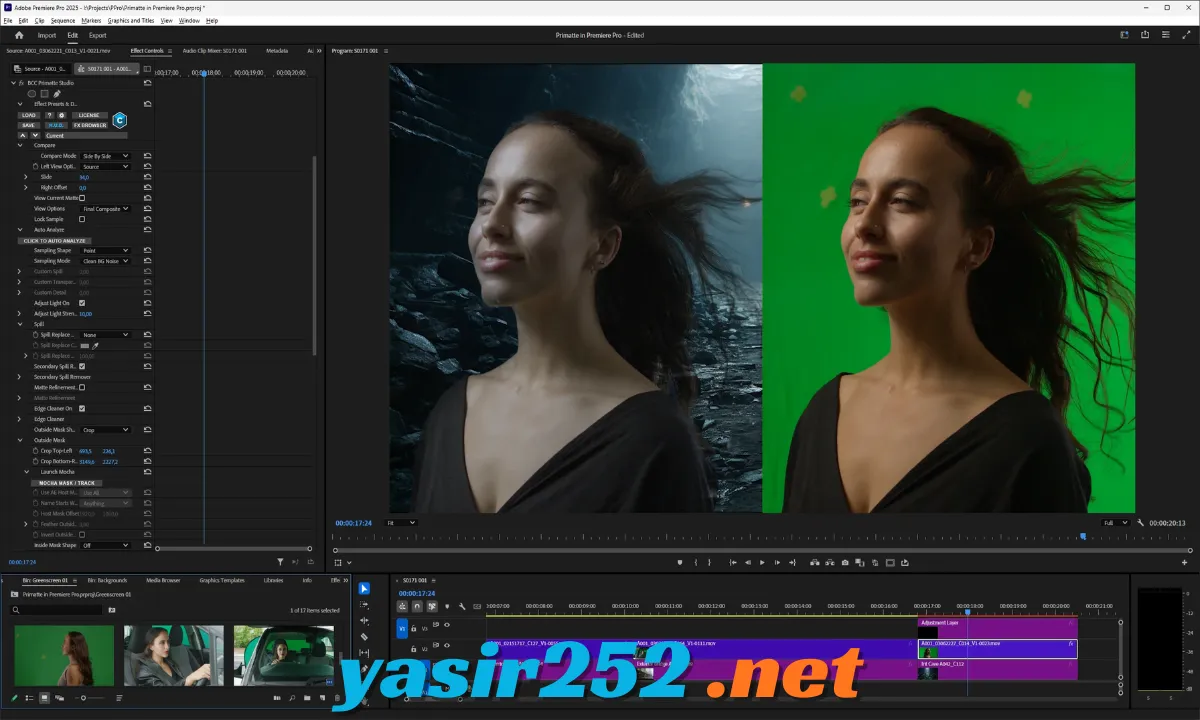
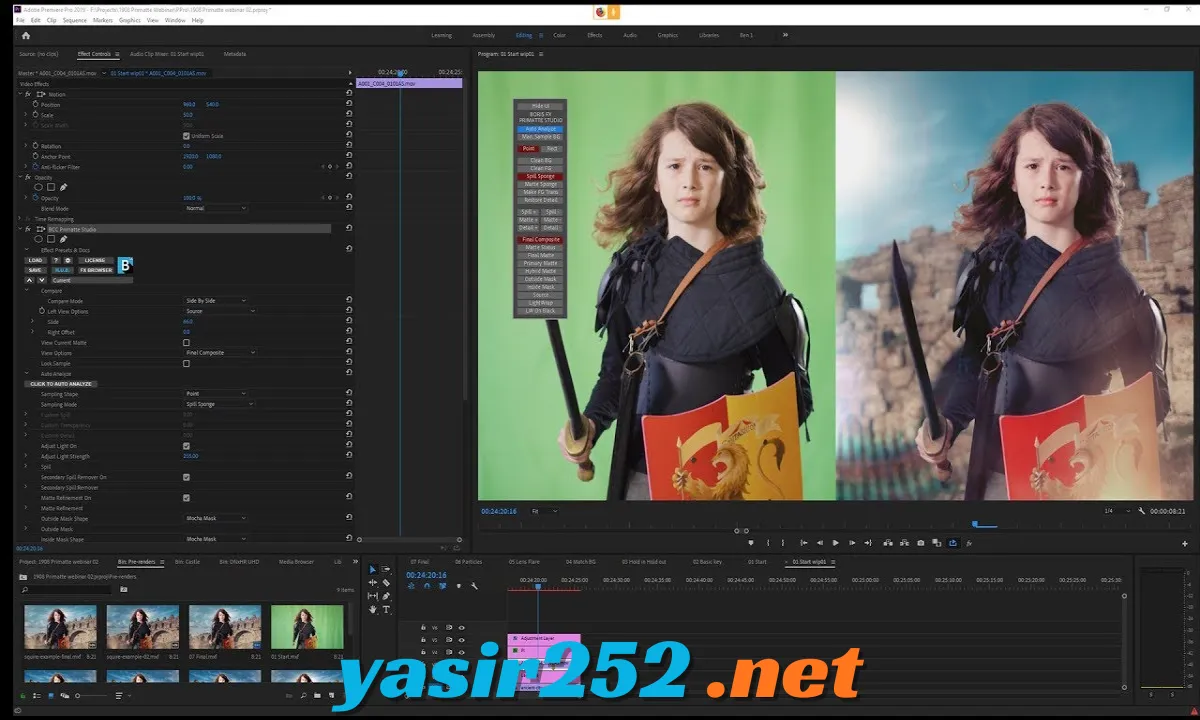
– Primatte Studio: Create and refine green-screen and chroma-key composites using specialized keying and edge-cleanup tools.
– Image Restoration: Improve footage using available restoration tools for selected problems such as blur, noise, banding, and other image-quality issues.
– Light and Diffusion Effects: Add glow, light leaks, diffusion, lens-inspired effects, and atmospheric visual treatments to your video.
– Distortion and Stylization: Transform footage with creative distortion, retro looks, blur effects, glow, damaged-film styles, and other visual treatments.
– Beat Reactor: Use audio-reactive effects that can animate visual parameters in response to music or audio signals.
– Presets and FX Editor: Browse presets, customize effects, and adjust parameters using Continuum’s effect controls and FX Editor workflow.
– Compositing Tools: Combine footage and visual elements using supported compositing, masking, keying, and tracking tools.
– Workflow Integration: Access Continuum effects inside compatible editing and compositing applications without needing to export footage into a separate standalone effects program for every task.
Boris FX Continuum Plug-ins for Adobe Premiere Pro and After Effects
Boris FX Continuum integrates with supported Adobe applications, including Premiere Pro and After Effects, making it useful for video editing, compositing, motion graphics, and visual enhancement.
Adobe Premiere Pro
Editors can apply Continuum filters directly to video clips, adjust effect parameters, use presets, create stylized footage, add transitions, and perform selected restoration or enhancement tasks within their editing timeline.
Adobe After Effects
After Effects users can work with Continuum effects for motion graphics, compositing, tracking, stylization, lighting, film looks, titles, and visual enhancement. Its integration with the host workflow helps reduce the need to switch between separate applications for common effects tasks.
Official product information: https://borisfx.com/products/continuum/
Boris FX Continuum for DaVinci Resolve
Continuum supports Blackmagic Design DaVinci Resolve through compatible OFX plug-ins, depending on the version and system configuration.
Resolve users can apply Continuum effects for color styling, transitions, film looks, image restoration, glow, blur, compositing, and other creative tasks. The plug-in workflow allows editors to use Continuum filters within supported Resolve editing and color grading environments.
Boris FX Continuum Plug-ins for Avid Media Composer
Boris FX Continuum is also available for supported Avid Media Composer versions. Avid editors can use Continuum effects and transitions within their editing workflow, helping them add creative treatments, restoration, stylization, and other visual enhancements.
Host compatibility depends on the Continuum release, Media Composer version, and operating system.
Boris FX Continuum Plug-ins for VEGAS Pro
Continuum supports compatible VEGAS Pro versions through the appropriate plug-in integration. VEGAS editors can use effects, transitions, film looks, motion graphics, and selected compositing tools directly within supported editing workflows.
Always check the current compatibility list before installing, particularly if you are using an older VEGAS Pro release.
What’s New in Boris FX Continuum?
Boris FX periodically updates Continuum with new effects, AI-powered tools, workflow improvements, compatibility updates, and performance enhancements.
The latest release information should be checked on the official Boris FX website because features, host support, and plug-in availability can vary between releases.
The Continuum product collection focuses on:
-
AI-assisted video and image processing.
-
Enhanced restoration and cleanup.
-
Creative film looks and stylization.
-
Motion graphics and particle effects.
-
Tracking and masking improvements.
-
Workflow enhancements and host compatibility.
How to Download Boris FX Continuum Plug-ins
To download Continuum safely, use the official Boris FX website rather than modified installers or unofficial software packages.
-
Visit the official Boris FX Continuum product page.
-
Locate the download or free trial section.
-
Select the compatible package for your operating system.
-
Review the supported host applications and version requirements.
-
Download the installer.
-
Run the installer and follow the setup instructions.
-
Select the appropriate plug-in components if the installer offers choices.
-
Open your supported editing application.
-
Check the effects or plug-ins panel for Continuum.
-
Activate a valid license or use the trial according to its terms.
Official download and trial: https://borisfx.com/products/continuum/
How to Install Boris FX Continuum on Windows
-
Download the official Continuum installer for Windows.
-
Close your video editing and compositing applications.
-
Run the installer.
-
Follow the setup wizard.
-
Choose the supported host applications where plug-ins should be installed, if prompted.
-
Complete the installation process.
-
Restart your computer if required.
-
Open your editing application.
-
Locate the Continuum effects in the effects or plug-ins panel.
-
Apply an effect to a compatible clip and test the controls.
How to Use Boris FX Continuum Plug-ins
Step 1 – Open Your Editing Application
Launch a supported host such as Premiere Pro, After Effects, DaVinci Resolve, Avid, or VEGAS Pro, depending on the plug-in version you installed.
Step 2 – Import Your Footage
Import your video clips and place them on the timeline. Choose the footage you want to enhance, stylize, restore, or transform.
Step 3 – Find Continuum Effects
Open your host application’s effects panel and locate the installed Continuum effects. Browse the available categories to find the effect you need.
Step 4 – Apply an Effect
Drag the selected effect onto your clip or apply it using your host’s supported method. Preview the effect to see how it changes your footage.
Step 5 – Adjust the Parameters
Customize the effect using its controls. You can adjust intensity, color, blur, glow, tracking, animation, or other parameters depending on the effect.
Step 6 – Use Presets
Browse available presets to quickly create different looks. You can customize a preset further to match the style of your project.
Step 7 – Preview and Render
Preview your footage and check the effect before rendering. Adjust settings to balance visual quality and performance.
Boris FX Continuum System Requirements
Continuum is a demanding professional effects suite, so hardware requirements matter when working with high-resolution footage, complex effects, tracking, and rendering.
The following are general requirements based on the current product information. Actual requirements vary by host application and Continuum release.
| Component | Windows | macOS |
|---|---|---|
| Operating System | Windows 10 or 11 with current updates | macOS Monterey 12.7 or newer; host-specific requirements may be higher |
| Processor | Intel or AMD CPU with AVX2 instructions | Intel or Apple Silicon, depending on support |
| RAM | 32 GB or more recommended by current product guidance | 32 GB or more recommended by current product guidance |
| GPU | Supported NVIDIA RTX 2000-series or higher with 6GB VRAM, or supported AMD Radeon RX 6000-series or higher with 6GB VRAM, according to current guidance | Supported modern AMD, NVIDIA, or Apple-compatible graphics hardware |
| Storage | SSD or high-speed storage recommended | SSD or high-speed storage recommended |
| Host Software | Compatible Premiere Pro, After Effects, Resolve, Avid, VEGAS, Nuke, or other supported host | Compatible Adobe, Resolve, Avid, Final Cut Pro, Motion, Nuke, or other supported host |
These are general product-level requirements, not a guarantee that every Continuum effect or host combination supports the same hardware. Check the official compatibility page before installation.
Is Boris FX Continuum Free?
Boris FX Continuum is commercial software. Boris FX offers a trial so users can test its effects, workflow, and host compatibility before purchasing.
The trial is not the same as a permanently free full version. Licensing, trial limitations, and activation requirements may vary by product release and subscription or purchase option.
Boris FX Continuum Full Version
The full licensed version of Boris FX Continuum provides access to the features included in the license you purchase. It is designed for editors, filmmakers, motion designers, and VFX professionals who need a broad collection of effects and production tools.
Before purchasing, check the license options, supported host applications, included components, and current pricing on the official Boris FX website.
Boris FX Continuum Crack and Free Download
Searches for Boris FX Continuum free download, cracked plug-ins, and unofficial full versions often lead to third-party installers or activation tools. These downloads may be modified, outdated, or unsafe.
The recommended option is to use the official Boris FX trial or purchase a valid license. Official installers also help ensure compatibility with your editing software and access to legitimate product updates.
Pros and Cons of Boris FX Continuum
Pros
-
Large collection of professional video effects.
-
AI-assisted tools for selected processing workflows.
-
Integrated Mocha tracking in supported effects.
-
Film looks, grain, lighting, and stylization.
-
Particle Illusion for particle-based motion graphics.
-
Title Studio for 2D and 3D motion graphics.
-
Primatte Studio for green-screen compositing.
-
Works inside multiple popular editing applications.
-
Presets and customizable effect controls.
-
Useful for video editors, filmmakers, and VFX artists.
Cons
-
Commercial software with a paid license.
-
Demanding effects may require powerful hardware.
-
Compatibility varies between host applications and plug-in versions.
-
Beginners may need time to learn advanced effects.
-
Complex effects can increase rendering time.
Best Alternatives to Boris FX Continuum
| Software | Best For | License |
|---|---|---|
| Red Giant Universe | Stylized effects, transitions, and motion graphics | Commercial |
| Video Copilot Effects | Creative VFX and motion graphics tools | Commercial / product-dependent |
| DaVinci Resolve Studio Effects | Editing, grading, compositing, and effects | Free and paid versions |
| Adobe After Effects | Motion graphics, compositing, and animation | Paid subscription |
| FilmConvert | Film emulation and cinematic color looks | Commercial |
Frequently Asked Questions
1. What is Boris FX Continuum?
Boris FX Continuum is a professional plug-in suite for video editing, compositing, visual effects, transitions, motion graphics, and image restoration.
2. Is Boris FX Continuum free?
Continuum is commercial software, but Boris FX offers a trial for users who want to test the product before purchasing.
3. Where can I download Boris FX Continuum?
You can download Continuum from the official Boris FX website at https://borisfx.com/products/continuum/.
4. Does Boris FX Continuum work with Adobe Premiere Pro?
Yes. Continuum supports compatible versions of Adobe Premiere Pro, allowing users to apply visual effects, transitions, restoration tools, and other filters directly in the editing workflow.
5. Does Boris FX Continuum work with After Effects?
Yes. Continuum is compatible with supported versions of Adobe After Effects and provides effects, tracking, compositing, motion graphics, and other creative tools.
6. Does Continuum support DaVinci Resolve?
Yes. Boris FX Continuum supports compatible versions of DaVinci Resolve through OFX integration.
7. Is Boris FX Continuum compatible with Avid Media Composer?
Yes. Continuum supports compatible Avid Media Composer versions, subject to the plug-in release and host compatibility requirements.
8. Does Continuum work with VEGAS Pro?
Yes. Boris FX Continuum supports compatible VEGAS Pro versions. Check the current compatibility list for your exact version.
9. What is Mocha tracking in Continuum?
Mocha tracking provides planar tracking and masking tools that help track objects, surfaces, and motion within footage for selected compositing and effects workflows.
10. What is Particle Illusion?
Particle Illusion is a particle-based motion graphics tool included within the Continuum ecosystem that helps create effects such as sparks, smoke, fireworks, and other animated particles.
11. What is Title Studio?
Title Studio is a motion graphics tool for creating and animating titles and graphics, including 2D and 3D text workflows.
12. Can Continuum remove green-screen backgrounds?
Yes. Continuum includes Primatte Studio, a chroma-key compositing tool designed to help remove green-screen and other keyable backgrounds.
13. Does Continuum include film effects?
Yes. Continuum includes film-inspired effects, grain, color styling, and presets for creating cinematic looks.
14. Does Continuum include AI tools?
Yes. The suite includes AI-driven tools for selected image restoration, enhancement, cleanup, and creative processing workflows. Exact AI capabilities depend on the release.
15. Can Continuum improve blurry video?
Continuum includes image restoration and enhancement tools that may help with selected image-quality problems. Results depend on the original footage and the specific tool used.
16. What are the system requirements for Continuum?
The requirements depend on the operating system, host application, and release. Current product guidance recommends 32GB or more of RAM and supported graphics hardware for demanding Windows and macOS workflows.
17. Is Boris FX Continuum suitable for beginners?
Yes, beginners can use presets and simpler effects to get started. However, advanced tracking, compositing, and motion graphics tools may require additional learning.
18. Does Continuum work on Windows 11?
Yes. Current product guidance supports Windows 10 and Windows 11, subject to the specific release and host application requirements.
19. Does Boris FX Continuum support macOS?
Yes. Continuum supports macOS on compatible hardware and host applications. Check the current requirements for the specific release.
20. Is Boris FX Continuum worth using?
Continuum can be worthwhile for editors who need a wide range of effects, restoration, compositing, tracking, motion graphics, and film looks in supported host applications. The value depends on your workflow, hardware, and licensing budget.
Final Words
Boris FX Continuum Plug-ins is a comprehensive VFX and video effects suite that offers tools for editing, compositing, motion graphics, image restoration, cinematic styling, and transitions. With features such as Mocha tracking, Particle Illusion, Title Studio, Primatte Studio, film looks, and AI-powered tools, it gives video creators a wide range of creative options within supported editing applications.
Whether you are editing YouTube videos, creating cinematic projects, designing motion graphics, or working on professional post-production, Continuum can help expand your workflow. Download the official trial to test the effects and compatibility with your host application before purchasing a license.