
Fast Video Cataloger 10.5.1.0 Download for Windows (Latest Version)
Fast Video Cataloger is a powerful video organization and cataloging application designed for users who work with large collections of video files. Developed by VideoStorm, this software helps you organize, browse, search, and manage thousands of videos from one convenient interface. Instead of opening every file individually, you can create visual catalogs with automatically generated thumbnails and quickly find the exact footage you need.
What makes Fast Video Cataloger really useful is its advanced search and AI-powered indexing system. You can find video scenes using keywords, spoken words, faces, objects, and visual descriptions. It also includes an integrated video player, customizable metadata, playlist creation, scripting support, and catalog sharing. Whether you’re a video editor, filmmaker, content creator, or media professional, Fast Video Cataloger makes managing large video libraries much easier.
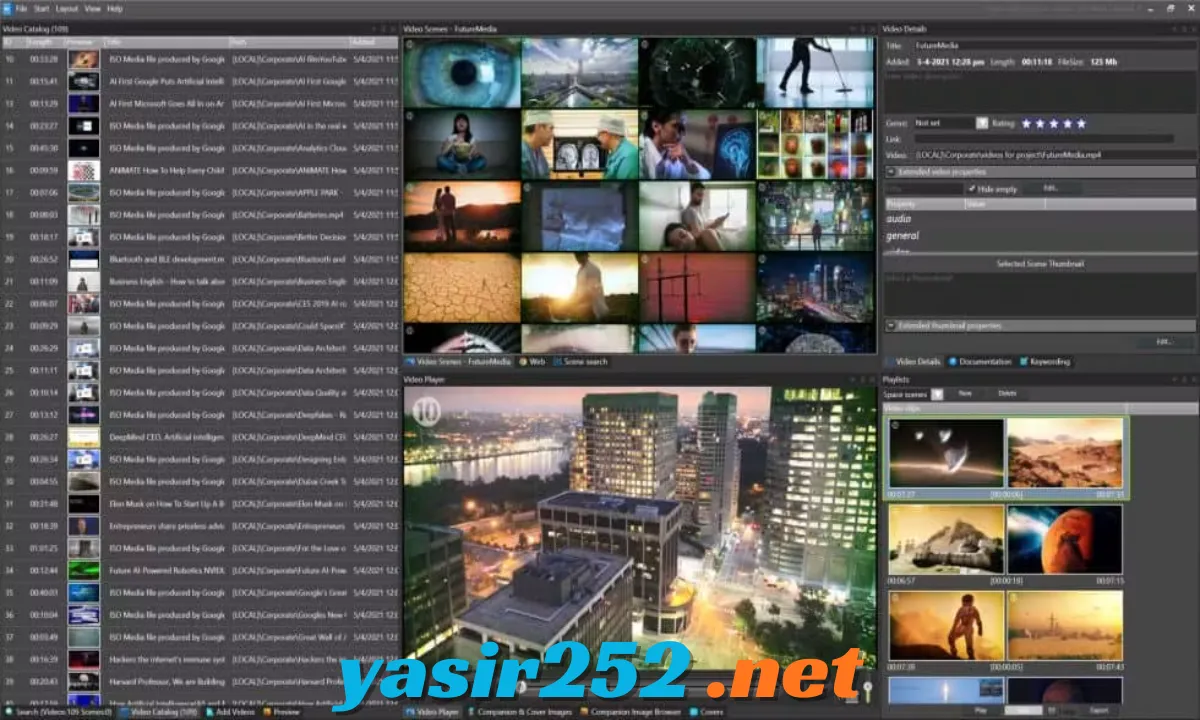
Fast Video Cataloger Information
| Field | Details |
|---|---|
| Title | Fast Video Cataloger |
| Genre | Video Cataloging & Media Management |
| Developer | VideoStorm |
| Publisher | VideoStorm |
| Franchise | Not Applicable |
| Release Date | 2011 (original development period) |
Overview
Fast Video Cataloger is a Windows-based video management solution that helps users build searchable databases of their video collections. It automatically generates thumbnails from imported videos, allowing you to browse footage through a visual timeline instead of manually searching through folders.
The application is particularly useful for professional video editors, production studios, filmmakers, and organizations managing large media archives. Its latest generation introduces built-in AI indexing, speech-to-text transcription, scene classification, object detection, and a web server for sharing video catalogs.
Latest version: 10.5.1 · October 29, 2026
Important Features of Fast Video Cataloger
1. Automatic Video Cataloging
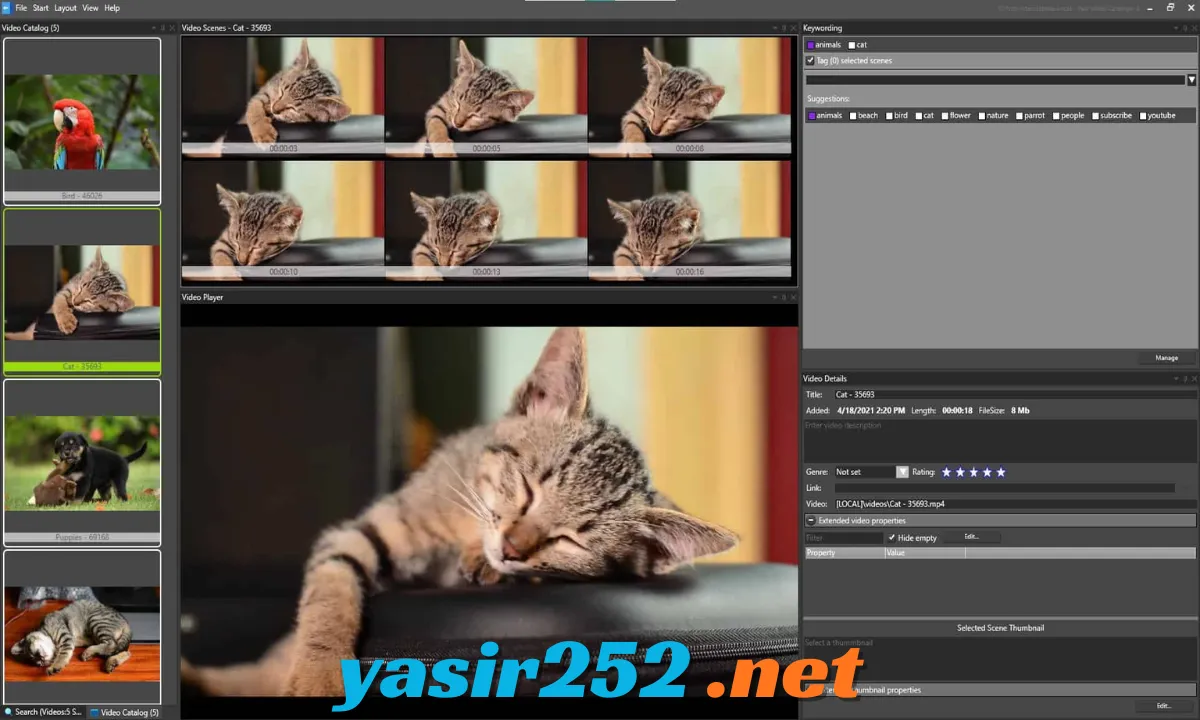
Automatically index video files and create searchable catalogs of your entire media collection. The application generates visual thumbnails so you can quickly browse footage without opening every video individually.
2. AI-Powered Video Indexing
Use artificial intelligence to analyze videos during the indexing process. Optional face detection, scene classification, and object detection help automatically identify useful information and generate searchable keywords.
3. Automatic Speech-to-Text Transcription
Convert spoken dialogue into searchable text using the built-in transcription functionality. You can search for specific words or sentences and jump directly to the corresponding moment in a video.
4. Visual Scene Search
Find footage by describing what appears in a scene. This feature helps locate specific shots based on visual content rather than relying entirely on manually created tags.
5. Automatic Thumbnail Generation
Generate multiple thumbnails from different sections of each video. These visual previews create an easy-to-browse timeline that helps you identify interesting scenes quickly.
6. Integrated Video Player
Play videos directly inside Fast Video Cataloger without opening another media player. You can also start playback from a selected thumbnail or a specific transcript sentence.
7. Advanced Video Search
Search your collection using keywords, metadata, video properties, transcripts, faces, and other available information. Combine different search conditions to find specific footage more accurately.
8. Custom Metadata Management
Add your own metadata fields to video records and customize the catalog according to your workflow. You can store descriptions, project information, categories, and other useful details.
9. Flexible Keyword Management
Organize videos and individual scenes using customizable keywords. Parent keywords and color-coded categories help keep large media collections structured.
10. Video Playlist Creation
Create virtual playlists using selected sections from multiple video clips. Combine different scenes into a continuous sequence without physically editing or modifying the original video files.
11. Built-in Web Server
Share video catalogs through the integrated HTTP server. Team members can browse and work with shared video libraries through supported web interfaces.
12. Multi-User Collaboration
Share catalogs with colleagues, editors, and clients through configurable user accounts. Access restrictions allow administrators to control what different users can view or manage.
13. Blackmagic RAW Support
Index and play supported Blackmagic RAW (BRAW) footage directly. The software can also read available camera metadata, helping professional editors organize cinema footage.
14. Duplicate Video Detection
Find duplicate videos in your collection and identify unnecessary copies. This helps maintain a cleaner media library and reduces storage waste.
15. Smart Thumbnail Cleanup
Remove consecutive thumbnails that look almost identical. You can also identify thumbnails without faces to create a cleaner visual overview of interview footage and other recordings.
16. C# Scripting Support
Customize workflows using the integrated C# scripting interface. Create automated actions, extend functionality, and connect the catalog with other applications.
17. Offline Catalog Browsing
Browse and search your catalog even when the original video files are stored on disconnected external drives. You can reconnect the storage device when you need to play the selected footage.
18. Multiple Video Format Support
Work with a wide range of video formats, including MP4, AVI, MOV, MKV, WMV, MPEG, WebM, FLV, MXF, MTS, and BRAW. Built-in decoders support many common formats without requiring separate codec packs.
19. Contact Sheet Export
Create printable and shareable contact sheets containing video thumbnails. These visual summaries are useful for reviewing footage, sharing project references, and planning editing work.
20. Customizable Workspace
Arrange the application interface according to your personal workflow. You can create different layouts, customize panels, and use multiple monitors for a more productive editing environment.
21. File Organizer
Manage video files and keep your catalog synchronized when files are moved or reorganized. Built-in repair tools help locate missing videos and update their stored paths.
22. Local AI Processing and Privacy
Fast Video Cataloger performs its video cataloging and built-in AI processing locally on your computer. Your video files are not uploaded to third-party AI services for these operations.
What’s New in Fast Video Cataloger 10?
Fast Video Cataloger 10 introduces several major improvements that make video cataloging and searching more powerful.
-
AI Auto-Tagging: Automatically identify faces, objects, and scenes while indexing videos.
-
Built-in Transcription: Generate searchable transcripts without installing an external transcription plugin.
-
Visual Search: Find scenes by describing what appears in the footage.
-
Web Server Improvements: Host video catalogs directly and share them through a browser.
-
Blackmagic RAW Support: Index and play BRAW video files without an additional conversion step.
-
Thumbnail Cleanup: Remove similar consecutive thumbnails and optionally filter out thumbnails without faces.
-
REST API Expansion: Connect external applications and automate catalog operations.
-
Improved Documentation: Access searchable HTML documentation directly for software guidance.
Supported Video Formats
Fast Video Cataloger supports many popular video formats, making it suitable for different media production workflows.
| Format | Extension |
|---|---|
| MPEG Video | MPG, MPEG |
| MP4 Video | MP4, M4V |
| AVI Video | AVI |
| QuickTime Video | MOV, QT |
| Matroska Video | MKV |
| Windows Media Video | WMV, ASF |
| Flash Video | FLV, F4V |
| Web Video | WebM |
| DVD Video | VOB |
| Blackmagic RAW | BRAW |
| Professional Video | MXF |
| AVCHD Video | MTS, M2TS |
| RealMedia Video | RM, RMVB |
| Transport Stream | TS, TP, TRP |
Is Fast Video Cataloger Free?
Fast Video Cataloger is commercial software, but the developer provides a fully functional 30-day free trial without requiring a credit card.
You can explore its video indexing, thumbnail generation, search, catalog management, and other features during the trial period. After the trial expires, you need a valid subscription or purchased license to continue using the software.
The developer offers different licensing options, including monthly subscriptions and perpetual licenses. Therefore, Fast Video Cataloger is not completely free software, but you can download and test the full-featured trial version without paying upfront.
System Requirements
| Component | Requirements |
|---|---|
| Operating System | Windows 10 or later |
| Architecture | 64-bit |
| Processor | Modern multi-core processor |
| RAM | Depends on catalog size and workload |
| Storage | SSD recommended |
| Free Disk Space | At least 10 GB recommended for a dedicated catalog setup |
| Graphics | Compatible GPU recommended for accelerated workloads |
| Internet | Required for downloading and updates |
| License | 30-day free trial / Paid license |
Note: The software requires 64-bit Windows. Performance requirements depend on the size of your video library and the AI features you use.
How to Download and Install Fast Video Cataloger
Follow these steps to install Fast Video Cataloger on your Windows computer.
-
Visit the official Fast Video Cataloger website.
-
Open the Download section.
-
Enter your email address to start the free trial.
-
Download the latest Windows installer.
-
Open the downloaded setup file.
-
Follow the installation instructions.
-
Launch Fast Video Cataloger after installation.
-
Start the trial from inside the program using the same email address.
-
Create a new video catalog.
-
Add your video folders and begin indexing your media collection.
Download the fully functional trial version and explore its video cataloging and AI-powered search features.
Download Fast Video Cataloger No credit card required. A valid license is required after the trial.
Final Words
Fast Video Cataloger is an excellent solution for anyone who needs to organize and search large video collections without wasting hours browsing individual files. Its automatic thumbnail generation, AI indexing, speech-to-text transcription, visual scene search, and integrated video player make it a valuable tool for professional video workflows.
The latest version also brings improved catalog sharing, Blackmagic RAW support, and built-in transcription capabilities. If you regularly work with video archives, stock footage, interviews, or production projects, Fast Video Cataloger is definitely worth trying.