
FontLab 9.0.9809 Download [2027] – Professional Font Editor and Typeface Design Software
FontLab is a professional font editor designed for creating, drawing, editing, spacing, kerning, and exporting digital typefaces. It gives type designers and graphic designers a specialized workspace for turning letter sketches and vector outlines into complete fonts that can be used in branding, publishing, websites, design projects, and digital products.
With FontLab, you can work on individual glyphs or entire typeface families, refine Bézier outlines, adjust spacing, manage kerning, and build font files using professional typography tools. Whether you’re designing a new font from scratch or modifying an existing typeface, FontLab provides a flexible environment for controlling nearly every aspect of font production.
FontLab 9.0.9809 Download Links
| Nitroflare | Rapidgator |
|---|---|
| 🟡 DOWNLOAD | 🟣 DOWNLOAD |
FontLab Software Information
| Field | Details |
|---|---|
| Title | FontLab |
| Latest Product | FontLab 8 |
| Developer | FontLab Ltd. |
| Publisher | FontLab Ltd. |
| Category | Font Editor / Typography Software |
| License | Commercial software |
| Operating System | Windows and macOS (supported versions vary) |
| Main Purpose | Font creation, glyph editing, spacing, kerning, and font production |
| Official Website | https://www.fontlab.com/ |
What Is FontLab?
FontLab is a typeface-design application used to create and edit digital fonts. It provides drawing tools, glyph management, typography controls, font metrics, OpenType features, and production tools that help designers develop a font from individual characters into a complete typeface.
The software is useful for independent type designers, studios, branding professionals, typography enthusiasts, and font developers. FontLab supports workflows involving vector outlines, spacing, kerning, font families, and export formats used by modern operating systems and design applications.
Key Features of FontLab
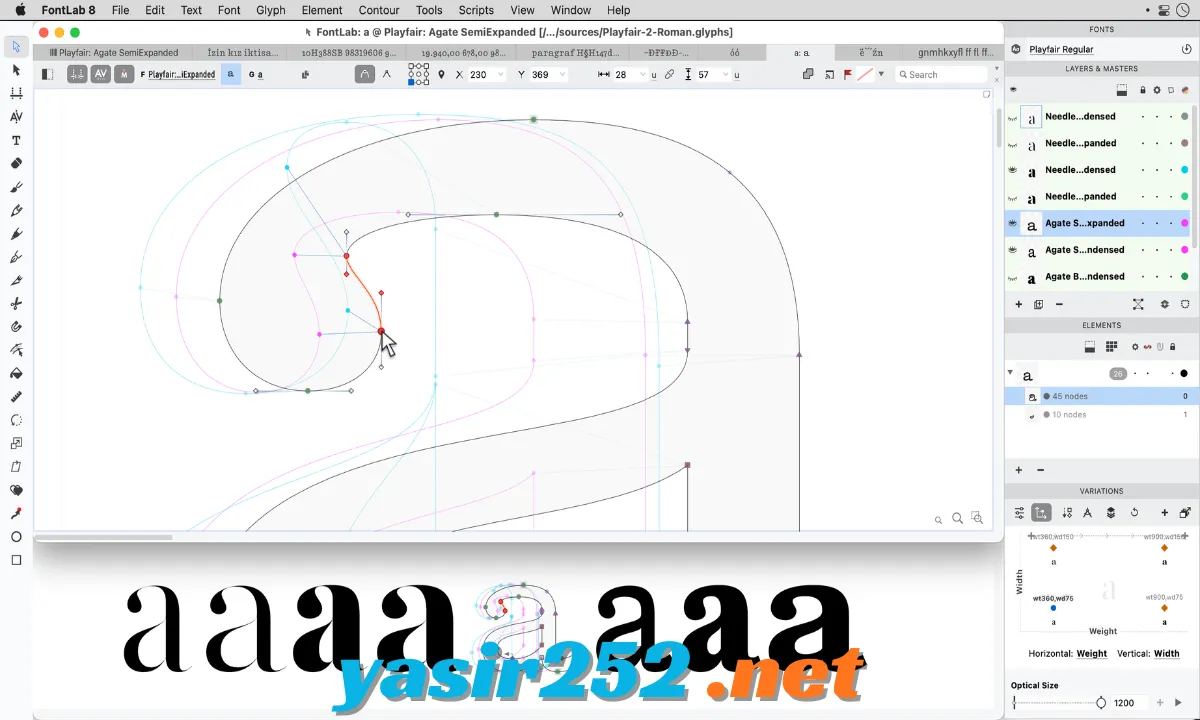
– Professional Glyph Editing: Draw and edit individual characters using Bézier curves, nodes, and outline-editing tools. Refine the shape of letters, numbers, symbols, and other glyphs with precise controls.
– Advanced Vector Drawing: Use drawing tools to create smooth curves, adjust anchor points, modify segments, and build accurate character outlines.
– Font Family Design: Work on multiple fonts and styles as part of a typeface family. Develop regular, bold, italic, and other styles within a structured font-design workflow.
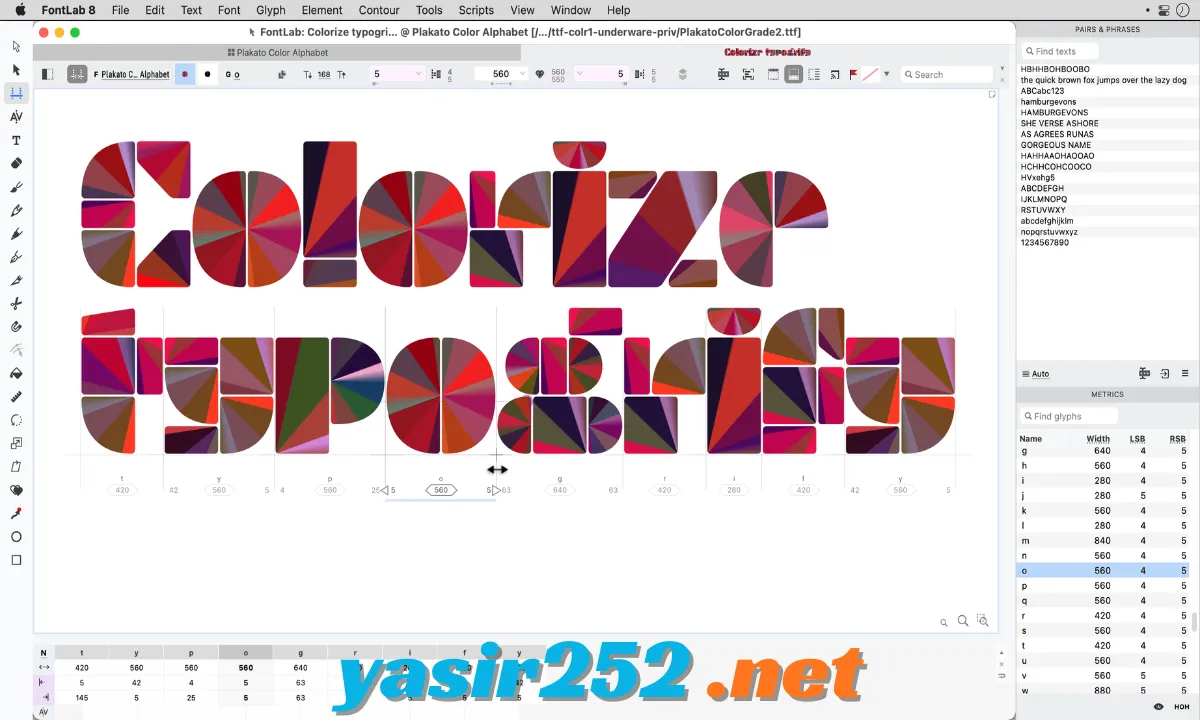
– Spacing and Metrics: Adjust advance widths, sidebearings, and other font metrics to create consistent spacing throughout your typeface.
– Kerning Tools: Define and refine kerning pairs to improve the visual spacing between characters such as AV, To, Wa, and other letter combinations.
– OpenType Features: Create and manage advanced typographic features for supported font formats and production workflows.
– Glyph Management: Organize glyphs, character sets, Unicode assignments, and font-related data within a professional font editor.
– Font Testing: Preview and test your font in different text combinations to evaluate spacing, letter shapes, readability, and overall appearance.
– Font Import and Export: Work with supported font formats and export fonts for use in desktop applications, web projects, and compatible design environments.
– Multiple Font Workflows: Manage related fonts and design variations using tools suited to professional typeface development.
– Outline Transformation: Modify, scale, rotate, and adjust outlines using available transformation tools while maintaining precise control.
– Font Production Tools: Prepare fonts for distribution by configuring supported font properties, naming, encoding, and production settings.
– Typography Workspace: Customize the workspace to focus on glyph drawing, metrics, editing, and font production.
– Professional Font Development: Use FontLab for creating commercial typefaces, custom brand typography, editorial fonts, and specialized lettering projects.
Feature availability, supported formats, and workflow details can differ between FontLab releases.
FontLab 8: What’s New and Why It Matters
FontLab 8 is the modern generation of FontLab’s professional type-design software. It focuses on a more integrated font-design workflow, combining drawing, glyph editing, spacing, kerning, and font production within a unified environment.
Some of the notable capabilities associated with the FontLab 8 workflow include:
-
Unified Editing Workspace: Draw, edit, space, and kern glyphs within a more integrated workflow.
-
Advanced Drawing Tools: Work with modern outline-editing tools for refining contours and character shapes.
-
Power Brush: Use specialized drawing tools for working with strokes and shapes where supported.
-
Rapid Drawing: Speed up outline creation and editing with drawing-oriented tools.
-
Live Fill Tools: Create or modify shapes through supported path-based drawing workflows.
-
Power Nudge: Move and adjust outline elements more efficiently using specialized editing controls.
-
Advanced Node Editing: Refine curves and outlines with enhanced node and contour editing capabilities.
-
Metrics and Kerning: Manage spacing and kerning alongside glyph editing.
-
OpenType Development: Work with advanced typography features as part of font production.
Check the official FontLab product page for the current release, edition details, and feature availability.
FontLab Interface
The FontLab interface is designed around glyph editing, font metrics, drawing, and typography production. Its workspace gives users access to font characters, outlines, spacing information, and editing tools.
The interface commonly revolves around the following areas:
-
Glyph Window: Draw and edit individual glyph outlines.
-
Font Window: Browse and manage characters across the font.
-
Metrics Window: Adjust spacing, advance widths, and kerning.
-
Drawing Tools: Create and modify outlines using vector-based tools.
-
Font Information: Manage font names, properties, and other production settings.
-
Preview and Testing: Inspect character shapes, spacing, and text appearance.
-
Workspace Controls: Organize editing panels and windows around your workflow.
The exact interface and available panels depend on the FontLab version and workspace configuration.
FontLab Download [2027]
FontLab is commercial software, and the full version requires a valid license. If you want to try the software, check the official website for any available trial or evaluation options.
Official FontLab website: https://www.fontlab.com/
How to Download and Install FontLab
-
Visit the official FontLab website.
-
Open the FontLab product page.
-
Select the available version for your operating system.
-
Check the current license or trial options.
-
Download the official installer.
-
Run the setup file and follow the installation instructions.
-
Launch FontLab after installation.
-
Activate the software with a valid license if required.
-
Start a new font project or open an existing font file.
Avoid unofficial cracked installers, keygens, and modified installation files. They can contain malicious software, compromise font projects, or cause installation and licensing problems.
How to Use FontLab 8
If you’re starting font design for the first time, FontLab can be used to create a basic typeface by drawing characters, adjusting spacing, and exporting a font.
Step 1: Create a New Font Project
Launch FontLab and create a new font project. Configure the font information and prepare the glyph set you want to design.
Step 2: Select a Glyph
Open the glyph you want to create, such as A, B, C, a number, or a symbol. Work inside the glyph-editing window.
Step 3: Draw the Character Outline
Use Bézier drawing tools and nodes to create the outline. Adjust the curves, anchor points, and contour shapes until the character looks correct.
Step 4: Adjust Glyph Metrics
Set the advance width and sidebearings to position the character correctly within its font space. Proper spacing is important for the consistency and readability of the typeface.
Step 5: Test Character Spacing
Use the metrics or testing workspace to preview characters in combinations and words. Identify spacing problems and refine the design.
Step 6: Add Kerning
Create kerning adjustments for letter pairs that require tighter or looser spacing. Test the font with common words and text combinations.
Step 7: Complete the Glyph Set
Continue designing the remaining characters, punctuation, numbers, and symbols needed for your font.
Step 8: Export the Font
Configure the font’s naming and production information and export it in a supported format, such as OpenType or TrueType, depending on the available options.
FontLab System Requirements
FontLab’s system requirements can vary by version and operating system. The following table provides general hardware guidance for font design rather than a verified minimum specification for a particular release.
| Component | General Guidance |
|---|---|
| Operating System | Supported Windows or macOS versions |
| Processor | Modern Intel, AMD, or supported Apple processor |
| RAM | 8 GB recommended for general font editing |
| Storage | Free space for installation, font projects, and backups |
| Display | A modern display with sufficient resolution for glyph editing |
| Graphics | Graphics hardware supported by the operating system |
| Internet | May be required for download, activation, license verification, and updates |
For exact requirements, consult the official FontLab website before installing.
Is FontLab Free?
No. FontLab is a commercial font-design application. The full version requires a valid license, although trial or evaluation options may be available depending on the current offer.
| Edition / Option | License | Details |
|---|---|---|
| FontLab 8 | Paid | Professional font editing and typeface production |
| Trial / Evaluation | Availability varies | Check the official website for current trial terms |
| Older FontLab Versions | License-dependent | Older versions may require an existing license |
| Cracked Version | Unofficial | Not recommended due to malware, security, and licensing risks |
FontLab Price
FontLab pricing depends on the product, license type, promotions, and region. Check the official pricing page for the current price and available license options before purchasing.
FontLab vs Glyphs
Glyphs and FontLab are both professional font editors, but they have different workflows and platform availability.
| Feature | FontLab | Glyphs |
|---|---|---|
| Main Purpose | Professional typeface design and font production | Professional typeface design and font production |
| Platform | Windows and macOS, depending on supported release | macOS |
| Glyph Editing | Advanced vector outline tools | Advanced vector outline tools |
| Spacing and Kerning | Professional metrics and kerning tools | Professional metrics and kerning tools |
| OpenType Features | Supported professional font workflows | Supported professional font workflows |
| Font Family Design | Supports multi-font design workflows | Supports multi-font and variation workflows |
| Best For | Designers seeking a cross-platform font-design environment | Designers working within the macOS font-design ecosystem |
Which is better?
FontLab is a strong option if you want a professional font editor available across supported Windows and macOS environments. Glyphs is a popular choice among Mac-based type designers because of its workflow and design environment. The best choice depends on your operating system, design preferences, and project requirements.
FontLab vs Fontographer
Fontographer is another font editor worth comparing with FontLab.
| Feature | FontLab | Fontographer |
|---|---|---|
| Design Focus | Modern professional font development | Classic font editing workflow |
| Glyph Editing | Advanced outline and glyph editing | Bézier-based glyph editing |
| Spacing and Kerning | Advanced professional tools | Metrics and kerning tools |
| OpenType Workflow | Modern font development workflow | Supported OpenType production features |
| Best For | Advanced typeface design and professional production | Traditional font editing and simpler workflows |
FontLab is generally better suited to designers who need a modern, more extensive type-design workflow, while Fontographer can appeal to users who prefer a classic and relatively straightforward font-editing environment.
Best FontLab Alternatives
If FontLab doesn’t match your workflow or budget, these font editors are worth exploring.
-
Glyphs: A professional font editor for macOS with tools for glyph design, spacing, kerning, and font production.
-
FontForge: A free and open-source font editor for creating, editing, and converting fonts.
-
Fontographer: A classic font editor with outline drawing, metrics, kerning, and font-generation tools.
-
Birdfont: A font-design application that provides glyph drawing and font creation tools.
-
RoboFont: A font editor aimed at type designers with customizable workflows and scripting capabilities.
Pros and Cons of FontLab
Pros
-
Professional font-design and editing tools.
-
Advanced Bézier outline drawing and editing.
-
Font spacing and kerning capabilities.
-
Supports professional font production workflows.
-
Suitable for designing complete typeface families.
-
Useful for commercial typography and branding projects.
-
Flexible workspace for glyph editing and production.
-
Suitable for experienced type designers and serious learners.
Cons
-
Commercial software requires a license.
-
The interface can be challenging for beginners.
-
Learning advanced font-production workflows takes time.
-
Professional features may be unnecessary for casual lettering projects.
-
Pricing may be expensive for hobbyists.
Frequently Asked Questions About FontLab
1. What is FontLab?
FontLab is a professional font editor used to design, edit, space, kern, and export digital typefaces. It provides tools for creating glyphs and developing complete font families.
2. Is FontLab free?
No. FontLab is commercial software. Trial or evaluation options may be available, but the full version requires a valid license.
3. What is the latest version of FontLab?
FontLab 8 is the modern product generation. Check the official website for the latest version, updates, and build information.
4. What is FontLab 8?
FontLab 8 is a professional font editor featuring glyph drawing, outline editing, spacing, kerning, font family management, and font production tools.
5. Where can I download FontLab?
You can download FontLab from its official website at https://www.fontlab.com/. Choose the installer compatible with your operating system.
6. Can FontLab create fonts?
Yes. FontLab is specifically designed for creating digital fonts from glyph outlines, spacing settings, font properties, and other typography data.
7. Is FontLab available for Windows?
Yes. FontLab offers versions for supported Windows systems. Check the official system requirements for compatibility with your Windows version.
8. Is FontLab available for Mac?
FontLab supports macOS versions, depending on the product release. Check the official download page for the current macOS installer and requirements.
9. What is FontLab Studio?
FontLab Studio is a name associated with older generations of FontLab’s font-editing software. Current product naming and editions have changed over time, so check the official website for current products.
10. What is FontLab 7?
FontLab 7 is a previous generation of FontLab font-editing software. FontLab 8 is the newer product generation.
11. Can FontLab edit existing fonts?
Yes. FontLab can open and edit supported font formats, allowing you to modify glyph outlines, metrics, kerning, and other font properties.
12. Does FontLab support OpenType fonts?
Yes. FontLab supports professional OpenType font workflows, including working with OpenType features and font-production settings.
13. Can FontLab export OTF and TTF files?
FontLab supports exporting font formats such as OpenType and TrueType, depending on the version and configuration.
14. Is FontLab better than Glyphs?
Both are professional font editors. FontLab offers Windows and macOS support for applicable versions, while Glyphs is primarily designed for macOS. The best choice depends on your workflow.
15. Is FontLab better than Fontographer?
FontLab generally offers a more modern and extensive professional type-design workflow. Fontographer is a classic font editor with a more traditional approach.
16. What is the best free alternative to FontLab?
FontForge is one of the best free alternatives. It offers font creation, glyph editing, spacing, and font export tools.
17. Can FontLab create variable fonts?
FontLab supports workflows for designing variable fonts, depending on the version and project configuration. Check the official documentation for supported variation features.
18. Can beginners use FontLab?
Yes. Beginners can learn FontLab by starting with simple glyphs, practicing outline drawing, and gradually learning metrics, kerning, and font production.
19. Does FontLab support kerning?
Yes. FontLab provides tools for creating and editing kerning pairs and managing font spacing.
20. Is FontLab worth buying?
FontLab can be worth purchasing for type designers, branding professionals, and designers who regularly create or modify fonts. Casual users may prefer a free alternative such as FontForge.
Conclusion
FontLab is a powerful professional font editor for designers who want to create their own typefaces, modify existing fonts, and develop complete typography projects. Its drawing tools, glyph editing, spacing, kerning, and font production capabilities make it a useful application for professional font development.
If you’re looking for FontLab Download in 2027, start with the official website to check the current version, pricing, and available trial options. For professional typography, custom branding, and font creation, FontLab remains an application worth exploring.