
IsMyMemoryOK Download 1.34 Multilingual – Free RAM Tester for Windows (2026)
IsMyMemoryOK is a lightweight RAM testing and benchmarking utility designed to help Windows users check the performance and stability of their computer’s memory. It provides a simple way to evaluate RAM read and write speeds, measure access times, and check for possible memory errors without needing complicated diagnostic software.
One of its biggest advantages is that it works as a portable application, so you don’t need to install it before running a test. It supports common memory generations, including DDR3, DDR4, DDR5, and DDR6, and offers different testing durations depending on how much time you have. Whether you’re troubleshooting computer problems or checking newly installed RAM, IsMyMemoryOK provides useful information through a straightforward interface.
IsMyMemoryOK Download Links
| Part / Link | Official / DDownload | Rapidgator | Nitroflare |
|---|---|---|---|
| IsMyMemoryOK | 🔵 DOWNLOAD | 🟣 DOWNLOAD | 🟡 DOWNLOAD |
IsMyMemoryOK Software Information
| Information | Details |
|---|---|
| Software Name | IsMyMemoryOK |
| Latest Version | 1.33 |
| Release Date | March 16, 2026 |
| Developer | Nenad Hrg |
| Publisher | SoftwareOK |
| License | Freeware |
| Category | System Utilities / RAM Testing |
| Operating System | Windows 7, 8.1, 10, 11 and supported Windows Server editions |
| Architecture | 32-bit and 64-bit |
| Supported RAM | DDR3, DDR4, DDR5, DDR6 and other detected memory |
| File Format | ZIP |
| Download Size | Approximately 199 KB |
| Installation | Portable – No installation required |
| Price | Free |
| Official Website | https://www.softwareok.com/ |
What Is IsMyMemoryOK?
IsMyMemoryOK is a free Windows utility developed by Nenad Hrg for testing and benchmarking computer RAM. It helps users evaluate memory performance through sequential and random read/write tests, access-time measurements, and optional memory error checking. These results can help identify unusual performance or potential memory-related problems.
The program is designed to be easy to use, even if you don’t have much experience with hardware diagnostics. You can choose between different test durations, view detected memory information, and save screenshots of completed results. Since it is portable, you can run it directly from an extracted folder or a USB drive.
Key Features of IsMyMemoryOK
– RAM Performance Testing: Evaluate your computer’s memory performance with built-in benchmark tests. The results help you understand how your installed RAM performs under different testing conditions.
– DDR3, DDR4, DDR5 and DDR6 Support: IsMyMemoryOK is designed to work with common RAM generations, including DDR3, DDR4, DDR5, and DDR6. Actual detection and testing depend on the installed hardware and system configuration.
– Sequential Read Testing: Measure how quickly your RAM handles continuous blocks of data. This provides useful information about memory read performance.
– Sequential Write Testing: Evaluate the speed of writing continuous data to memory. It helps you compare memory performance under sequential workloads.
– Random Read Testing: Check memory performance when accessing data from different locations. This provides another perspective on how your RAM handles less predictable workloads.
– Random Write Testing: Measure memory write performance with randomly accessed data blocks. It helps evaluate memory behavior beyond simple sequential operations.
– Access-Time Measurement: View memory access-time results in nanoseconds. This gives you an additional performance measurement alongside read and write speeds.
– Multiple Test Durations: Choose between Quick, Short, Long, and Very Long tests. These options allow you to select a testing period that suits your troubleshooting or benchmarking needs.
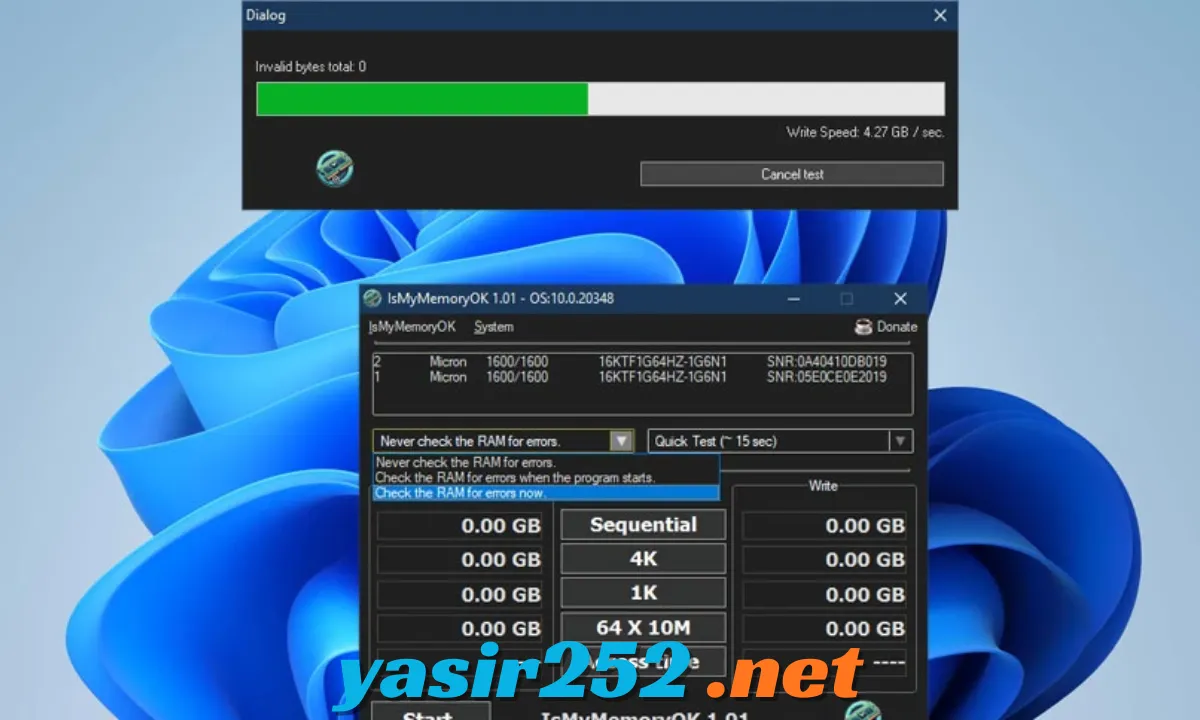
– Memory Error Checking: Run an optional memory check to look for invalid bytes and possible RAM errors. This can help identify potential memory problems, although it is not a replacement for comprehensive bootable memory diagnostics.
– Portable Application: Run the software without a traditional installation process. Simply extract the downloaded ZIP file and launch the executable.
– Screenshot Saving: Save screenshots of your benchmark results for later reference. This makes it easier to compare performance between different tests or computers.
– Multilingual Interface: Use the application in several languages. Its language detection and translation files have been improved through recent updates.
– Simple User Interface: Access memory information, testing options, and benchmark results through a compact interface. You don’t need advanced technical knowledge to start a basic test.
– Performance Comparison: Keep screenshots of your results and compare them with other systems or previous tests. Remember that RAM speeds vary according to the processor, motherboard, memory configuration, and BIOS settings.
– Lightweight Design: The application has a very small download size and does not require a large installation package. It is convenient for quick checks on different Windows computers.
Available RAM Tests
IsMyMemoryOK provides several test durations so users can choose between quick checks and longer benchmark sessions.
| Test Type | Approximate Duration | Purpose |
|---|---|---|
| Quick Test | 1 minute | Fast memory check |
| Short Test | 2 minutes | Short benchmark and evaluation |
| Long Test | 3 minutes | Longer memory testing |
| Very Long Test | 4 minutes | Extended benchmark session |
The actual time can vary depending on your computer’s hardware and system conditions. These benchmark durations should not be confused with lengthy diagnostic tests designed to detect intermittent memory faults.
Memory Performance Measurements
The program provides several measurements to help users understand their RAM performance.
| Measurement | Description |
|---|---|
| Sequential Read | Measures continuous memory read performance |
| Sequential Write | Measures continuous memory write performance |
| Random Read | Measures reading from different memory locations |
| Random Write | Measures writing to different memory locations |
| Access Time | Displays measured memory access time |
| Memory Errors | Checks for invalid memory bytes when error checking is enabled |
System Requirements
IsMyMemoryOK is designed for Windows computers and supports both older and modern Windows systems listed by the developer.
| Requirement | Details |
|---|---|
| Operating System | Windows 7 or later supported versions |
| Windows 11 | Supported |
| Windows 10 | Supported |
| Windows 8.1 | Supported |
| Windows 7 | Supported |
| Windows Server | Supported Server editions |
| Architecture | x86, x64 |
| RAM | Depends on the memory installed in your computer |
| Storage | Very small amount of free disk space |
| Internet Connection | Not required for local RAM testing |
| Installation | Not required |
Is IsMyMemoryOK Free to Download?
Yes. IsMyMemoryOK is freeware developed by Nenad Hrg and distributed through SoftwareOK. You can download and use the application without purchasing a subscription or paying for a standard licence.
The developer’s licence permits distribution of unmodified copies, but selling the software or reverse-engineering its executable components is not permitted under the stated licence terms.
For the safest download, use the original ZIP package from the official SoftwareOK website rather than modified third-party versions.
IsMyMemoryOK Portable Version
IsMyMemoryOK is available as a portable application, which means you don’t need to complete a conventional installation.
Its portable design is useful for:
-
Testing RAM on different Windows computers.
-
Running quick benchmarks from a USB drive.
-
Keeping a small hardware diagnostic utility available.
-
Avoiding unnecessary installation steps.
-
Removing the application by deleting its extracted folder when it is no longer needed.
How to Download IsMyMemoryOK
Follow these steps to download the official version:
-
Open your web browser.
-
Visit the official SoftwareOK IsMyMemoryOK page.
-
Find the download section.
-
Select the appropriate 32-bit or 64-bit package for your Windows system.
-
Download the ZIP archive.
-
Wait for the download to finish.
-
Extract the ZIP file to a folder on your computer.
-
Open the extracted folder and launch IsMyMemoryOK.
Official Download Page: https://www.softwareok.com/?seite=Freeware/IsMyMemoryOK
Version History: https://www.softwareok.com/?seite=Freeware/IsMyMemoryOK/History
How to Use IsMyMemoryOK to Test RAM
After extracting the application, you can begin checking your memory by following these steps.
-
Open the folder containing the extracted files.
-
Double-click the IsMyMemoryOK executable.
-
Review the detected memory information.
-
Choose the benchmark or memory test you want to perform.
-
Select a suitable test duration.
-
Click the Start button to begin.
-
Allow the test to complete without interrupting it.
-
Review the displayed read, write, access-time, and error information.
-
Save a screenshot if you want to keep a record of the results.
Important: Close unnecessary applications before testing and avoid interrupting an active memory test. If you suspect serious RAM instability, save your work first and consider using a dedicated bootable memory diagnostic tool for more extensive testing.
How to Check RAM Errors with IsMyMemoryOK
IsMyMemoryOK includes an optional memory error-checking function. You can configure it to check memory when the application starts or run the check manually.
-
Launch IsMyMemoryOK.
-
Open the available options.
-
Select the memory error-checking option.
-
Start the test.
-
Wait until the checking process finishes.
-
Review the result for reported memory errors.
If the application reports memory errors, repeat the test and consider checking your RAM modules individually. Persistent errors may indicate a problem with the memory module, motherboard, memory settings, or another hardware component.
Advantages and Disadvantages
| Advantages | Disadvantages |
|---|---|
| Completely free freeware | Available for Windows only |
| Very small download size | Basic interface |
| No installation required | Benchmark tests are relatively short |
| Supports multiple RAM generations | Results depend on system configuration |
| Sequential and random memory tests | Not a complete replacement for advanced RAM diagnostics |
| Optional memory error checking | Does not guarantee detection of every memory fault |
| Multiple test durations | No advanced hardware repair functions |
| Screenshot saving | Requires understanding of benchmark results for detailed comparisons |
Frequently Asked Questions
1. Is IsMyMemoryOK free to download?
Yes. IsMyMemoryOK is freeware, so you can download and use it without paying for a standard licence.
2. What is the latest version of IsMyMemoryOK?
Version 1.33 is the latest version listed by the developer, with an update date of March 16, 2026.
3. Does IsMyMemoryOK work on Windows 11?
Yes. The developer lists Windows 11 among the supported operating systems.
4. Can I use IsMyMemoryOK on Windows 10?
Yes. IsMyMemoryOK supports Windows 10 and can be used to benchmark and check compatible RAM configurations.
5. Does IsMyMemoryOK require installation?
No. It is a portable application. Extract the ZIP archive and run the executable directly.
6. Which RAM types does IsMyMemoryOK support?
The developer describes support for common memory generations, including DDR3, DDR4, DDR5, and DDR6. Actual detection depends on your hardware and system configuration.
7. Can IsMyMemoryOK detect faulty RAM?
It includes an optional memory error-checking feature that can help identify invalid bytes. However, no short test can guarantee detection of every possible memory fault.
8. How long does the RAM test take?
The available options have approximate durations of one, two, three, and four minutes. Actual testing time may vary depending on your system.
9. Can I check RAM speed with IsMyMemoryOK?
Yes. It provides sequential and random read/write benchmark measurements, along with access-time information.
10. Does IsMyMemoryOK support 64-bit Windows?
Yes. The developer provides versions for 32-bit and 64-bit Windows systems.
11. Can I run IsMyMemoryOK from a USB drive?
Yes. Because it is portable, you can extract the application to a USB drive and run it on compatible Windows computers.
12. Does IsMyMemoryOK work without an internet connection?
Yes. Once downloaded, the application can perform local memory tests without an internet connection.
13. Can I save RAM benchmark results?
Yes. The program includes screenshot functions that let you save test results for later comparison.
14. Is IsMyMemoryOK safe?
Download the original application from the official SoftwareOK website. Avoid modified installers and keep your Windows security software enabled.
15. Is IsMyMemoryOK better than Windows Memory Diagnostic?
They serve somewhat different purposes. IsMyMemoryOK offers quick performance benchmarks and optional error checking within Windows, while Windows Memory Diagnostic is a dedicated Windows memory-testing utility that runs outside the normal desktop environment.
Conclusion
IsMyMemoryOK is a useful free utility for Windows users who want a quick way to evaluate RAM performance and check for possible memory errors. Its sequential and random benchmarks, access-time measurements, multiple test durations, and screenshot features make it convenient for everyday hardware checks.
The portable design and tiny download size are additional advantages, especially for technicians and users who regularly troubleshoot different computers. If you need a simple RAM benchmarking tool without a complicated installation, IsMyMemoryOK is worth trying.