
Maxon ZBrush 2027.1 (x64) Multilingual Download [2027] – Professional 3D Digital Sculpting Software
Maxon ZBrush is a professional 3D digital sculpting and painting application used by artists, designers, game developers, and visual effects studios to create highly detailed 3D models. Unlike traditional polygon modeling workflows, ZBrush lets artists shape digital objects with sculpting brushes that feel more like working with clay, making it possible to build everything from realistic characters and creatures to props, environments, and intricate surface details.
Now part of the Maxon product family, ZBrush continues the software originally developed by Pixologic. It combines advanced sculpting tools, powerful detailing workflows, painting capabilities, and production-ready features for professional 3D content creation. Whether you’re creating characters for games, models for animation, collectibles for 3D printing, or detailed concept art, ZBrush offers a specialized creative workspace for bringing complex 3D ideas to life.
Maxon ZBrush 2027.1.0 Download Links
| Part | Rapidgator | Nitroflare |
|---|---|---|
| Part 1 | 🟣 DOWNLOAD | 🟡 DOWNLOAD |
| Part 2 | 🟣 DOWNLOAD | 🟡 DOWNLOAD |
Maxon ZBrush Software Information
| Field | Details |
|---|---|
| Software Name | Maxon ZBrush |
| Product Type | 3D Digital Sculpting and Painting Software |
| Developer | Maxon |
| Original Developer | Pixologic |
| Publisher | Maxon Computer GmbH |
| Category | 3D Modeling / Digital Sculpting |
| License | Commercial |
| Pricing Model | Subscription; options vary by platform and plan |
| Operating System | Windows and macOS |
| Latest Version | Check the official Maxon release page |
| Main Purpose | 3D sculpting, modeling, detailing, and painting |
| Official Website | https://www.maxon.net/en/zbrush |
What Is Maxon ZBrush?
Maxon ZBrush is an advanced digital sculpting program that allows artists to create and refine detailed 3D models using a wide range of brushes, sculpting tools, and surface-detailing techniques. It is widely used in character design, game development, animation, visual effects, product visualization, and 3D printing.
The software is especially known for handling extremely detailed models and high polygon counts. Artists can sculpt organic shapes, refine anatomy, create hard-surface objects, paint materials, and prepare models for use in other 3D applications. Its workflow combines traditional artistic techniques with specialized digital tools for professional production.
What’s New in Maxon ZBrush 2027?
As of November 2026, Maxon’s release information lists ZBrush 2027.1, released on November 23, 2026. The 2027 generation introduces several workflow improvements for professional sculptors, while version 2027.1 adds collaboration and touch-related functionality.
November 23, 2026 – Knowledge Base+1
Main Updates in ZBrush 2027
– New UV Editor: Create, unwrap, edit, and pack UV layouts directly inside ZBrush. The editor includes UDIM support, texel density tools, trim-sheet workflows, automatic unwrapping options, and flexible UV packing.
October 14, 2026 – Knowledge Base+1
– Selection Sets: Store and recall different versions of Polygroups, masks, Polypaint, UVs, and morph targets. This makes it easier to manage different modeling states without rebuilding selections manually.
October 14, 2026 – Knowledge Base
– Improved 3D Layers: The Bake Current option allows artists to bake only the selected 3D layer, giving them more control over sculpting workflows.
October 14, 2026 – Knowledge Base
– Spotlight Improvements: A Delete option clears Spotlight images from the canvas, making reference-image management more convenient.
October 14, 2026 – Knowledge Base
ZBrush 2027.1 Updates
– Maxon Review Integration: Share 3D models through web links so clients, directors, and collaborators can inspect models and leave comments or visual annotations. Feedback can be viewed inside ZBrush.
November 23, 2026 – Knowledge Base+1
– Multitouch Support: ZBrush adds multitouch support for newer Apple ProMotion displays. Touch interaction is also supported when an iPad is connected to a compatible Apple desktop or laptop through Sidecar.
November 23, 2026 – Knowledge Base
– Stability Improvements: The release includes fixes for certain second-display launch problems and macOS interface flickering.
November 23, 2026 – Knowledge Base
Main Features of Maxon ZBrush
1. Digital Sculpting Brushes
ZBrush includes a large collection of sculpting brushes for shaping, refining, and detailing 3D models. Artists can push, pull, smooth, carve, inflate, and reshape digital surfaces with different brush behaviors.
2. High-Resolution Sculpting
The software is built to handle highly detailed digital models with millions of polygons. This makes it suitable for character anatomy, facial details, creature designs, clothing textures, and complex surface work.
3. DynaMesh
DynaMesh allows artists to rebuild mesh topology dynamically while sculpting. It is especially useful during early design stages when the model’s shape changes frequently.
4. ZRemesher
ZRemesher automatically generates cleaner polygon topology from sculpted geometry. It helps artists prepare models for further refinement, animation workflows, and other 3D production tasks.
5. ZModeler
ZModeler provides polygon modeling tools for creating and editing hard-surface objects. Artists can use it for mechanical parts, armor, accessories, props, and other structured forms.
6. SubTool Management
SubTools allow artists to organize complex projects into separate model components. Characters can be divided into elements such as the body, clothing, hair, accessories, and equipment.
7. Polypaint
Polypaint lets users paint color directly onto a 3D model without requiring a traditional texture map workflow first. It is useful for concept development, color blocking, and detailed model painting.
8. UV Mapping
ZBrush provides UV tools for preparing models for texture creation and external rendering workflows. The 2027 UV Editor expands this workflow with dedicated editing, unwrapping, and packing tools.
9. Fibermesh
Fibermesh can generate fiber-like geometry for hair, fur, grass, and other fine surface details. Artists can adjust the generated fibers to create different visual styles.
10. Live Boolean
Live Boolean allows artists to combine, subtract, or intersect compatible mesh objects while previewing the resulting shape. It is useful for mechanical modeling and complex hard-surface designs.
11. IMM and VDM Brushes
Insert Multi Mesh and Vector Displacement Mesh brushes provide reusable shapes and sculpting elements that can be inserted into a model. They help speed up workflows involving repeated details and complex forms.
12. 3D Layers and Morph Targets
3D Layers allow artists to organize sculpting changes into separate layers, while Morph Targets help preserve and restore selected model states. These features provide more flexibility when refining a design.
13. Transpose and Gizmo 3D
Transformation tools let users move, rotate, scale, and deform selected objects or model sections. Gizmo 3D provides a visual control system for manipulating geometry.
14. Spotlight
Spotlight provides reference-image and projection-painting workflows. Artists can use visual references to guide modeling and apply image-based details to suitable models.
15. Rendering and Presentation
ZBrush includes its own rendering tools for creating model previews and presentation images. Artists can adjust materials, lighting, shadows, and other supported rendering settings.
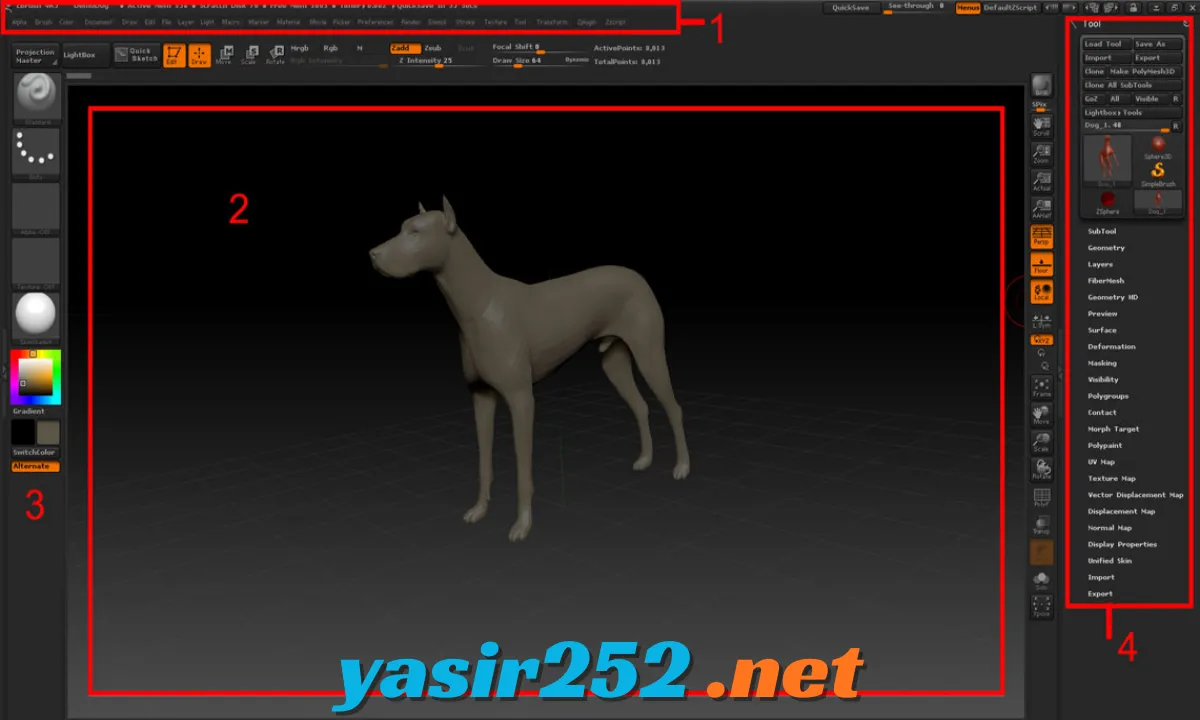
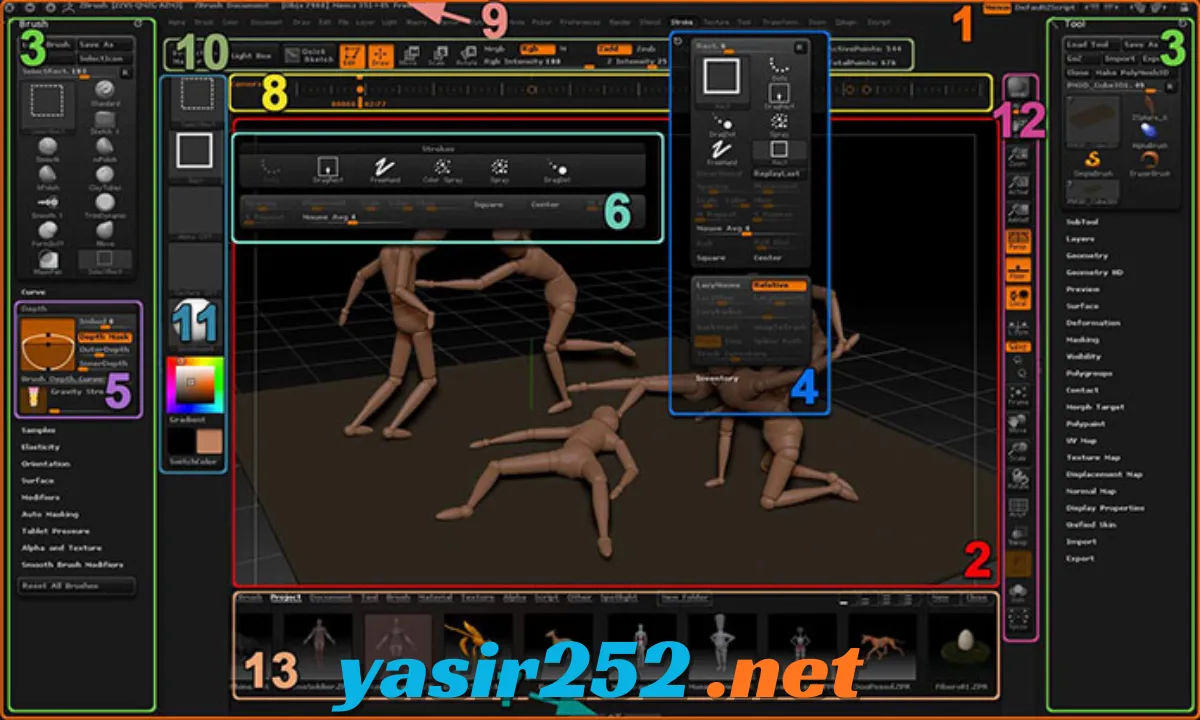
Maxon ZBrush Interface Overview
ZBrush has a specialized interface designed around sculpting, brush control, model organization, and detailed 3D editing. Its layout may look different from traditional polygon modeling applications, but the interface provides direct access to the tools used throughout a sculpting workflow.
-
Canvas: The main working area where artists view, rotate, sculpt, and edit their 3D models.
-
Brush Palette: Contains sculpting brushes and related controls for changing how the model’s surface responds.
-
Tool Palette: Provides access to model-related options, SubTools, geometry settings, and other object controls.
-
SubTool Panel: Organizes separate components within a complex 3D project.
-
Tool Properties: Displays settings for brushes, geometry, deformation, masking, and other functions.
-
Lightbox: Provides access to supported projects, brushes, materials, and other resources.
-
UV Tools: Offers UV creation, editing, unwrapping, and packing capabilities in the 2027 generation.
-
Document and Render Controls: Manage the working document and presentation settings.
How to Download Maxon ZBrush for PC
To download Maxon ZBrush for Windows or macOS, use the official Maxon website. The Maxon application and account system provide access to eligible software downloads and license management.
-
Visit the official Maxon ZBrush product page.
-
Review the available ZBrush subscription options.
-
Create a Maxon account or sign in to your existing account.
-
Choose an eligible subscription or trial option if available.
-
Download the Maxon App from the official website.
-
Open the Maxon App and sign in.
-
Locate ZBrush in your available products.
-
Select the compatible version and install it.
Official ZBrush website: https://www.maxon.net/en/zbrush
Official Maxon downloads: https://www.maxon.net/en/downloads
ZBrush release information: https://www.maxon.net/en/zbrush/new
How to Install Maxon ZBrush
After downloading the official installer, follow these steps:
-
Open the Maxon App installer.
-
Follow the installation instructions.
-
Launch the Maxon App.
-
Sign in using your Maxon account.
-
Find ZBrush in the product list.
-
Select the available version.
-
Click Install and wait for the installation to finish.
-
Launch ZBrush from the Maxon App or your desktop shortcut.
Keep the Maxon App available for product updates, account access, and license management.
How to Use Maxon ZBrush
Step 1: Start a New Project
Open ZBrush and select a suitable starting object or primitive. You can use a sphere or another base mesh to begin a new sculpting project.
Step 2: Choose a Sculpting Brush
Select a brush from the Brush palette. Different brushes provide different effects, including adding volume, smoothing surfaces, carving details, and reshaping geometry.
Step 3: Build the Basic Shape
Start with broad strokes to establish the overall form. Focus on proportions and silhouette before adding small details.
Step 4: Add Geometry and Detail
Use DynaMesh, subdivision levels, and other geometry tools to refine the model. Add surface details gradually as the design develops.
Step 5: Organize Your Model
Separate complex objects into SubTools. This helps keep individual components organized and makes it easier to edit different parts of a project.
Step 6: Refine Topology
Use ZRemesher or other suitable topology tools when you need a cleaner mesh for additional production work.
Step 7: Paint and Apply Materials
Use Polypaint and supported material options to add colors and surface appearance to your model.
Step 8: Prepare and Export
Check the model’s geometry, UVs, and export settings before sending it to another application or preparing it for 3D printing.
Maxon ZBrush System Requirements
The following specifications are based on Maxon’s published ZBrush system requirements. Requirements can change with future releases, so check the official documentation before installing.
help.maxon.net
| Requirement | Windows Minimum | Windows Recommended |
|---|---|---|
| Operating System | 64-bit Windows 10 or 11 | 64-bit Windows 10 or 11 |
| Processor | Core 2 Duo or AMD equivalent with SSE2 | Intel i5/i7/Xeon or AMD Ryzen/Threadripper or newer |
| RAM | 4 GB | 8 GB minimum for multi-million polygon models; 16 GB or more preferred |
| Storage | 8 GB free space | 100 GB free space; SSD highly recommended |
| Graphics API | OpenGL 3.3 and Vulkan 1.1 support | Compatible graphics hardware |
| Display | 1280 × 1024 | 1920 × 1080 or higher |
| Input | Mouse or compatible pen tablet | Wacom or compatible pen tablet |
macOS Requirements
| Requirement | Details |
|---|---|
| Operating System | macOS 10.14 or later, according to the published requirements |
| Processor | Intel Core 2 Duo or newer; Apple Silicon supported |
| RAM | 4 GB minimum; 8 GB or more recommended for multi-million polygon models |
| Storage | 8 GB minimum; 100 GB recommended |
| Graphics | OpenGL 3.3 support |
| Display | 1280 × 1024 minimum; 1920 × 1080 recommended |
| Input | Mouse or compatible pen tablet |
These are the published ZBrush requirements currently listed in Maxon’s documentation. Confirm compatibility with the specific release and your hardware before installation.
Is Maxon ZBrush Free?
Maxon ZBrush desktop is commercial software that requires an eligible license. It is not a permanently free desktop application.
Maxon offers subscription options for ZBrush and Maxon One. A 14-day Maxon One trial is listed in Maxon’s licensing information, but trial eligibility and available products should be checked before signing up.
Knowledge Base+1
ZBrush for iPad also has a separate free plan with limited functionality. This should not be confused with the full desktop version.
maxon.net
Maxon ZBrush Price and Subscription
Maxon offers ZBrush through subscription licensing. Users can subscribe to ZBrush individually or access it through a Maxon One subscription. Both subscription routes have monthly and annual options, subject to the current plan and region.
Knowledge Base
| License Option | Details |
|---|---|
| ZBrush Subscription | Access to the desktop sculpting application |
| Maxon One Subscription | ZBrush included with other eligible Maxon creative products |
| Monthly Plan | Subscription billed monthly, where offered |
| Annual Plan | Subscription billed annually |
| Student License | Discounted educational access for eligible students |
| Trial | Maxon One trial availability, subject to eligibility |
| Perpetual License | New perpetual ZBrush licenses discontinued in December 2023 |
How much does Maxon ZBrush cost?
The price depends on the subscription period, region, taxes, and selected plan. Maxon may update its prices, so check the official pricing page for the current amount before purchasing.
Official pricing: https://www.maxon.net/en/buy
Maxon ZBrush Student License
Students and eligible educational users may qualify for discounted Maxon One access, which includes ZBrush and other Maxon products.
The student license is intended for learning and personal educational use, not commercial production. Eligibility verification may be required, and the license is generally valid for one year before renewal or reapplication.
maxon.net+1
To check eligibility:
-
Visit the official Maxon educational licensing page.
-
Create or sign in to a Maxon account.
-
Review the student eligibility requirements.
-
Complete the required educational verification.
-
Choose the available student subscription.
-
Follow the checkout instructions.
Official educational licensing: https://www.maxon.net/en/educational-licenses
Pixologic ZBrush vs Maxon ZBrush
Pixologic was the original developer of ZBrush. Maxon acquired the ZBrush product line and continued its development under the Maxon brand. The software is still known by many artists as Pixologic ZBrush, but the current product is marketed as Maxon ZBrush.
| Comparison | Pixologic ZBrush | Maxon ZBrush |
|---|---|---|
| Developer | Pixologic | Maxon |
| Product Status | Original historical branding | Current product branding |
| Core Sculpting Workflow | Digital sculpting and painting | Digital sculpting and painting |
| Brush-Based Sculpting | Yes | Yes |
| SubTool Workflow | Yes | Yes |
| Current Development | No longer the active product brand | Actively maintained by Maxon |
| Licensing | Historical license arrangements | Current subscription licensing |
Which one should you use?
For new installations and current updates, choose the official Maxon ZBrush release. Older Pixologic-branded versions may still be relevant to users with legacy workflows or compatible licenses, but they do not represent the current product release.
Maxon ZBrush vs Other 3D Software
| Software | Best For |
|---|---|
| Maxon ZBrush | High-detail digital sculpting and character creation |
| Blender | General 3D modeling, sculpting, animation, and rendering |
| Autodesk Maya | Professional 3D animation, modeling, and production |
| Autodesk Mudbox | Digital sculpting and texture painting |
| 3DCoat | Sculpting, retopology, and texturing |
| Cinema 4D | Motion graphics, modeling, animation, and rendering |
ZBrush is particularly strong in high-detail sculpting, while Blender provides a broader all-in-one 3D creation environment. Maya is widely used in animation and production pipelines, and 3DCoat offers a combination of sculpting, retopology, and texturing tools.
Pros and Cons of Maxon ZBrush
Pros
-
Powerful digital sculpting and detailing tools.
-
Handles highly detailed, high-polygon models.
-
Large collection of sculpting brushes.
-
DynaMesh and ZRemesher workflows.
-
Advanced SubTool organization.
-
Polypaint and surface-detailing capabilities.
-
Dedicated UV Editor in the 2027 generation.
-
Useful for games, animation, collectibles, and visual effects.
-
Professional production workflows.
-
Regular product updates from Maxon.
Cons
-
Professional interface can take time to learn.
-
Subscription required for new desktop licenses.
-
High-detail projects benefit from substantial RAM and storage.
-
Workflow differs from conventional polygon modeling applications.
-
Some beginners may find the toolset overwhelming.
Who Should Use Maxon ZBrush?
-
3D Character Artists: Create detailed human characters, creatures, anatomy, clothing, and facial features.
-
Game Developers: Sculpt characters, props, weapons, and other assets for game production.
-
Film and VFX Artists: Develop detailed digital models for visual effects and animation projects.
-
3D Printing Designers: Create detailed models and prepare suitable geometry for 3D printing.
-
Concept Artists: Turn sketches and visual ideas into three-dimensional designs.
-
Collectible Designers: Build statues, miniatures, figurines, and other detailed physical models.
-
Professional Sculptors: Use advanced brushes and geometry tools for complex digital sculpting projects.
Frequently Asked Questions (FAQs)
1. What is Maxon ZBrush?
Maxon ZBrush is professional 3D digital sculpting and painting software used to create detailed characters, creatures, props, and other 3D models.
2. Is Maxon ZBrush free?
No. The desktop version requires a commercial subscription. ZBrush for iPad has a separate free plan with limited features.
3. What is the latest version of Maxon ZBrush?
The latest release listed in Maxon’s release information as of November 24, 2026, is ZBrush 2027.1.
4. Where can I download Maxon ZBrush?
Download it through the official Maxon website and Maxon App: https://www.maxon.net/en/zbrush.
5. Does Maxon ZBrush work on Windows 11?
Yes. Maxon’s published requirements list 64-bit Windows 10 and Windows 11.
6. Is Maxon ZBrush available for macOS?
Yes. ZBrush supports macOS, including Apple Silicon according to the published system requirements.
7. What is the price of Maxon ZBrush?
ZBrush is available through monthly and annual subscription options. The current price depends on the region and plan selected.
8. Does Maxon ZBrush have a student license?
Yes. Eligible students can access ZBrush through Maxon One educational licensing, subject to verification and non-commercial-use conditions.
9. Is Pixologic ZBrush the same as Maxon ZBrush?
Yes. Maxon acquired the ZBrush product line from Pixologic and now develops and distributes the software under the Maxon name.
10. What is ZBrush used for?
It is used for digital sculpting, character modeling, creature design, surface detailing, 3D painting, and preparing models for professional production workflows.
11. What is DynaMesh in ZBrush?
DynaMesh is a dynamic remeshing feature that allows artists to rebuild mesh geometry while sculpting.
12. What is ZRemesher?
ZRemesher is an automatic retopology tool that helps create cleaner polygon structures from existing 3D models.
13. Does ZBrush support 3D printing?
Yes. Artists can create and prepare suitable 3D models for printing, although geometry, thickness, scale, and mesh integrity should be checked before exporting.
14. Can I use ZBrush for game development?
Yes. It is widely used to create detailed characters, creatures, props, and other assets for game production pipelines.
15. Does ZBrush support Apple Silicon?
Yes. Apple’s Silicon processors are supported according to Maxon’s published ZBrush system requirements.
16. Can ZBrush handle millions of polygons?
Yes. High-resolution sculpting is one of its main strengths. The practical limit depends on your system resources and project complexity.
17. Is Maxon ZBrush subscription-based?
Yes. New desktop ZBrush licenses are subscription-based. Maxon discontinued new perpetual ZBrush licenses in December 2023.
18. What is new in ZBrush 2027?
ZBrush 2027 introduces a dedicated UV Editor, Selection Sets, and additional workflow improvements. Version 2027.1 adds Maxon Review integration and multitouch support.
October 14, 2026 – Knowledge Base+1
19. Is ZBrush better than Blender?
ZBrush is specialized for advanced digital sculpting, while Blender offers a broader collection of 3D modeling, animation, rendering, and sculpting tools. The better option depends on your workflow.
20. Can I use an old Pixologic ZBrush license?
Legacy license availability and activation depend on the original license terms and Maxon’s current support policies. Contact Maxon if you need help with an older license.
Conclusion
Maxon ZBrush remains one of the leading tools for professional digital sculpting, detailed 3D modeling, and character creation. Its advanced brush system, DynaMesh, ZRemesher, SubTools, Polypaint, and high-resolution sculpting capabilities make it a strong choice for artists working in games, animation, visual effects, and 3D printing.
The 2027 release adds a dedicated UV Editor and Selection Sets, while version 2027.1 introduces Maxon Review collaboration and multitouch improvements. If you want a specialized application for creating detailed digital models, Maxon ZBrush is worth considering. Download the official version through Maxon and select a subscription or educational plan that matches your needs.