
n-Track Studio Suite 11.0.0.11570 (x64) Multilingual Download [2027] – Music Recording and Audio Production Software
n-Track Studio Suite 9 is a digital audio workstation (DAW) designed for recording, editing, mixing, and producing music on a computer. It provides tools for multitrack audio recording, MIDI composition, sound processing, virtual instruments, mixing, and mastering, making it a useful audio production environment for musicians, producers, songwriters, and recording enthusiasts.
With n-Track Studio, you can record vocals, guitars, keyboards, and other instruments, arrange MIDI tracks, add effects, mix audio, and create finished music projects. Its flexible recording workflow and built-in audio processing tools make it suitable for home studios, music production, podcast recording, songwriting, and audio editing projects.
n-Track Studio Suite 11.0.0 (64-bit) Download Links
| Nitroflare | Rapidgator |
|---|---|
| 🟡 DOWNLOAD | 🟣 DOWNLOAD |
n-Track Studio Suite 9 Software Information
| Field | Details |
|---|---|
| Software Name | n-Track Studio |
| Version | Suite 9 / 9.1.0 keyword variant |
| Category | Digital Audio Workstation (DAW) / Music Production |
| Developer | n-Track Software |
| Operating System | Windows, macOS and other supported platforms |
| License | Free version and paid editions, depending on features |
| Main Purpose | Recording, editing, mixing, MIDI and music production |
| Audio Support | Multitrack recording and audio processing |
| Official Website | https://www.ntrack.com/ |
| Official Download | https://www.ntrack.com/download/ |
What Is n-Track Studio Suite 9?
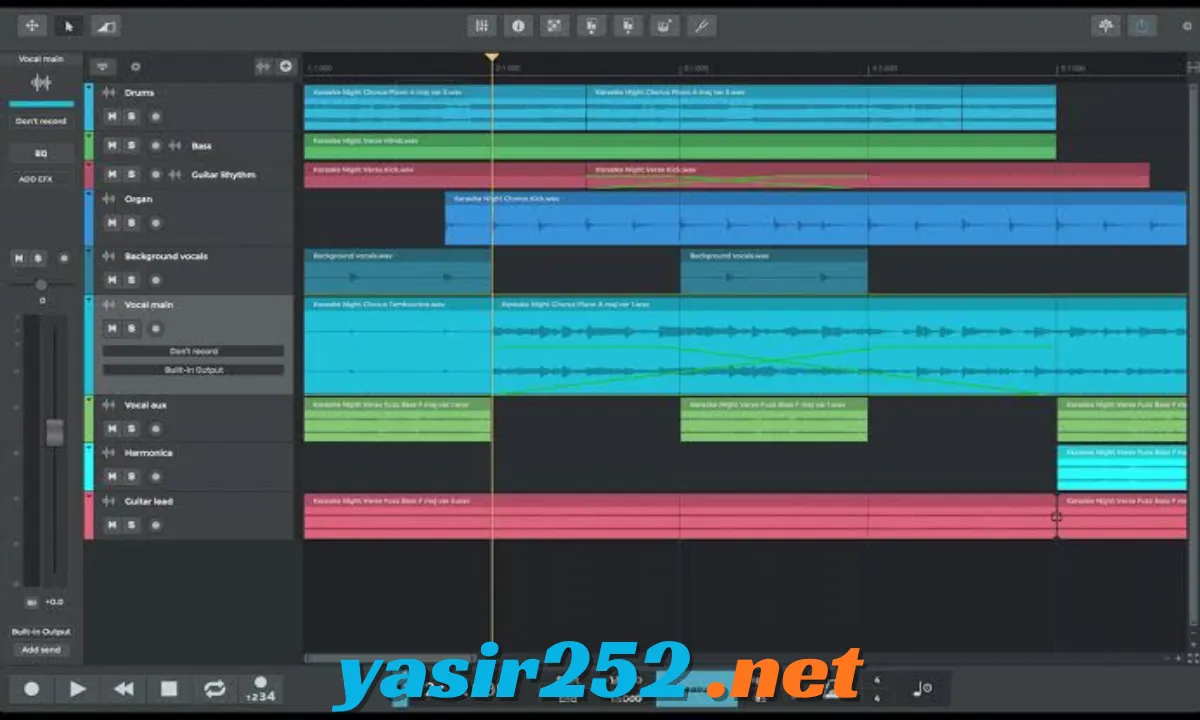
n-Track Studio is a digital audio workstation that allows users to record, edit, mix, and produce music using audio and MIDI tracks. It provides a multitrack workspace where you can record instruments, capture vocals, arrange musical ideas, add audio effects, and create a complete production.
The software combines recording, editing, mixing, MIDI sequencing, virtual instruments, effects, and audio export tools within one application. It can be used by musicians creating songs at home, producers working on studio projects, guitarists recording demos, and users producing podcasts or other audio content.
Key Features of n-Track Studio Suite 9
n-Track Studio includes a collection of audio recording and music production tools designed to support different stages of a music project.
– Multitrack Audio Recording: Record multiple audio tracks using microphones, instruments, audio interfaces, and other compatible recording equipment. Organize different recording takes within a project for easier editing and mixing.
– Audio Editing: Edit recorded audio using the available cutting, trimming, splitting, positioning, and arrangement tools. Organize recordings to build a complete musical composition.
– MIDI Recording and Editing: Record and edit MIDI performances using compatible keyboards and MIDI controllers. Arrange notes and musical patterns to create instrumental parts.
– Virtual Instruments: Use compatible built-in or supported virtual instruments to create musical parts without recording every instrument directly.
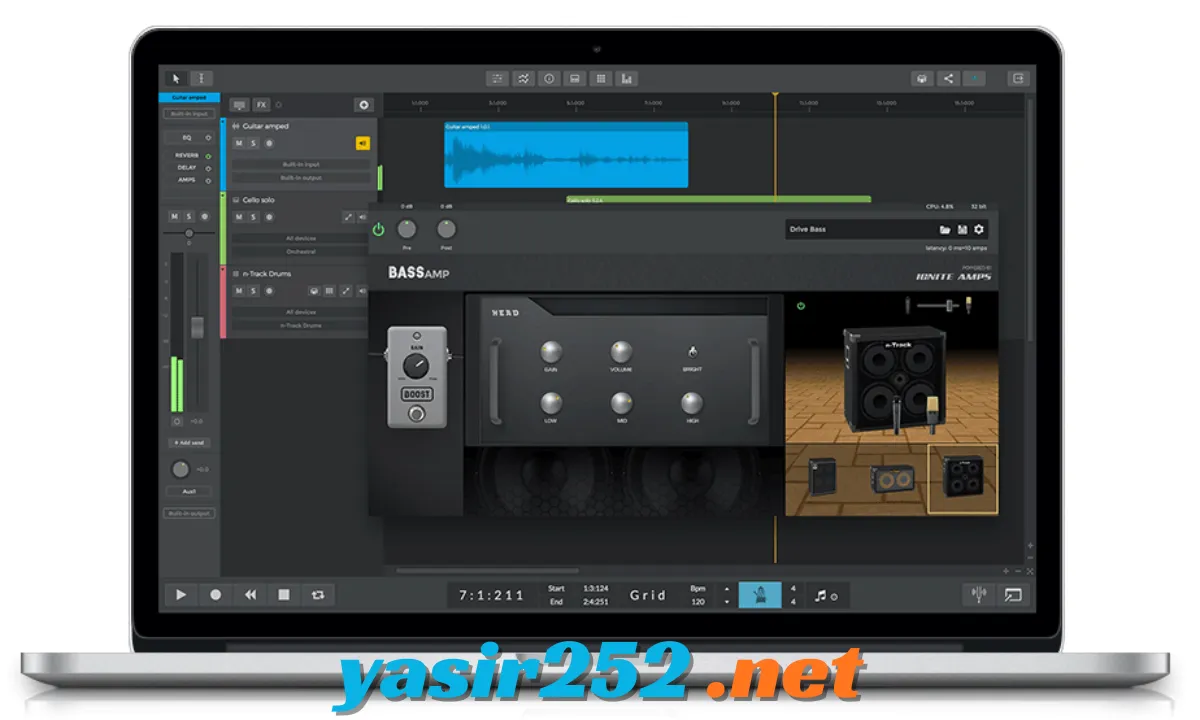
– Audio Effects: Apply audio processing effects such as equalization, compression, reverb, delay, and other supported plugins to shape the sound of your recordings.
– Mixing Console: Control track volume, panning, routing, and effects while mixing multiple audio and MIDI tracks together.
– Automation: Automate supported track parameters, including volume, panning, and effect settings, to create dynamic changes throughout a song.
– VST Plugin Support: Use supported VST plugins to expand the audio processing and instrument capabilities of your recording environment. Plugin compatibility depends on the software version and system configuration.
– Loop and Arrangement Workflow: Arrange recorded material, musical loops, and different track sections to develop songs, demos, and compositions.
– Audio Interface Support: Work with compatible audio hardware for recording and playback. Configure supported input and output channels to accommodate studio equipment.
– Real-Time Audio Processing: Apply supported effects and monitor audio through the recording and mixing workflow, depending on your hardware and configuration.
– Track Organization: Manage audio tracks, MIDI tracks, effects, and recordings in a multitrack project for easier editing and production.
– Music Production Workflow: Combine recordings, MIDI instruments, effects, automation, and mixing tools to create complete musical arrangements.
– Audio Export: Export finished projects using the available audio formats and settings for sharing, publishing, or further processing.
– Home Studio Recording: Use the software for recording vocals, guitars, keyboards, acoustic instruments, demos, and other home recording projects.
– Podcast and Voice Recording: Record and edit spoken audio using multitrack recording, editing, mixing, and supported audio effects.
What Can You Do with n-Track Studio?
Record Vocals and Instruments
Record vocals, guitars, keyboards, and other instruments using a compatible microphone or audio interface. You can create separate tracks for different recording sources and edit them independently.
Produce Songs and Music
Combine recorded audio, MIDI tracks, virtual instruments, loops, and effects to create songs. Arrange musical sections and adjust tracks until the composition is ready for mixing.
Mix Audio Tracks
Control track levels, panning, effects, and other mixing settings to balance different sounds in a project. You can create a more organized mix by separating instruments, vocals, and supporting audio.
Create MIDI Arrangements
Record or edit MIDI parts using compatible controllers and MIDI tools. MIDI tracks can be used for keyboards, virtual instruments, drums, bass, and other musical arrangements.
Record Podcasts
Record spoken content, edit different audio sections, apply supported effects, and mix voice recordings for podcast production or other audio projects.
Create Music Demos
Develop song ideas, record rough arrangements, add instruments, and produce demo tracks before moving to a more advanced recording or mastering workflow.
n-Track Studio Suite 9 vs n-Track Studio Suite 10
Users searching for n-Track Studio Suite 9 and n-Track Studio Suite 10 may be comparing different versions of the software.
| Feature | n-Track Studio 9 | n-Track Studio 10 |
|---|---|---|
| Recording | Multitrack recording | Multitrack recording |
| Audio Editing | Audio editing tools | Audio editing tools |
| MIDI | MIDI recording and editing | MIDI recording and editing |
| Mixing | Track mixing and effects | Track mixing and effects |
| Plugins | Supported plugin workflows | Supported plugin workflows |
| Compatibility | Depends on the specific release | Depends on the specific release |
| Availability | Older version | Newer version family |
| License | Depends on edition | Depends on edition |
The exact feature differences between Studio 9 and Studio 10 depend on the individual release and edition. This table compares their general DAW workflows rather than claiming specific version-exclusive features.
n-Track Studio Suite 9.1.0
The keyword n-Track Studio Suite 9.1.0 refers to a specific version-number search. Before downloading this release, verify the version number on the installer or the official version history.
The available functionality, plugin compatibility, system requirements, and licensing options can differ between builds of n-Track Studio 9. If you need a particular older release, make sure it is compatible with your operating system and audio hardware.
Is n-Track Studio Suite 9 Free?
n-Track Studio offers free and paid options, but the available features depend on the edition and release. Not every feature included in the paid Studio Suite is necessarily available in the free version.
-
Free Version: Provides access to selected recording and audio production features, depending on the current edition.
-
Paid Editions: Unlock additional tools, capabilities, plugins, or features depending on the license.
-
Trial Availability: Check the official website for the current trial terms and available editions.
-
Activation: Paid features may require a legitimate license or account-based activation.
-
Upgrades: Upgrade eligibility and pricing depend on the license purchased.
Avoid cracked versions, keygens, or unauthorized activation patches. They may contain malware and can compromise audio projects, files, or personal information.
How to Download n-Track Studio Suite 9
Follow these steps to download n-Track Studio for your PC:
-
Visit the official n-Track Studio website.
-
Open the Download page.
-
Select the appropriate installer for your operating system.
-
Download the setup file.
-
Verify that the installer comes from the official website.
-
Run the downloaded file and follow the installation instructions.
-
Launch n-Track Studio after installation.
-
Explore the available recording, editing, and mixing features.
Official Website: https://www.ntrack.com/
Official Download Page: https://www.ntrack.com/download/
How to Install n-Track Studio on Windows
-
Download the Windows installer from the official n-Track website.
-
Open the Downloads folder on your computer.
-
Locate the n-Track Studio setup file.
-
Double-click the installer.
-
Follow the installation wizard.
-
Select the installation options if prompted.
-
Complete the installation process.
-
Launch n-Track Studio from the Start menu or desktop shortcut.
-
Configure your audio device and recording settings.
How to Use n-Track Studio Suite 9
1. Create a New Project
Launch n-Track Studio and create a new project. Choose your project settings and prepare the workspace for recording or music production.
2. Configure Audio Devices
Select your audio input and output devices. If you’re using an external audio interface, configure the appropriate recording channels and playback settings.
3. Record Audio
Create an audio track and select the input source. Connect your microphone, instrument, or audio interface and start recording.
4. Add MIDI Tracks
Create a MIDI track and connect a compatible MIDI keyboard or controller. Record your performance or edit MIDI notes using the available tools.
5. Add Effects
Apply supported audio effects to your recordings. Use equalization, compression, reverb, delay, or compatible plugins to improve the sound.
6. Mix Your Tracks
Adjust volume levels, panning, routing, and effect settings. Balance the instruments and vocals to create a more polished mix.
7. Arrange Your Song
Organize recorded tracks and musical sections. Move, trim, or edit audio and MIDI material to create the desired arrangement.
8. Export Your Project
When your project is ready, use the available export options to render your music or recording into a supported audio format.
System Requirements
The exact system requirements depend on the particular n-Track Studio 9 release. The following table provides a general recommendation for a PC audio recording workflow, not verified minimum requirements for every Suite 9 build.
| Requirement | Recommended Setup |
|---|---|
| Operating System | Compatible Windows version |
| Processor | Intel or AMD multicore processor |
| RAM | 8 GB recommended for basic projects; 16 GB for larger projects |
| Storage | SSD recommended for audio projects |
| Audio Hardware | Compatible audio interface or sound device |
| Headphones | Recommended for recording and monitoring |
| Microphone | Optional, depending on recording workflow |
| Internet | May be required for downloads, registration, or activation |
Advantages and Disadvantages
Advantages
-
Multitrack Recording: Record vocals, instruments, and other audio sources into separate tracks.
-
Music Production: Combine audio, MIDI, instruments, and effects to create musical arrangements.
-
Audio Editing: Edit and arrange recordings using a multitrack workflow.
-
Mixing Tools: Adjust volume, panning, routing, and effects.
-
Plugin Support: Expand the production environment using compatible plugins.
-
MIDI Workflow: Record and edit MIDI musical performances.
-
Home Studio Use: Suitable for songwriting, demos, recording, and music production.
-
Podcast Recording: Record and edit spoken audio and other voice-based projects.
Disadvantages
-
Learning Curve: Beginners may need time to understand multitrack recording, MIDI, mixing, and plugin workflows.
-
Edition Differences: Some features may require a paid edition.
-
Hardware Dependency: Professional recording results may require a compatible audio interface, microphones, and monitoring equipment.
-
Plugin Compatibility: Third-party plugins may not work with every version or system configuration.
-
Older Version Limitations: Studio 9 may lack features, fixes, or compatibility improvements introduced in newer releases.
n-Track Studio Suite 9 Alternatives
If you’re looking for other music production and audio recording applications, consider these alternatives.
| Software | Description |
|---|---|
| Audacity | Free audio recording and editing software suitable for audio editing, voice recording, and basic production. |
| REAPER | Flexible digital audio workstation for multitrack recording, mixing, and audio production. |
| FL Studio | Music production software focused on composition, beatmaking, MIDI, and electronic music. |
| Ableton Live | DAW designed for music production, arrangement, creative performance, and live workflows. |
| Cakewalk | DAW workflow for recording, editing, mixing, and music production, subject to current product availability and licensing. |
| Studio One | Professional audio production environment for recording, composing, mixing, and mastering, subject to current edition availability. |
Frequently Asked Questions (FAQs)
1. What is n-Track Studio Suite 9?
n-Track Studio Suite 9 is a digital audio workstation used for multitrack recording, audio editing, MIDI composition, mixing, and music production.
2. Is n-Track Studio Suite 9 free?
n-Track Studio offers free and paid editions, but the features available depend on the version and license. Check the official website for the current options.
3. What is n-Track Studio Suite 10?
n-Track Studio 10 is a newer version family of the n-Track Studio recording and music production software. Its features and compatibility depend on the specific release.
4. What is n-Track Studio 9.1.0?
n-Track Studio 9.1.0 is a specific version-number variant associated with searches for Studio 9. Verify the exact build through the official release information.
5. Can n-Track Studio record vocals?
Yes, n-Track Studio supports audio recording and can be used to record vocals through compatible microphones and audio hardware.
6. Does n-Track Studio support MIDI?
Yes, n-Track Studio provides MIDI recording and editing workflows for compatible MIDI controllers and virtual instruments.
7. Can I use n-Track Studio for music production?
Yes, it can be used to record, arrange, edit, mix, and produce music using audio tracks, MIDI, effects, and supported instruments.
8. Does n-Track Studio support VST plugins?
n-Track Studio supports compatible plugin workflows, including VST plugins, depending on the version and operating system.
9. Is n-Track Studio suitable for beginners?
Yes, beginners can use it for recording, songwriting, and basic music production, although learning audio recording and mixing concepts takes time.
10. Can n-Track Studio record guitar?
Yes, you can record guitar using compatible audio inputs or an audio interface. Instrument connections and monitoring settings depend on your hardware.
11. Can n-Track Studio be used for podcast recording?
Yes, it can be used to record, edit, and mix spoken audio for podcasts and other voice-based projects.
12. Is n-Track Studio Suite 9 available for Windows?
n-Track Studio has Windows versions. Check the official download page for the operating system compatibility of the particular Studio 9 build.
13. Can n-Track Studio mix multiple tracks?
Yes, it is designed for multitrack mixing and allows users to work with multiple audio and MIDI tracks.
14. Where can I download n-Track Studio Suite 9?
You can visit the official n-Track website to access the available installers, downloads, and product information.
15. Is n-Track Studio Suite 9 crack safe?
Cracked software is not recommended because modified installers and activation patches can contain malware, compromise your projects, or expose personal information. Use the official version instead.
Conclusion
n-Track Studio Suite 9 is a digital audio workstation for musicians, songwriters, recording enthusiasts, and audio creators who need tools for recording, editing, mixing, MIDI composition, and music production. Its multitrack workflow allows you to combine vocals, instruments, MIDI, and effects to develop complete audio projects.
If you’re searching for n-Track Studio Suite 9, n-Track Studio Suite 10, or n-Track Studio 9.1.0, check the official website for compatible versions, available editions, and licensing information. It can be a useful option for home recording, music production, songwriting, and podcast projects.