
Pointdev IDEAL Administration 27.0.1 Download [2027] – Active Directory Management and Remote Administration Tool
Managing multiple Windows computers, servers, users, and Active Directory domains can become a serious challenge for IT administrators. Pointdev IDEAL Administration brings many of these management tasks together in one centralized application, helping administrators monitor networks, manage user accounts, troubleshoot computers, generate reports, and perform remote operations.
If you’re searching for Pointdev IDEAL Administration Download [2027], this guide covers its features, Active Directory management tools, remote control capabilities, installation process, system requirements, and licensing information. Whether you’re managing a small business network or a larger Windows infrastructure, IDEAL Administration provides tools designed to make everyday IT administration easier and more organized.
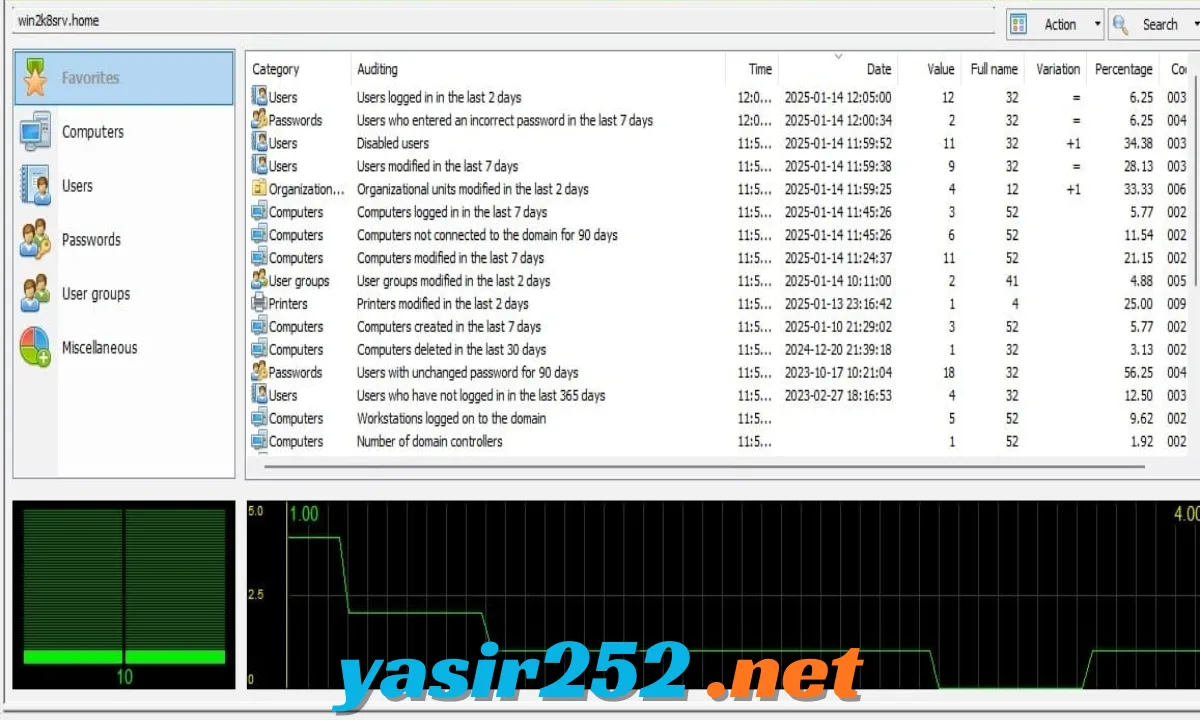
Pointdev Ideal Administration 27.0.1 Download Links
| Nitroflare | Rapidgator |
|---|---|
| 🟡 DOWNLOAD | 🟣 DOWNLOAD |
Pointdev IDEAL Administration Software Information
| Software Details | Information |
|---|---|
| Software Name | Pointdev IDEAL Administration |
| Version in Provided Download Listing | 27.0.1 |
| Latest Official Download Listed | 26.8.5 (September 14, 2026) |
| Developer | Pointdev |
| Category | Network Administration / Active Directory Management |
| License | Commercial / 30-Day Free Trial |
| Operating System | Windows 11, Windows 10, Windows 8 |
| Server Compatibility | Windows Server 2008 and later, including Windows Server 2025 |
| Architecture | 32-bit and 64-bit editions |
| Main Functions | Active Directory management, remote administration, inventory, auditing, reporting |
| Remote Control | RustDesk, TightVNC, RDP and other supported methods |
| Languages | English, French, German, Spanish, Italian |
| Official Website | https://www.pointdev.com/ |
Version clarification: Version 27.0.1 appears in Pointdev’s current FAQ pages, while the official download page lists version 26.8.5. The 27.0.1 version number in the supplied download listing should therefore be checked against the actual installer before describing it as the latest publicly downloadable release.
What Is Pointdev IDEAL Administration?
Pointdev IDEAL Administration is a professional Windows network administration application designed to simplify the management of Active Directory domains, servers, workstations, and Windows workgroups. It provides a centralized interface where IT administrators can manage user accounts, organizational units, security settings, computer properties, network resources, and remote systems.
Instead of switching between different Windows management consoles, administrators can access many everyday IT tools from one application. Its features include Active Directory exploration, Group Policy management, remote computer administration, hardware and software inventory, security auditing, reporting, and remote desktop access.
One of its major advantages is its agentless administration approach. Most standard management operations use native Windows protocols and administrator permissions, so there is no need to install a dedicated IDEAL Administration agent on every computer. Certain remote-control scenarios still require their own components, depending on the operating system and network location.
Key Features of Pointdev IDEAL Administration
1. Centralized Active Directory Management
IDEAL Administration provides a centralized environment for managing Windows Active Directory domains. Administrators can explore directory objects, manage users and groups, organize computers, and perform common administrative operations from one interface.
2. Multiple Domain Administration
The software supports administration across multiple Active Directory domains and Windows workgroups. This is useful for organizations that manage several network environments and want to access them through one management console.
3. Agentless Network Administration
One of its most useful features is agentless administration. Standard management tasks rely on Windows-native protocols and appropriate administrator permissions, reducing the need to deploy additional software across every workstation.
4. Active Directory User Management
Administrators can create, edit, move, rename, and manage Active Directory user accounts. The application also provides tools for viewing account properties, group memberships, and other directory information.
5. Organizational Unit Management
The software allows administrators to create and manage Organizational Units (OUs), move directory objects, and organize users and computers according to an organization’s structure.
6. Group Policy Management
IDEAL Administration includes Group Policy Object management tools. Administrators can explore and manage GPO-related information to help maintain consistent Windows configurations across their networks.
7. Remote Computer Management
The application provides remote management tools for Windows computers and servers. Administrators can inspect computer properties, manage services and processes, access event logs, and perform other maintenance operations.
8. Remote Desktop Control
Multiple remote access methods
IDEAL Administration supports remote-control workflows through technologies such as RustDesk, TightVNC, and Windows Remote Desktop Protocol (RDP). These options allow administrators to connect to computers for troubleshooting and support.
9. RustDesk Integration
The software integrates RustDesk for remote desktop access. Supported workflows include automated deployment and configuration, screen sharing, file transfers, and remote support sessions.
10. Windows Remote Desktop Support
Administrators can use Windows Remote Desktop and supported RDP functions to access remote computers and servers. RDP Shadow capabilities are also available for supported Windows environments and configurations.
11. Hardware and Software Inventory
IDEAL Administration can collect information about computers across a Windows network. Inventory data can include hardware, installed applications, operating system information, services, devices, printers, and network configuration.
12. Active Directory Auditing
The auditing tools help administrators monitor changes and activities within Active Directory environments. They can be used to identify potentially sensitive changes, investigate account activity, and review directory security conditions.
13. Real-Time Active Directory Alerts
The application includes real-time Active Directory alerts based on native auditing capabilities. Administrators can configure thresholds, define alert severity, and review notifications through a centralized interface.
14. Cloud AI Analysis
IDEAL Administration includes optional Cloud AI capabilities for analyzing Active Directory alerts and answering administrative questions. This can help administrators understand certain events and receive recommendations without manually reviewing every detail.
15. Active Directory Reporting
The software generates reports about Active Directory domains and their objects. Reports can be exported into formats such as HTML and CSV, making it easier to document network configurations and share administrative information.
16. WMI Management
The integrated WMI tools provide access to remote Windows Management Instrumentation information. Administrators can inspect system properties and manage supported remote computer settings through a graphical interface.
17. Windows Registry Management
IDEAL Administration provides remote registry management tools for compatible Windows computers. Administrators can explore registry information and work with supported 32-bit and 64-bit registry environments.
18. Services and Process Management
The application allows administrators to inspect and manage remote Windows services, devices, and processes. This can be useful when troubleshooting applications or investigating performance issues on network computers.
19. Wake On LAN
The Wake On LAN feature allows administrators to remotely wake supported computers on a network. This can help with scheduled maintenance, software deployment, and other IT operations.
20. Remote Shutdown and Restart
Administrators can perform supported remote shutdown and restart operations. These tools are useful for maintenance activities and managing multiple Windows computers.
21. File and Directory Management
IDEAL Administration includes tools for exploring shared folders, files, directories, and access permissions. Administrators can inspect access control information and manage supported file and directory operations.
22. Permission and ACL Management
The software provides access to security permissions and Access Control Lists (ACLs). This helps administrators examine how users and groups access network resources.
23. Network Security Management
The application includes remote Windows Firewall and User Account Control management tools. Administrators can inspect and manage supported security settings across multiple computers.
24. Scheduled Inventory and Automation
Inventory operations can be scheduled and automated for selected domains, workgroups, organizational units, or computers. This helps maintain updated information about the organization’s IT environment.
25. CSV, HTML, Access and SQL Reporting
IDEAL Administration supports several inventory and reporting workflows. Depending on the selected operation, information can be exported into HTML or CSV files or stored in Microsoft Access and Microsoft SQL Server databases.
26. Multi-Computer Operations
Administrators can select multiple computers and perform supported actions across them. This reduces repetitive work when managing a large number of Windows systems.
27. Remote Product Key Recovery
The software includes tools for recovering supported product key information from remote computers. This can help administrators document software installations and manage licensing information.
28. Intervention Management
IDEAL Administration provides intervention tracking tools for planning and recording network maintenance activities. This can help IT teams organize administrative work and maintain a shared record of tasks.
29. Customizable Interface
The application offers a multi-tab graphical interface for navigating domains, workgroups, computers, remote-control history, favorites, and other administrative areas.
30. Multi-Language Support
IDEAL Administration is available in English, French, German, Spanish, and Italian. This makes the software accessible to IT teams working in different language environments.
What’s New in Pointdev IDEAL Administration 27.0.1?
The supplied download listing identifies Pointdev IDEAL Administration 27.0.1. Pointdev’s current FAQ pages also display version 27.0.1, although its public download page lists version 26.8.5.
The following improvements are confirmed in the current version 27-related documentation.
Version 27 Improvements
-
Recent Search History: The Microsoft Windows Network search field can remember the last 10 searches.
-
Faster Search Access: Users can select a previous search from a dropdown list instead of entering the same query repeatedly.
-
Search History Management: Recent searches can be removed individually using the Delete key.
-
RustDesk Connection History: The remote desktop window can remember the last 10 computers and RustDesk IDs used.
-
Context Menus: Right-click menus provide quick access to actions for computers, domains, users, organizational units, and other objects.
-
Multi-Computer Actions: Administrators can select several computers and access supported grouped operations from the context menu.
Recent Version 26.8.5 Improvements
The official download information also identifies version 26.8.5, which includes:
-
Updated RustDesk integration to version 1.4.9.
-
Redesigned icons with a modern Windows-style appearance.
-
Improvements to interface readability.
-
A fix for an issue that could cause unexpected application closure when retrieving information from remote computers.
-
Minor stability improvements and bug fixes.
Pointdev IDEAL Administration User Interface
IDEAL Administration uses a multi-tab interface designed to make network management easier. Instead of opening multiple independent applications, administrators can access different management areas through the main workspace.
The interface includes several useful sections:
-
Microsoft Windows Network: Browse Windows computers and workgroups.
-
Active Directory Network: Explore domains, users, groups, and organizational units.
-
Remote Control History: Access previously used remote-control connections.
-
Internet Remote Control: Manage supported remote connections over the internet.
-
VPN: Access VPN-related network information and configurations.
-
Favorites: Keep frequently accessed computers and resources available.
-
External Tools: Access additional administrative utilities.
-
FAQ: Find help and technical information.
A particularly useful shortcut is the right-click context menu. Selecting a computer, user, domain, or organizational unit and right-clicking it displays actions relevant to that object.
How to Download Pointdev IDEAL Administration for Windows
You can download IDEAL Administration from the official Pointdev website. The developer provides a free 30-day trial for evaluating the application in your own network environment.
Follow these steps:
-
Open the official Pointdev website.
-
Navigate to the IDEAL Administration product page.
-
Select the download option.
-
Choose the English version or another supported language.
-
Select the appropriate 32-bit or 64-bit installer.
-
Download the installation package.
-
Run the installer on your administration workstation.
-
Follow the setup instructions.
-
Launch IDEAL Administration and configure your network environment.
Official download page: https://www.pointdev.com/en/download/download.php?product=ia
Important: The official download page currently lists version 26.8.5. If you specifically need version 27.0.1, confirm its availability and authenticity with Pointdev before installing a third-party package.
How to Install IDEAL Administration on Windows 11 and Windows 10
-
Download the appropriate installer from Pointdev.
-
Locate the downloaded installation package.
-
Extract the files if the download is provided as a ZIP archive.
-
Run the setup program using an account with suitable administrative permissions.
-
Follow the installation wizard.
-
Complete the setup process.
-
Restart Windows if the installer requests it.
-
Launch IDEAL Administration.
-
Configure the required network and administrative credentials.
The application is installed on the administrator’s workstation. Most standard administration operations do not require a dedicated IDEAL Administration agent on every managed computer.
How to Configure IDEAL Administration
After installation, configure the software to access your Windows network.
Step 1: Launch the Application
Open IDEAL Administration from the Windows Start menu.
Step 2: Configure Administrative Access
Use an account with the required permissions for the domains, computers, and resources you intend to manage.
Step 3: Select the Network Environment
Choose the Microsoft Windows Network or Active Directory Network tab according to the task you want to perform.
Step 4: Connect to Your Domain
Browse or configure access to the relevant Active Directory domain or Windows workgroup.
Step 5: Explore Computers and Users
Select the computers, users, groups, and organizational units you need to manage.
Step 6: Run Administrative Tasks
Use the available context menus and management tools to perform supported operations.
Step 7: Generate Reports
Open the reporting and inventory tools to collect information and export the results into supported formats.
How to Manage Active Directory with IDEAL Administration
-
Open the Active Directory Network tab.
-
Select the domain you want to manage.
-
Browse organizational units and directory objects.
-
Select a user, group, computer, or OU.
-
Right-click the selected object.
-
Choose the required administrative operation.
-
Review the changes before applying them.
-
Refresh the directory view to verify the result.
The software supports common directory operations, including creating users, managing group memberships, moving objects, renaming entries, and organizing organizational units.
How to Remotely Control a Computer
IDEAL Administration supports several remote-control methods.
-
Open the Microsoft Windows Network tab.
-
Locate the computer you want to access.
-
Right-click the computer.
-
Select the appropriate remote desktop option.
-
Choose RustDesk, TightVNC, RDP, or another supported method.
-
Authenticate using the required credentials.
-
Start the remote session.
The available connection methods depend on the target operating system, network configuration, installed components, and administrative permissions.
Does IDEAL Administration Require Agents?
Most standard IDEAL Administration operations are agentless. The application uses native Windows protocols and administrator permissions to access supported management features.
However, remote control has separate requirements:
-
Windows Computers on the Local Network: RustDesk or TightVNC components can be installed automatically from the console. RDP uses the Windows service.
-
macOS and Linux Computers: Remote control requires a compatible VNC server on the target computer.
-
Windows Computers Outside the Corporate Network: The Pointdev Remote Control agent must be installed and configured beforehand.
This distinction is important: agentless administration does not mean every remote-control feature works without any additional component.
Pointdev IDEAL Administration System Requirements
IDEAL Administration is designed for Windows administration workstations and supports several Windows client and server environments.
| Component | Requirement |
|---|---|
| Operating System | Windows 11, Windows 10, Windows 8 |
| Windows Server Compatibility | Windows Server 2008 and later, including Windows Server 2025 |
| Architecture | 32-bit and 64-bit editions |
| Processor | Compatible Windows processor |
| RAM | 4 GB or more recommended for administration workloads |
| Storage | Sufficient free space for installation, logs, and inventory data |
| Network | LAN, WAN, VPN, or supported internet connectivity |
| Permissions | Appropriate Windows and Active Directory administrative rights |
| Database | Microsoft Access or Microsoft SQL Server for supported inventory workflows |
Note: RAM and storage figures above are practical recommendations, not confirmed official minimum specifications. Actual requirements depend on the size of your network, database configuration, and administrative workload.
Is Pointdev IDEAL Administration Free?
Pointdev IDEAL Administration is commercial software. The developer offers a free 30-day trial, allowing administrators to test its features in their own network before purchasing a license.
The trial is useful for evaluating Active Directory management, remote administration, auditing, inventory, and reporting capabilities.
IDEAL Administration Licensing
-
Free Trial: 30 days of evaluation.
-
Commercial License: A perpetual license assigned to each administrator workstation.
-
Managed Computers: The license is not limited by the number of managed domains, servers, or client computers.
-
Maintenance: A new license includes one year of software maintenance and technical support.
-
Renewals: Additional maintenance periods can be purchased.
The official price list identifies a starting price of €389 for one license with one year of maintenance. Prices and regional currency conversions may change, so check the developer’s current pricing page before purchasing.
IDEAL Administration Full Version, Crack and License Key
Some users search for IDEAL Administration full version, crack, serial key, activation code, or license key when looking for ways to unlock the application.
IDEAL Administration is commercial software, and its full functionality requires a valid license after the trial period. Unofficial cracked installers and unauthorized activation tools can expose an administrator’s workstation and business network to malware, credential theft, and unauthorized access.
For network administration software, security is especially important because the application may operate with powerful administrative permissions. Download the original installer and use a legitimate license to protect your organization’s systems.
Advantages and Disadvantages of IDEAL Administration
Advantages
-
Centralized Windows network administration.
-
Multiple Active Directory domain management.
-
Agentless administration for many standard tasks.
-
Remote computer and server management.
-
RustDesk, TightVNC, and RDP integration.
-
Active Directory auditing and alerts.
-
Optional Cloud AI analysis.
-
Hardware and software inventory.
-
HTML and CSV reporting.
-
WMI and remote registry management.
-
Group Policy administration.
-
Remote shutdown and Wake On LAN.
-
Multi-computer administrative operations.
-
Per-administrator licensing without a managed-device limit.
Disadvantages
-
Commercial licensing may be expensive for individual users.
-
Requires administrative permissions and network configuration.
-
Advanced features can take time to learn.
-
Some remote-control scenarios require additional components.
-
Primarily designed for Windows administration.
-
New users may need training to understand all available tools.
Best Alternatives to Pointdev IDEAL Administration
If IDEAL Administration does not match your requirements, consider these alternatives.
| Software | Best For |
|---|---|
| Microsoft Windows Admin Center | Managing Windows servers and infrastructure |
| ManageEngine ADManager Plus | Active Directory management and reporting |
| SolarWinds Access Rights Manager | Access rights and permission management |
| Remote Desktop Manager | Organizing remote connections |
| PDQ Deploy | Software deployment and Windows administration |
| Lansweeper | IT asset discovery and inventory |
| Microsoft Active Directory Users and Computers | Basic Active Directory administration |
Each alternative has a different focus. Some specialize in directory management, while others focus on remote access, software deployment, or IT inventory.
Frequently Asked Questions (FAQs)
1. What is Pointdev IDEAL Administration?
Pointdev IDEAL Administration is a Windows network management application for administering Active Directory domains, servers, workstations, users, groups, and other IT resources.
2. Is IDEAL Administration free?
No. It is commercial software, but Pointdev offers a free 30-day trial.
3. Where can I download IDEAL Administration?
You can download the trial from the official Pointdev website at pointdev.com.
4. What is the latest version of IDEAL Administration?
Version 27.0.1 appears in the developer’s current FAQ pages. However, the official public download page lists version 26.8.5. Check Pointdev’s download page for the latest installer.
5. Does IDEAL Administration work on Windows 11?
Yes. Pointdev lists Windows 11 compatibility.
6. Does IDEAL Administration support Windows Server 2025?
Yes. The software supports Windows Server 2025 administration.
7. Can IDEAL Administration manage multiple domains?
Yes. It supports centralized administration of multiple Active Directory domains and Windows workgroups.
8. Does IDEAL Administration require an agent?
Most standard administration operations do not require an agent on each computer. Certain remote-control scenarios require additional components.
9. Can I manage Active Directory users?
Yes. The application provides tools for creating, editing, moving, renaming, and managing Active Directory user accounts.
10. Does IDEAL Administration support Group Policy?
Yes. It includes Group Policy Object management capabilities.
11. Can I remotely control Windows computers?
Yes. It supports remote-control workflows using RustDesk, TightVNC, and Windows Remote Desktop Protocol.
12. Does IDEAL Administration support Linux and macOS?
Its administration features are primarily designed for Windows environments. Remote control of macOS and Linux computers is available through compatible VNC server configurations.
13. Can I generate Active Directory reports?
Yes. IDEAL Administration supports Active Directory reporting and can export supported reports into HTML and CSV formats.
14. Does IDEAL Administration support hardware inventory?
Yes. It can collect hardware and software information from managed Windows computers and store inventory data in supported databases.
15. Can I use IDEAL Administration for remote shutdown?
Yes. The application includes supported remote shutdown and restart tools.
16. Does IDEAL Administration support Wake On LAN?
Yes. Administrators can use its Wake On LAN functionality to wake compatible network computers.
17. Does IDEAL Administration include AI features?
Yes. The software includes optional Cloud AI features for Active Directory alert analysis and administrative questions.
18. What is the license price of IDEAL Administration?
The official price list identifies a starting price of €389 for one administrator license with one year of maintenance. Check the current pricing page for updated rates.
19. Is the IDEAL Administration license perpetual?
Yes. The developer describes its commercial license as perpetual, with software maintenance and technical support included for the selected period.
20. Is IDEAL Administration worth using in 2027?
IDEAL Administration can be valuable for IT teams that manage multiple Windows domains, servers, and workstations. Its centralized management, auditing, inventory, reporting, and remote-control features make it a comprehensive option for professional network administration.
Conclusion
Pointdev IDEAL Administration is a comprehensive Windows network management solution for IT administrators who need centralized control over Active Directory, servers, workstations, and network resources. Its combination of directory management, remote desktop access, auditing, inventory, reporting, and security tools can reduce the need to switch between multiple administrative utilities.
The agentless approach for standard administration tasks is another useful advantage, while RustDesk, TightVNC, and RDP integration provide additional remote-support options. The 30-day trial gives organizations an opportunity to evaluate the software before purchasing a perpetual license.
If you’re looking for Pointdev IDEAL Administration Download [2027], visit the official Pointdev website to check the latest available version, download the correct installer, and review the current licensing terms before deployment.