
SoftPerfect NetWorx 26.11 Multilingual License Key [2027] – Download, Features & License Guide
SoftPerfect NetWorx is a powerful network monitoring utility that helps users keep track of Internet traffic, bandwidth consumption, connection speed, and network performance. It gives you a clear view of how much data your computer uses and helps identify applications or network activity that may be consuming excessive bandwidth.
If you’re searching for a SoftPerfect NetWorx license key, NetWorx code, or the full version in 2027, this guide explains the software, its features, license options, download process, and how to activate a legitimate license. NetWorx is commercial software that offers a fully featured trial, so a valid purchased license is required after the trial period.
NetWorx 26.11 Download Links
| Nitroflare | Rapidgator |
|---|---|
| 🟡 DOWNLOAD | 🟣 DOWNLOAD |
SoftPerfect NetWorx Software Information
| Field | Details |
|---|---|
| Software Name | SoftPerfect NetWorx |
| Developer | SoftPerfect |
| Category | Network Monitoring / Bandwidth Monitoring |
| Latest Verified Version | 26.5 |
| Release Date | May 7, 2026 (version 26.5) |
| License | Commercial / 30-day trial |
| Platforms | Windows, macOS, Linux |
| Architecture | Intel, AMD and ARM64 (platform-dependent) |
| Main Purpose | Monitor network traffic, bandwidth, speed, and connection quality |
| Official Website | https://www.softperfect.com/products/networx/ |
What Is SoftPerfect NetWorx?
SoftPerfect NetWorx is a network monitoring program built to help users understand and manage their Internet connection. It measures upload and download traffic, stores usage statistics, tracks network performance, and provides reports that help users analyze their data consumption.
The software is useful for home users, IT professionals, administrators, and anyone who wants to monitor bandwidth usage or troubleshoot connection problems. NetWorx can monitor network adapters, supported routers and network devices, and certain application-level traffic information.
Key Features of SoftPerfect NetWorx
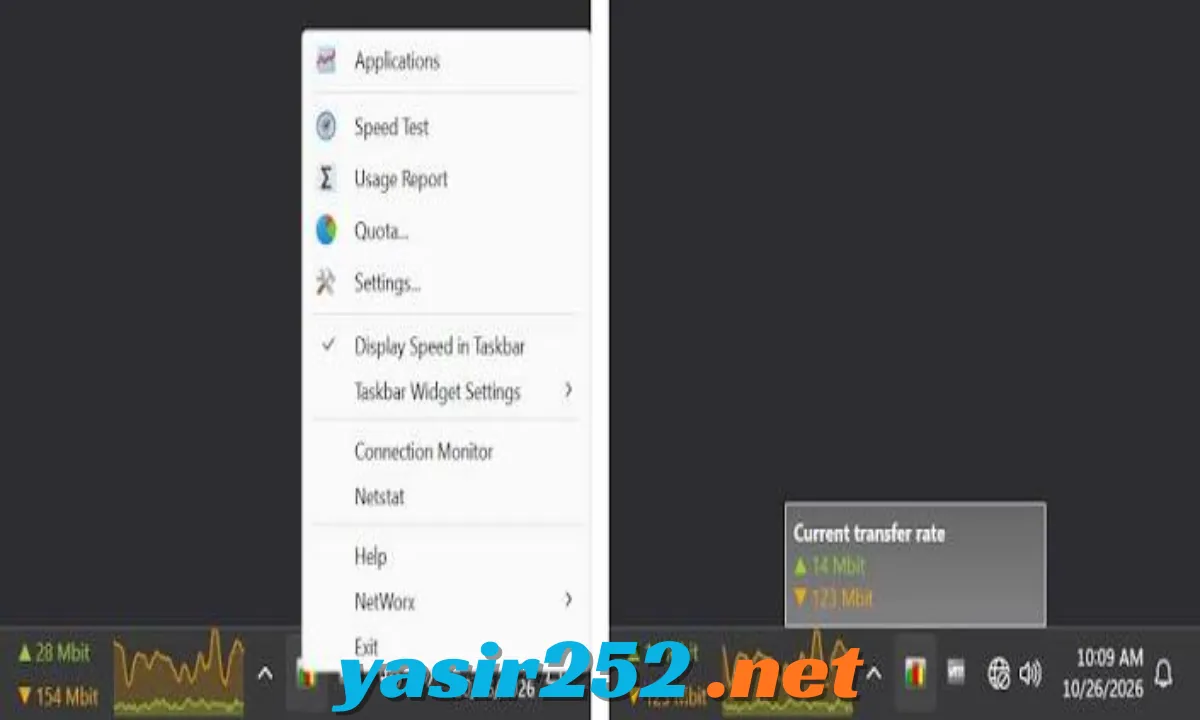
– Real-Time Bandwidth Monitoring: Monitor upload and download traffic as it happens. The real-time graph makes it easier to see how network activity changes throughout the day.
– Internet Data Usage Tracking: Keep track of daily, weekly, and monthly Internet consumption. This is particularly useful for connections with data limits or usage-based billing.
– Network Usage Reports: Review historical bandwidth statistics and analyze network usage over different periods to understand your Internet consumption patterns.
– Application Traffic Monitoring: View information about applications accessing the Internet where supported, helping you identify programs that may be using excessive bandwidth.
– Internet Speed Testing: Measure connection performance using the built-in Speed Test to evaluate the speed of your Internet connection.
– Connection Quality Monitoring: Monitor connection status, ping, and downtime to identify potential Internet connectivity issues.
– Network Adapter Monitoring: Monitor selected local network adapters to collect traffic information and view network usage statistics.
– Router and Device Monitoring: NetWorx supports certain remote devices and monitoring methods, including SNMP and UPnP, depending on the device and configuration.
– Usage Alerts: Configure actions and notifications when network activity or usage exceeds specified thresholds.
– Customizable Graphs: Adjust the appearance and behavior of the traffic graph to make bandwidth monitoring easier.
– Portable Version: A portable package is available for Windows, allowing users to run NetWorx without using the standard installer.
– Exportable Statistics: Export collected usage data and reports for further analysis or recordkeeping.
What Is a SoftPerfect NetWorx License Key?
A SoftPerfect NetWorx license key is the license information used to activate the purchased version of NetWorx. It allows users to access the software according to the terms of the license they obtain from SoftPerfect.
Users searching for a NetWorx license key are generally looking for a way to unlock the full software, continue using it after the trial, or reinstall a previously purchased copy.
A legitimate license is obtained from SoftPerfect after purchasing the software. The license details should be kept safely so you can use them when reinstalling or activating the program.
How to Get a SoftPerfect NetWorx License Key
If you want to activate NetWorx legally, follow these steps:
-
Visit the official SoftPerfect NetWorx website.
-
Open the purchase or licensing section.
-
Review the available license options and pricing.
-
Purchase the license that matches your requirements.
-
Check your purchase confirmation for the license information.
-
Open NetWorx on your computer.
-
Follow the software’s activation or registration instructions.
-
Enter the valid license information provided with your purchase.
Keep your license details in a secure location in case you need to reinstall the program later.
SoftPerfect NetWorx Code, Key and Registration Information
Search terms such as SoftPerfect NetWorx code, NetWorx key, and NetWorx registration code refer to license information used for software registration. These codes should come from an authorized purchase.
Avoid using randomly generated codes or license information published on unofficial websites. Such codes may not work, and some download pages distribute modified installers or malicious files.
The safest way to obtain a valid NetWorx license is through SoftPerfect’s official website.
SoftPerfect NetWorx Crack, Keygen and Full Version
A NetWorx crack or keygen is often promoted as a way to unlock the commercial software without purchasing a license. These unofficial tools are not legitimate activation methods and may expose your computer to malware, compromised files, or unwanted software.
Instead of using a crack, you can download NetWorx from the official website and use its fully featured 30-day trial. If you want to continue using the software beyond the trial, purchase a valid license.
Official website: https://www.softperfect.com/products/networx/
How to Download SoftPerfect NetWorx
Follow these steps to download the official NetWorx installer:
-
Visit the SoftPerfect NetWorx official website.
-
Navigate to the download section.
-
Select the appropriate package for Windows, macOS, or Linux.
-
Choose the standard installer or portable package where available.
-
Download the package to your computer.
-
Verify that you obtained it from the official website.
-
Install or run the software according to the package instructions.
How to Install SoftPerfect NetWorx on Windows
-
Download the NetWorx Windows installer.
-
Locate the downloaded file on your computer.
-
Double-click the installer to begin.
-
Follow the installation wizard.
-
Choose the installation options you prefer.
-
Complete the installation.
-
Launch NetWorx.
-
Select the network connection you want to monitor.
-
Configure the monitoring and reporting options.
How to Use SoftPerfect NetWorx
Step 1 – Start Network Monitoring
Open NetWorx and select the network adapter or monitoring source you want to track. The software begins collecting network usage information according to your configuration.
Step 2 – View Real-Time Traffic
Open the real-time graph to monitor upload and download activity. This helps you identify when your connection is busy and understand how network usage changes.
Step 3 – Check Data Usage
Open the usage statistics section to view your network consumption. You can review daily, weekly, or monthly data depending on the reporting options available.
Step 4 – Test Your Internet Speed
Use the built-in speed testing feature to check your connection performance. Compare results at different times if you want to understand changes in Internet speed.
Step 5 – Monitor Connection Quality
Use the Connection Monitor to observe connection status and ping information. This can help you identify periods of downtime or network instability.
Step 6 – Configure Alerts
Set usage limits or monitoring actions where supported. Alerts can help you keep track of network activity and avoid excessive data consumption.
Step 7 – Export Reports
Export or save your statistics for later analysis. Historical reports can help you compare usage over time and understand your network habits.
SoftPerfect NetWorx System Requirements
NetWorx is available for multiple operating systems, including Windows, macOS, and Linux. Exact compatibility depends on the release and the package you download.
| Component | Requirements |
|---|---|
| Operating System | Compatible Windows, macOS, or Linux release |
| Processor | Intel, AMD, or ARM64 depending on platform |
| RAM | Sufficient memory for the operating system |
| Storage | Space for the software and collected monitoring data |
| Network | Internet or local network connection |
| Additional Support | SNMP or UPnP support for compatible devices, where applicable |
Check the official download page for the exact operating system and hardware requirements for your chosen version.
Is SoftPerfect NetWorx Free?
SoftPerfect NetWorx is commercial software, but it offers a fully featured 30-day trial. This allows users to test the program before purchasing a license.
The trial is useful for evaluating its bandwidth monitoring, network usage reports, speed testing, connection monitoring, and other available features.
After the trial period, you may need to purchase a license to continue using the software according to its licensing terms.
SoftPerfect NetWorx Portable
NetWorx also offers a portable Windows package. A portable version can be useful for users who prefer to run software without following the standard installation process.
The portable package is convenient for troubleshooting, network monitoring, and use on compatible Windows systems where you prefer a portable workflow. Availability and functionality may depend on the release and system configuration.
Pros and Cons of SoftPerfect NetWorx
Pros
-
Easy-to-use network monitoring interface.
-
Tracks upload and download traffic.
-
Provides daily, weekly, and monthly statistics.
-
Includes Internet speed testing.
-
Helps monitor connection quality and downtime.
-
Supports monitoring of compatible network devices.
-
Offers a portable Windows package.
-
Available for multiple operating systems.
-
Provides a fully featured 30-day trial.
Cons
-
Commercial license required for continued use beyond the trial, according to license terms.
-
Advanced device monitoring depends on compatible hardware and configuration.
-
Historical usage information requires time to collect meaningful data.
-
Network monitoring features may vary between operating systems.
-
Some users may prefer simpler free alternatives.
Best Alternatives to SoftPerfect NetWorx
| Software | Main Purpose | License |
|---|---|---|
| GlassWire | Network monitoring and traffic visualization | Free and paid options |
| TrafficMonitor | Windows network speed and resource monitoring | Free |
| BitMeter OS | Bandwidth usage monitoring | Open source |
| PRTG Network Monitor | Network monitoring and administration | Free tier and commercial |
| Wireshark | Network packet analysis and troubleshooting | Free and open source |
Frequently Asked Questions
1. What is SoftPerfect NetWorx?
SoftPerfect NetWorx is a network monitoring utility that tracks bandwidth usage, Internet traffic, connection quality, speed, and historical usage statistics.
2. Where can I get a SoftPerfect NetWorx license key?
You can purchase a legitimate license through the official SoftPerfect website. License information is provided through the authorized purchase process.
3. Is SoftPerfect NetWorx free?
NetWorx offers a fully featured 30-day trial. The software is commercial, and continued use after the trial may require a purchased license.
4. What is a SoftPerfect NetWorx code?
A NetWorx code generally refers to software registration or license information used to activate a purchased copy of the program.
5. Can I download SoftPerfect NetWorx for Windows 11?
NetWorx has Windows packages. Check the official download page to confirm compatibility with your specific Windows 11 release.
6. Is SoftPerfect NetWorx crack safe?
Cracks and unofficial activation tools are not recommended because they can contain malware, modified files, or unsafe components. Use the official trial or a purchased license.
7. Does SoftPerfect NetWorx have a keygen?
Unofficial keygens are not legitimate SoftPerfect activation tools. Obtain a valid license directly from SoftPerfect.
8. What is SoftPerfect NetWorx full version?
The full licensed version refers to NetWorx used under an authorized commercial license rather than the time-limited trial.
9. Can NetWorx monitor Internet speed?
Yes. NetWorx includes a built-in Speed Test that can measure connection performance.
10. Can NetWorx monitor data usage?
Yes. NetWorx records Internet and network usage and provides historical statistics for analyzing data consumption.
11. Does NetWorx show daily data usage?
Yes. It can organize historical usage into daily reports and other periods, including weekly and monthly statistics.
12. Can NetWorx monitor applications?
NetWorx can provide information about applications accessing the Internet where supported by the platform and configuration.
13. Is NetWorx available for macOS?
Yes. SoftPerfect provides a macOS package. Check the official website for the supported macOS versions.
14. Is NetWorx available for Linux?
Yes. SoftPerfect provides Linux packages, including packages for supported Intel/AMD and ARM64 environments.
15. Does NetWorx have a portable version?
Yes. A portable Windows package is available, allowing users to run NetWorx without the standard installation process.
16. Can NetWorx monitor routers?
NetWorx can monitor compatible routers and network devices using supported technologies such as SNMP and UPnP, depending on device capabilities.
17. Does NetWorx monitor network downtime?
Yes. Its Connection Monitor can track connection status and ping information, helping users identify interruptions.
18. Is SoftPerfect NetWorx suitable for IT professionals?
Yes. It can help IT professionals and administrators monitor bandwidth usage, analyze network activity, and investigate certain connectivity issues.
19. Where can I download the latest NetWorx version?
The official SoftPerfect website is the recommended source for the latest available release and compatible installers.
20. Should I download NetWorx from torrent websites?
No. Downloading from the official website is safer because unofficial torrents may contain modified installers, outdated versions, or malware.
Final Words
SoftPerfect NetWorx is a useful network monitoring solution for anyone who wants to understand Internet usage, track bandwidth, monitor connection performance, and investigate network problems. Its historical reports, real-time graphs, speed testing, and connection monitoring tools make it practical for everyday users and IT professionals.
If you are searching for a SoftPerfect NetWorx license key in 2027, the safest option is to download the official trial and purchase a license if you decide to continue using the software. Avoid cracks, keygens, and unofficial registration codes to protect your computer and keep your software installation reliable.