
SweetScape 010 Editor 17.0.2 Download [2027] – Professional Hex Editor and Text Editor for Windows
SweetScape is the software company behind 010 Editor, a powerful professional hex editor and text editor built for examining, editing, and analyzing files at a low level. Unlike ordinary text editors, 010 Editor lets users inspect binary data, modify hexadecimal values, work with large files, and understand complex file structures through specialized editing tools.
Whether you’re a software developer, security researcher, digital forensics professional, or someone who needs to investigate unfamiliar file formats, 010 Editor provides a flexible workspace for working with both binary and text-based data. Its standout feature is the Binary Templates system, which helps users interpret structured files and view their contents in a more meaningful way instead of dealing with raw hexadecimal values alone.
SweetScape 010 Editor 15 Download Links
| Rapidgator | Nitroflare |
|---|---|
| 🟣 DOWNLOAD | 🟡 DOWNLOAD |
SweetScape Software Information
| Field | Details |
|---|---|
| Software Name | 010 Editor |
| Company | SweetScape Software |
| Developer | SweetScape Software |
| Category | Hex Editor / Text Editor / Binary Analysis |
| License | Commercial; trial availability |
| Operating System | Windows, macOS, and Linux |
| Architecture | Platform-dependent 32-bit and 64-bit support |
| Main Purpose | Hex editing, binary analysis, text editing, and file inspection |
| Key Technology | Binary Templates and Binary Variables |
| Official Website | https://www.sweetscape.com/ |
| Official Product Page | https://www.sweetscape.com/010editor/ |
What Is SweetScape 010 Editor?
SweetScape 010 Editor is a professional hex editor designed to open, inspect, edit, and analyze files in hexadecimal, binary, and text formats. It gives users direct access to the underlying bytes of a file, making it useful for tasks that ordinary text editors cannot handle effectively.
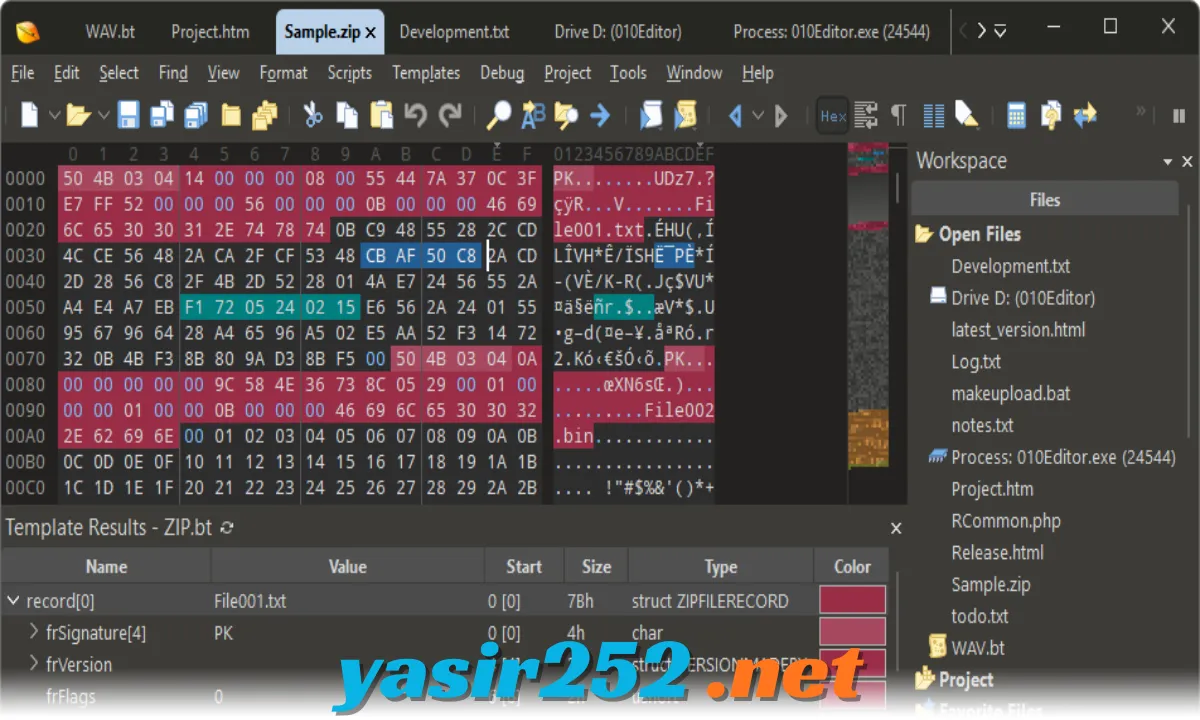
The software is especially known for its Binary Templates technology. These templates describe the structure of a file and allow 010 Editor to display its data as organized fields and values. This makes it useful for investigating file formats, debugging software, analyzing binary structures, and performing digital forensics.
What’s New in SweetScape 010 Editor 17.0.1?
As of November 2026, the official SweetScape website lists 010 Editor 17.0.1, released on November 4, 2026. Version 17.0 introduced several useful editing and recovery improvements, while version 17.0.1 includes additional fixes for macOS and Linux users.
Main Updates in Version 17.0
-
Automatic File Recovery: Automatically save unsaved changes to recovery files, helping protect work after application crashes or unexpected power interruptions.
-
Keep for Later: Preserve changes when closing a modified file and automatically restore them when the file is opened again.
-
Code Beautification: Format supported C, C++, C#, Java, JavaScript, Objective-C, HTML, JSON, and XML files using the new Beautify command.
-
Improved Calculator: View previously evaluated expressions in the integrated calculator.
-
Template Improvements: Support for default arguments in Binary Template functions and structures.
-
Editing Improvements: Continue working with large files using an editor that includes additional recovery and formatting capabilities.
Version 17.0.1 Fixes
-
Recovery File Fix: Corrected an issue affecting the storage location of recovery files on macOS and Linux.
-
Sorting Improvements: Updated ascending sorting so alphabetical results follow the expected A-to-Z order.
-
Bookmark Updates: Fixed an issue where the Bookmarks tab sometimes failed to refresh correctly after loading a file.
These improvements make 010 Editor more convenient for developers and professionals who regularly edit important binary and text files.
Main Features of SweetScape 010 Editor
1. Advanced Hex Editor
010 Editor provides a powerful hexadecimal editing environment for inspecting and modifying raw file data. Users can view and edit bytes directly, making it useful for debugging, file analysis, reverse engineering, and low-level data investigation.
2. Powerful Text Editor
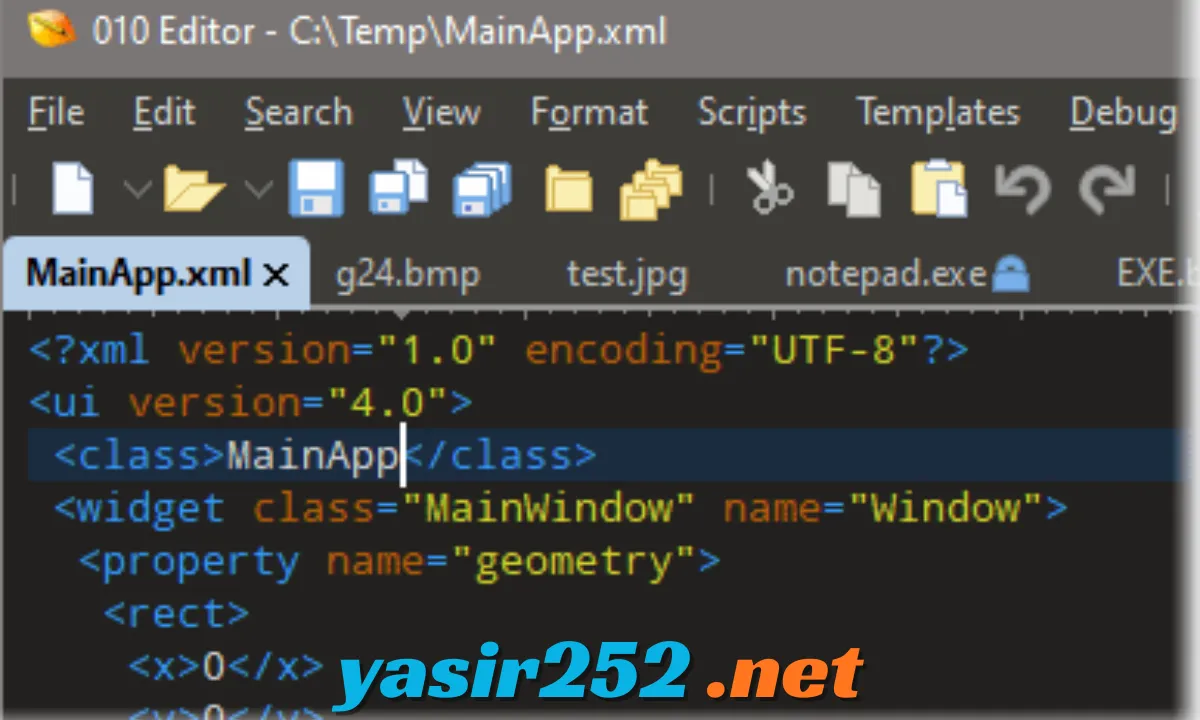
The built-in text editor supports standard editing operations, syntax highlighting, Unicode, UTF-8, and EBCDIC files. It also provides advanced editing features for working with large text documents and source code.
3. Binary Templates
Binary Templates are one of the most important features of 010 Editor. They allow users to describe a file’s internal structure and display raw binary information as meaningful variables, fields, and data types.
4. Support for 330+ File Formats
010 Editor includes Binary Templates for many file formats, helping users inspect and understand structured files. Templates can be used to interpret supported formats such as ZIP, BMP, WAV, and many other binary structures.
5. Binary Variables
Binary Variables allow users to interpret file contents as structured data rather than individual bytes. This makes it easier to examine values, edit fields, and understand how a particular file is organized.
6. Integrated Scripting Engine
The scripting engine uses a C-like programming syntax to automate repetitive editing operations. Users can write scripts to search, modify, compare, import, export, and process file data.
7. Script Debugger
The built-in debugger helps developers test and troubleshoot scripts and Binary Templates. It supports breakpoints, watches, step-by-step execution, and call-stack inspection.
8. Disassembler
The integrated disassembler can interpret machine instructions for several processor architectures, including x86, ARM, MIPS, PowerPC, and others. This is useful for examining executable files and understanding low-level program instructions.
9. Large File Support
010 Editor is designed to work with very large files, including text files exceeding 50 GB. Its editing environment is useful when ordinary text editors struggle with large datasets.
10. Advanced Search and Replace
Search for specific text, hexadecimal sequences, and other data patterns. Advanced search options help users locate information within complex binary and text files.
11. Syntax Highlighting
The text editor supports syntax highlighting for many programming and markup languages. This makes source code easier to read and helps identify keywords, structures, and other elements.
12. Unlimited Undo and Redo
Undo and redo functionality allows users to reverse or restore editing operations. This is particularly helpful when working with complicated files or making multiple binary modifications.
13. Binary Data Inspector
The Inspector displays selected file data in different formats, including bytes, integers, floating-point values, and strings. It helps users understand how raw data can be interpreted.
14. Integrated Calculator
The built-in calculator supports mathematical expressions, hexadecimal calculations, bitwise operations, and numerous mathematical functions. It is useful for calculating offsets and interpreting binary values.
15. File Comparison
Compare files and identify differences in their contents. This can help developers investigate changes between file versions and examine modified binary data.
16. Bookmarks
Create bookmarks to identify important locations within a file. Bookmarks help users return to specific byte positions and organize their analysis workflow.
17. Workspace and Project Management
Organize open files, projects, and workspaces in a structured environment. This makes it easier to manage multiple files during development and analysis tasks.
18. Auto-Recovery
The recovery system introduced in version 17 helps protect unsaved changes. It can restore work after certain unexpected interruptions, reducing the risk of losing important editing progress.
19. Binary Template Repository
Access a collection of community-contributed Binary Templates and scripts. These resources can help users work with additional file formats and automate common tasks.
20. Cross-Platform Availability
010 Editor is available for Windows, macOS, and Linux. This allows developers and technical professionals to use the same general editing environment across supported operating systems.
SweetScape 010 Editor Interface
010 Editor combines a traditional text editor with a specialized hexadecimal editing environment. Its interface is designed to provide access to file contents, editing tools, Binary Templates, and analysis functions.
-
Hex Editor Panel: Displays raw file bytes in hexadecimal and character formats.
-
Text Editor Panel: Provides a familiar environment for editing source code and text files.
-
Inspector Panel: Displays selected data using different numeric and text representations.
-
Template Results: Shows the structured information generated by a Binary Template.
-
Script Editor: Provides a workspace for writing and executing automation scripts.
-
Bookmarks Panel: Organizes saved positions and important file locations.
-
Calculator Window: Performs mathematical and hexadecimal calculations.
-
Project Explorer: Helps organize files, projects, and workspaces.
How to Download SweetScape 010 Editor for PC
If you want to download SweetScape 010 Editor, use the official SweetScape website to obtain the latest compatible installer.
-
Visit the official SweetScape website.
-
Open the 010 Editor product page.
-
Select the download option.
-
Choose the appropriate Windows, macOS, or Linux package.
-
Download the installer to your computer.
-
Open the downloaded setup file.
-
Follow the installation instructions.
-
Launch 010 Editor after installation.
Official website: https://www.sweetscape.com/
Official 010 Editor download: https://www.sweetscape.com/010editor/
Official release notes: https://www.sweetscape.com/010editor/manual/ReleaseNotes.htm
How to Install SweetScape 010 Editor
Follow these instructions to install the software on your computer:
-
Download the appropriate 010 Editor installer.
-
Open the downloaded setup file.
-
Follow the installation wizard.
-
Select the installation location if prompted.
-
Complete the installation process.
-
Launch 010 Editor.
-
Activate the software with a valid license if required.
The installation process may differ slightly between Windows, macOS, and Linux packages.
How to Use SweetScape 010 Editor
Step 1: Open a File
Start 010 Editor and select File > Open. Choose the binary or text file you want to inspect.
Step 2: Examine the Hexadecimal Data
The Hex Editor displays the contents of your file as hexadecimal values alongside their corresponding character representations. Select bytes to inspect their values.
Step 3: Use the Inspector
Open the Inspector panel to interpret selected bytes as integers, strings, floating-point numbers, or other supported data types.
Step 4: Apply a Binary Template
Select an appropriate Binary Template to interpret the file structure. The results panel displays organized fields and values instead of only raw hexadecimal data.
Step 5: Edit File Contents
Modify the required bytes or structured variables. Always understand the file format before changing important binary values.
Step 6: Run Scripts
Use the integrated scripting editor to automate repetitive operations. You can create scripts for searching, editing, comparing, and processing file contents.
Step 7: Save Your Changes
Save the modified file after reviewing your changes. Consider creating a backup before editing important files.
SweetScape 010 Editor System Requirements
010 Editor is available for Windows, macOS, and Linux. The exact requirements depend on the operating system and release. The following table provides general compatibility guidance rather than a complete official minimum specification.
| Requirement | Details |
|---|---|
| Software | SweetScape 010 Editor |
| Operating System | Windows, macOS, Linux |
| Processor | Compatible 64-bit processor |
| RAM | 4 GB recommended for general use |
| Storage | Available space for installation and working files |
| Display | Standard supported desktop display |
| Architecture | Platform-dependent |
| Internet Connection | Required for downloading and certain online features |
| Installation | Platform-specific installer or package |
Performance recommendation: If you regularly work with very large files, use an SSD and sufficient RAM. Large binary analysis projects may require more resources than ordinary text editing.
Is SweetScape 010 Editor Free?
SweetScape 010 Editor is commercial software that offers a free trial for evaluation. Users can download the trial from the official website and test its editing and analysis capabilities before purchasing a license.
The trial is not the same as a permanently free full version. Continued use of the complete commercial product requires a valid license under the applicable licensing terms.
SweetScape 010 Editor License and Pricing
010 Editor uses a commercial licensing model. Users can review the available license options through the official SweetScape purchasing page.
| License Detail | Information |
|---|---|
| Product | 010 Editor |
| License Type | Commercial |
| Trial | Available |
| Personal Use | Subject to license terms |
| Business Use | Requires an appropriate commercial license |
| Activation | Valid license information |
| Pricing | Check the official purchase page |
| Official Store | https://www.sweetscape.com/010editor/buy.html |
Prices and licensing conditions can change, so check the official website before purchasing.
SweetScape 010 Editor Review
SweetScape 010 Editor is a specialized editing tool for users who need more than a standard text editor. Its combination of hexadecimal editing, Binary Templates, scripting, disassembly, and data inspection makes it useful for technical tasks involving complex file structures.
One of its biggest advantages is the ability to interpret binary data using custom templates. Instead of manually examining long sequences of hexadecimal values, users can create structured views of file contents and edit individual fields more easily.
The application may feel technical to beginners, especially those unfamiliar with hexadecimal data and binary file structures. However, developers, security researchers, and digital forensics professionals can benefit from its extensive editing and analysis capabilities.
Overall: 010 Editor is a strong choice for professional hex editing, binary analysis, and structured file inspection. Its feature set makes it particularly valuable for users who regularly work with low-level data.
Pros and Cons of SweetScape 010 Editor
Pros
-
Powerful hexadecimal and text editing tools.
-
Advanced Binary Templates technology.
-
Supports hundreds of file formats through templates.
-
Integrated scripting and automation.
-
Built-in disassembler.
-
Supports very large files.
-
Includes a data Inspector and calculator.
-
Advanced search and comparison tools.
-
Auto-Recovery functionality.
-
Available for Windows, macOS, and Linux.
Cons
-
Commercial license required for continued full use.
-
Advanced features may be difficult for beginners.
-
Binary editing requires technical knowledge.
-
The interface is more specialized than a standard text editor.
-
Editing important binary files without understanding their structure can cause corruption.
Best SweetScape 010 Editor Alternatives
If you need another application for hexadecimal editing, binary analysis, or text editing, consider these alternatives.
| Software | Main Purpose |
|---|---|
| HxD | Free hexadecimal editor for Windows |
| ImHex | Hex editor and binary analysis tool |
| Hex Fiend | Hexadecimal editor for macOS |
| wxHexEditor | Large-file hexadecimal editor |
| Frhed | Free hexadecimal editor for Windows |
| Hex Workshop | Professional hexadecimal editing and data analysis |
| Bless Hex Editor | Hexadecimal editor for Linux |
010 Editor vs HxD: HxD is a popular free option for basic hexadecimal editing, while 010 Editor provides advanced Binary Templates, scripting, debugging, and disassembly tools.
010 Editor vs ImHex: Both applications provide advanced binary analysis capabilities. 010 Editor is known for its Binary Templates and scripting environment, while ImHex offers pattern-based analysis and a modern open-source workflow.
Frequently Asked Questions (FAQs)
1. What is SweetScape?
SweetScape Software is the developer of 010 Editor, a professional hexadecimal editor and text editor used for binary analysis, file inspection, and data editing.
2. What is SweetScape 010 Editor?
010 Editor is a professional hex editor that allows users to inspect, edit, and analyze binary and text files using specialized tools.
3. Is SweetScape 010 Editor free?
010 Editor offers a free trial, but the full commercial product requires a valid license.
4. Where can I download SweetScape 010 Editor?
You can download it from the official website at https://www.sweetscape.com/010editor/.
5. What is the latest version of 010 Editor?
As of November 24, 2026, the latest version listed on the official website is 17.0.1.
6. Does 010 Editor work on Windows 11?
Yes. 010 Editor is available for Windows, including supported modern Windows versions.
7. Is 010 Editor available for macOS?
Yes. SweetScape provides a macOS version of 010 Editor.
8. Does SweetScape support Linux?
Yes. 010 Editor is available for supported Linux distributions.
9. What are Binary Templates in 010 Editor?
Binary Templates are scripts that describe the structure of binary files. They allow users to display raw data as organized variables and fields.
10. Can 010 Editor edit EXE files?
Yes. It can open and edit executable files at the binary level. However, modifying executable data without understanding its structure can make the program unusable.
11. Can 010 Editor open large files?
Yes. The software is designed to work with very large files, including text files exceeding 50 GB.
12. Does 010 Editor support scripting?
Yes. It includes a scripting engine with C-like syntax for automating editing and file-processing operations.
13. Does 010 Editor include a disassembler?
Yes. Its disassembler supports several processor architectures, including x86, ARM, MIPS, and PowerPC.
14. Can 010 Editor compare two files?
Yes. The application includes file comparison functionality to help identify differences between files.
15. What is the difference between a hex editor and a text editor?
A text editor focuses on readable characters and text documents, while a hex editor displays the underlying byte values of files. 010 Editor combines both editing approaches.
16. Is 010 Editor suitable for digital forensics?
It can be useful for examining binary data, file structures, and disk-related information. However, professional forensic investigations also require appropriate evidence-handling procedures and specialized forensic tools.
17. Does 010 Editor support Unicode?
Yes. Its text editor supports Unicode and UTF-8, along with other supported text encodings.
18. What is new in 010 Editor 17.0?
Version 17.0 introduced Auto-Recovery, Keep for Later, code beautification, calculator history, and Binary Template improvements.
19. Is 010 Editor better than HxD?
010 Editor offers more advanced features, including Binary Templates, scripting, and disassembly. HxD may be more suitable for users who only need basic hexadecimal editing.
20. How much does SweetScape 010 Editor cost?
The price depends on the license type and current purchasing terms. Visit the official SweetScape purchase page for the latest pricing.
Conclusion
SweetScape 010 Editor is a powerful hexadecimal and text editing application designed for developers, security researchers, and professionals who need to inspect and modify complex files. Its Binary Templates, scripting engine, disassembler, Inspector, and large-file support make it much more than a basic text editor.
The latest 17.0.1 release adds important fixes following the major 17.0 update, which introduced automatic recovery and code beautification. If you regularly work with binary data, reverse engineering, file-format analysis, or low-level editing, 010 Editor is worth evaluating through its official free trial.