
XML Blueprint 23.20261125 Multilingual Download [2027] – Free XML Schema and Blueprint Design Tool
XML Blueprint is a tool designed to help users work with XML files, structures, and blueprint-style document definitions in a more organized way. XML-based data is still widely used in software development, configuration files, data exchange, and structured documents, so having a dedicated tool for working with XML can make certain tasks easier.
If you’re searching for XML Blueprint Download [2027], you’re likely looking for the software, its available features, installation details, or a way to manage XML-related structures. This guide explains what XML Blueprint is, how to approach downloading it, and what to consider before installing it on your Windows PC.
XML Blueprint 22 Download Links
| DDownload | Nitroflare |
|---|---|
| 🔵 DOWNLOAD | 🟡 DOWNLOAD |
XML Blueprint Software Information
| Software Details | Information |
|---|---|
| Software Name | XMLBlueprint XML Editor |
| Latest Verified Version | 22.2026.0817 |
| Release Date | August 17, 2026 |
| Developer | Monkfish XML Software |
| Category | XML Editor / XML IDE |
| License | Commercial / 15-Day Free Trial |
| Operating System | Windows 10 (64-bit), Windows 11 (64-bit) |
| Supported Technologies | XML, XSD, DTD, Relax NG, Schematron, XSLT, XPath |
| Latest Version Size | Not officially confirmed |
| Official Website | xmlblueprint.com |
What Is XMLBlueprint?
XMLBlueprint is a professional XML editor and development environment for creating, editing, validating, and managing XML documents. It offers intelligent code completion, schema validation, XML formatting, XPath evaluation, and XSLT transformation tools, making it useful for developers, technical writers, database professionals, and anyone working with structured data.
Unlike basic text editors, XMLBlueprint understands XML document structures and can provide suggestions based on associated schemas. This makes it easier to build properly structured XML documents, identify errors, and maintain complicated XML projects without manually checking every tag and attribute.
The software also supports several XML-related technologies, including XML Schema (XSD), DTD, Relax NG, Schematron, XPath, and XSLT. Its advanced editing tools are particularly useful for projects involving large XML documents, structured content, data conversion, and schema-based workflows.
Key Features of XMLBlueprint
1. Advanced XML Editor
XMLBlueprint provides an intelligent editing environment for writing, modifying, and organizing XML documents. Syntax highlighting, automatic closing tags, context-aware suggestions, and document structure tools help users work more efficiently.
2. XML Validation
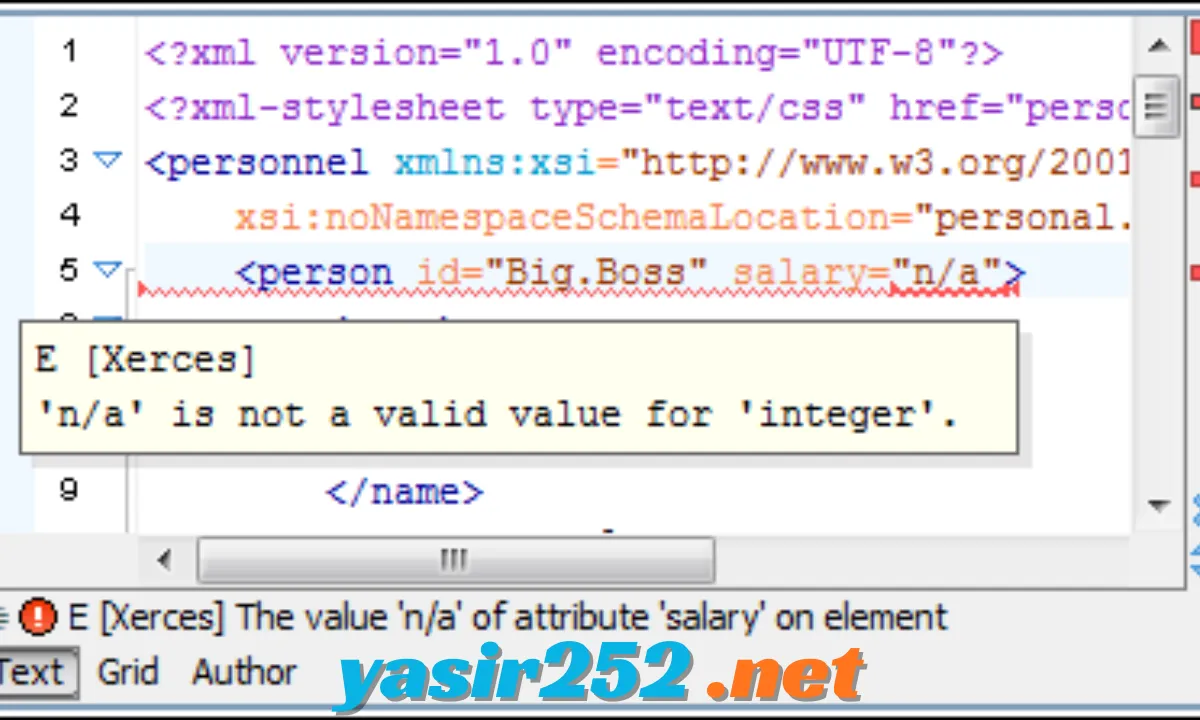
The software can validate XML documents against supported schema formats such as XSD, DTD, Relax NG, and Schematron. Validation helps identify structural errors and incorrect document elements before XML files are used in other applications.
3. Intelligent Code Completion
Context-aware XML assistance
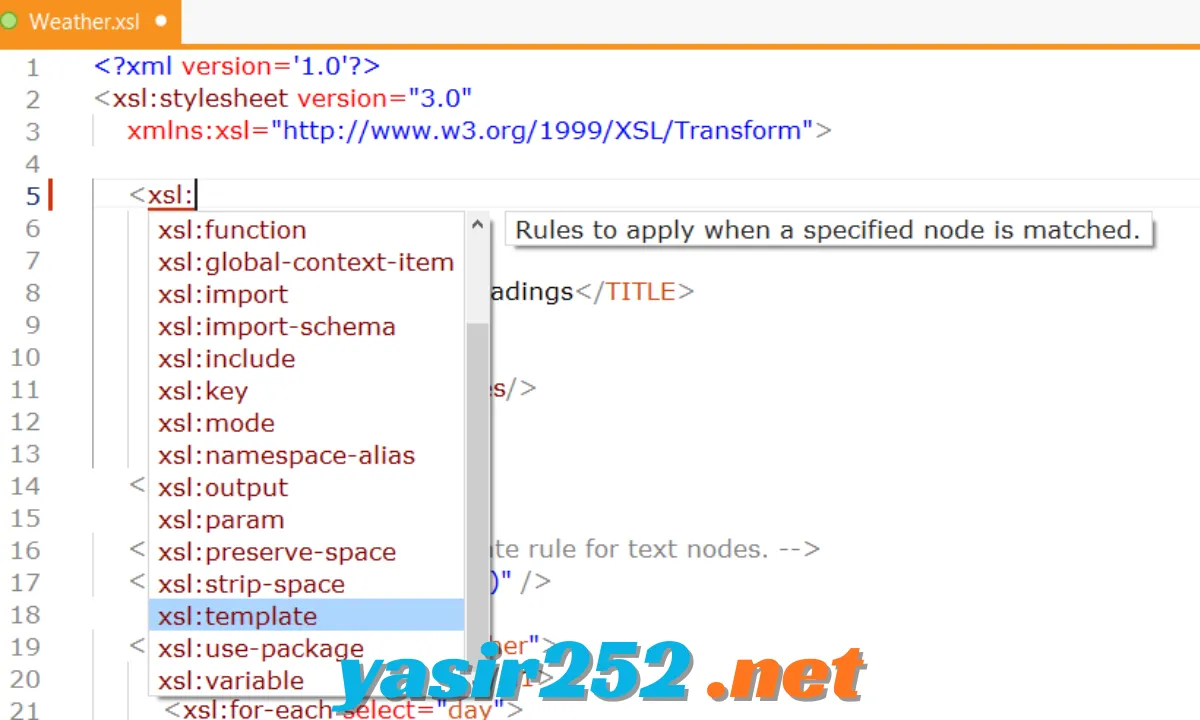
XMLBlueprint offers intelligent completion suggestions for XML elements, attributes, and values when working with supported schemas. These suggestions help reduce typing errors and make it easier to follow complex document structures.
4. XML Schema Support
The program supports XML Schema Definition (XSD), allowing users to work with schema-based documents and examine the relationships between XML elements and their definitions.
5. DTD and Relax NG Editing
XMLBlueprint includes tools for working with DTD and Relax NG documents. These technologies help define document structures, rules, and validation requirements for XML files.
6. Schematron Support
Schematron validation provides rule-based checks for XML documents. This can be useful when traditional schema validation is not enough to check specific conditions or relationships within structured data.
7. XSLT Transformation
XMLBlueprint allows users to create, edit, and execute XSLT stylesheets. You can transform XML data into other formats or structures and inspect the transformation output through the application’s tools.
8. XPath Evaluator
The integrated XPath evaluator allows users to test and evaluate XPath expressions against XML documents. It helps developers locate specific elements, attributes, and data without manually navigating through the entire document.
9. XML Formatting and Beautification
The XML formatter helps organize XML files using indentation, line formatting, whitespace management, and attribute formatting. Proper formatting improves readability, especially when working with large or deeply nested documents.
10. XML Refactoring
XMLBlueprint provides XML-specific refactoring functions for modifying elements, structures, and document content. These tools can make structural changes more reliable than performing ordinary text replacements.
11. XML Generator
The software can generate sample XML documents based on supported schema definitions. It also provides schema-generation tools that can help create XSD, DTD, or Relax NG definitions from sample XML files.
12. CSV and Excel to XML Conversion
XMLBlueprint includes conversion workflows for transforming data from CSV and Excel formats into XML. This is useful when structured information needs to be moved into an XML-based system.
13. Large XML File Support
XMLBlueprint is designed to work with very large XML documents, including files around 1 GB or larger. Its editing and navigation tools help users manage complex datasets and structured documents.
14. Outline View
The outline view displays XML elements and attributes in a structured hierarchy. Users can quickly navigate through document sections and locate particular elements without scrolling through the entire file.
15. XML Folding
XML folding allows users to collapse or expand sections of a document. This feature helps keep the editing workspace clean when working with deeply nested structures or lengthy XML files.
16. Unicode Support
XMLBlueprint supports Unicode, including UTF-8 and UTF-16, allowing users to work with XML documents containing international characters and multilingual content.
17. Remote File Editing
The software supports remote file workflows involving FTPS, SFTP, and WebDAV. This can help users edit and manage XML files stored on remote servers, depending on their configuration.
18. Templates and Snippets
XMLBlueprint offers document templates and reusable snippets to help users create XML documents with predefined structures. Templates can simplify repetitive work and provide starting points for common document types.
19. Multiple Editing Views
The application provides several workspace views, including an outline, attributes, entities, errors, files, output, snippets, model, and XPath views. Users can customize the workspace to suit their development workflow.
20. XML and XSLT Error Detection
The error-view tools help identify problems in XML and XSLT documents. Error reporting makes debugging easier by allowing users to review issues within the editing environment.
What’s New in XMLBlueprint 22?
XMLBlueprint 22 is the current version identified in the available official release information, with version 22.2026.0817 dated August 17, 2026. For 2027 searches, it is important to distinguish the latest available version from the calendar year used in the keyword.
The software continues to provide a comprehensive XML editing environment with support for schema validation, XML formatting, XPath, XSLT, and structured document workflows.
Version 22.2026.0817 is the version identified here; a newer 2027 release has not been confirmed.
XMLBlueprint User Interface
XMLBlueprint features a customizable interface designed to help users work with different XML technologies without switching between multiple applications.
-
Editor Window: The main workspace for writing and editing XML documents, schemas, and stylesheets.
-
Outline View: Displays document structure in a hierarchical format.
-
Errors View: Helps inspect validation and editing problems.
-
XPath View: Provides tools for evaluating XPath expressions.
-
Attributes View: Shows information about the attributes associated with XML elements.
-
Output View: Displays transformation output and related results.
-
Files View: Helps manage and navigate files and folders.
-
Snippets View: Provides access to reusable code fragments.
The interface is customizable, so users can arrange different views according to their workflow and preferences.
How to Download XMLBlueprint for Windows
If you want to download XMLBlueprint for Windows 10 or Windows 11, follow these steps to obtain the installer from the official website.
-
Visit the official XMLBlueprint website.
-
Open the XMLBlueprint download page.
-
Select the download option for the latest version of XMLBlueprint.
-
Download the Windows installer to your computer.
-
Locate the downloaded installation file.
-
Run the installer and follow the setup instructions.
-
Launch XMLBlueprint after installation.
-
Start the free trial or activate a valid license if you already have one.
Official download page: https://www.xmlblueprint.com/download-xml-editor.htm
How to Install XMLBlueprint on Windows 11 or Windows 10
Installing XMLBlueprint on a compatible Windows computer is straightforward.
-
Download the official XMLBlueprint installer.
-
Double-click the downloaded setup file.
-
Allow the installer to run if Windows displays a security prompt.
-
Follow the installation wizard.
-
Select the installation options according to your preferences.
-
Complete the installation process.
-
Open XMLBlueprint from the Start menu or desktop shortcut.
-
Begin creating, editing, or validating XML documents.
Always download the installer from the official website to reduce the risk of bundled malware or modified installation files.
How to Use XMLBlueprint
Create a New XML Document
-
Open XMLBlueprint.
-
Select File from the menu.
-
Choose New File.
-
Select an XML document type or start with a blank document.
-
Write your XML content in the editor.
-
Save the file using the XML extension.
Validate an XML Document
-
Open your XML file in XMLBlueprint.
-
Associate the document with an appropriate schema if necessary.
-
Run the validation process.
-
Review any errors or warnings displayed by the software.
-
Correct the document and validate it again.
Format an XML File
-
Open your XML document.
-
Access the XML formatting options.
-
Configure indentation and formatting preferences.
-
Apply the formatter.
-
Save the formatted XML document.
Use XPath to Search XML Data
-
Open an XML document.
-
Open the XPath view or evaluator.
-
Enter an XPath expression.
-
Execute the expression.
-
Review the matching elements or data.
Transform XML Using XSLT
-
Open your XML file and XSLT stylesheet.
-
Review the stylesheet and its transformation rules.
-
Run the XSLT transformation.
-
Examine the output in the output view.
-
Modify the stylesheet if needed and run the transformation again.
XMLBlueprint System Requirements
XMLBlueprint is designed to run on modern Windows systems and does not require a powerful computer for typical XML editing tasks.
| Component | Requirement |
|---|---|
| Operating System | Windows 10 64-bit or Windows 11 64-bit |
| Processor | Modern compatible Windows processor |
| RAM | 64 MB listed minimum |
| Storage | 200 MB free disk space listed |
| Architecture | 64-bit |
| Internet Connection | Recommended for downloading, updates, and online resources |
| Additional Software | No special additional hardware or software required for standard installation |
The listed minimum RAM and storage figures are based on the available software download information. Actual resource usage may increase with very large documents or complex transformations.
Is XMLBlueprint Free?
XMLBlueprint is commercial software, not a permanently free XML editor. Users can download a fully functional 15-day trial to evaluate its features before purchasing a license.
The trial allows users to explore the software’s editing, validation, formatting, and XML development capabilities. After the trial period, users generally need a valid license to continue using the program under its licensing terms.
XMLBlueprint License Options
-
15-Day Free Trial: A fully functional trial period for testing the application.
-
Professional License: Designed for commercial users.
-
Freelancer License: Intended for individuals working independently.
-
Academic License: Educational licensing may be available for eligible students and teachers.
Official website: https://www.xmlblueprint.com/
XMLBlueprint Download Full Version and License Information
Some users search for XMLBlueprint full version, XML Blueprint crack, serial key, activation code, or license key when looking for ways to unlock the software.
XMLBlueprint is a commercial application, so its full functionality is subject to the applicable license terms. Downloading unofficial cracked versions, modified installers, or unauthorized activation files can expose your computer to malware, data theft, or unwanted software.
The safest option is to download the official trial and purchase the appropriate license if you need the software for continued professional use.
Pros and Cons of XMLBlueprint
Pros
-
Supports multiple XML-related technologies.
-
Provides intelligent code completion.
-
Includes XML validation and schema support.
-
Offers XSLT transformation tools.
-
Includes an XPath evaluator.
-
Provides XML formatting and refactoring tools.
-
Supports large XML documents.
-
Offers customizable workspace views.
-
Supports remote editing workflows.
-
Includes XML generation and conversion capabilities.
Cons
-
The trial is limited to 15 days.
-
Continued usage generally requires a paid license.
-
Primarily designed for Windows.
-
Advanced features may take time to learn.
-
May be more feature-rich than necessary for casual XML editing.
Best Alternatives to XMLBlueprint
If XMLBlueprint does not meet your needs, you can consider these alternatives.
| Software | Best For |
|---|---|
| Visual Studio Code | Lightweight editing with extensions |
| Oxygen XML Editor | Professional XML development |
| Notepad++ | Simple XML editing |
| Altova XMLSpy | Advanced XML and data development |
| IntelliJ IDEA | XML editing within development projects |
| Eclipse | Extensible development environment |
Each alternative offers different features, licensing models, and workflows, so the best choice depends on your XML editing requirements.
Frequently Asked Questions (FAQs)
1. What is XMLBlueprint?
XMLBlueprint is a professional XML editor for creating, editing, validating, formatting, and transforming XML documents.
2. Is XMLBlueprint free to download?
XMLBlueprint offers a 15-day fully functional free trial. Continued use generally requires a paid license.
3. Where can I download XMLBlueprint?
You can download XMLBlueprint from its official website at xmlblueprint.com.
4. Does XMLBlueprint work on Windows 11?
Yes, XMLBlueprint supports Windows 11 64-bit and Windows 10 64-bit.
5. What is the latest version of XMLBlueprint?
The latest version confirmed in this guide is XMLBlueprint 22.2026.0817, released on August 17, 2026.
6. Can XMLBlueprint validate XML files?
Yes, it can validate XML documents using supported technologies such as XSD, DTD, Relax NG, and Schematron.
7. Does XMLBlueprint support XPath?
Yes, XMLBlueprint includes an XPath evaluator for testing and evaluating XPath expressions.
8. Can XMLBlueprint edit XSLT files?
Yes, the software includes XSLT editing and transformation capabilities.
9. Can XMLBlueprint generate XML files?
Yes, it can generate sample XML documents from supported schema formats, including XSD, DTD, and Relax NG.
10. Can XMLBlueprint convert Excel to XML?
XMLBlueprint offers conversion tools for Excel and CSV data to XML, depending on the supported conversion workflow.
11. Can XMLBlueprint handle large XML files?
Yes, the software is designed to handle very large XML files, including documents around 1 GB or larger.
12. Does XMLBlueprint support Unicode?
Yes, XMLBlueprint supports Unicode, including UTF-8 and UTF-16 encoding.
13. Can I use XMLBlueprint to format XML?
Yes, it includes formatting options for indentation, whitespace, attributes, and document structure.
14. Is XMLBlueprint suitable for beginners?
Yes, beginners can use it for basic XML editing, although some advanced schema and transformation tools may require technical knowledge.
15. Does XMLBlueprint support remote editing?
Yes, it supports remote file editing through technologies such as FTPS, SFTP, and WebDAV.
16. Can XMLBlueprint edit XSD files?
Yes, XMLBlueprint supports XML Schema documents and provides tools for schema editing and validation.
17. Does XMLBlueprint include an XML outline?
Yes, its outline view provides a hierarchical representation of document elements and attributes.
18. Can XMLBlueprint replace Notepad++?
For advanced XML development, XMLBlueprint offers dedicated validation, schema, XPath, XSLT, and refactoring tools. Notepad++ may still be a better choice for lightweight text editing.
19. Is XMLBlueprint available for macOS?
The confirmed official platform support is Windows 10 64-bit and Windows 11 64-bit. Native macOS support has not been confirmed.
20. Is XMLBlueprint worth using in 2027?
XMLBlueprint can be a useful choice for developers, technical writers, and professionals who regularly work with structured XML documents, schemas, and transformations. Its value depends on whether you need its advanced tools and whether the commercial license fits your budget.
Conclusion
XMLBlueprint is a powerful XML editing solution for users who need more than a basic text editor. It combines intelligent code completion, validation, XML formatting, schema support, XPath evaluation, XSLT transformations, refactoring, and document navigation into a single Windows application.
If you work with XML files regularly, XMLBlueprint can help simplify document editing, reduce structural errors, and improve your workflow. Its 15-day free trial provides an opportunity to test the available tools before purchasing a license.
If you’re looking for XML Blueprint Download [2027], use the official download page to obtain the installer and explore the software on your Windows computer.